-
23
-
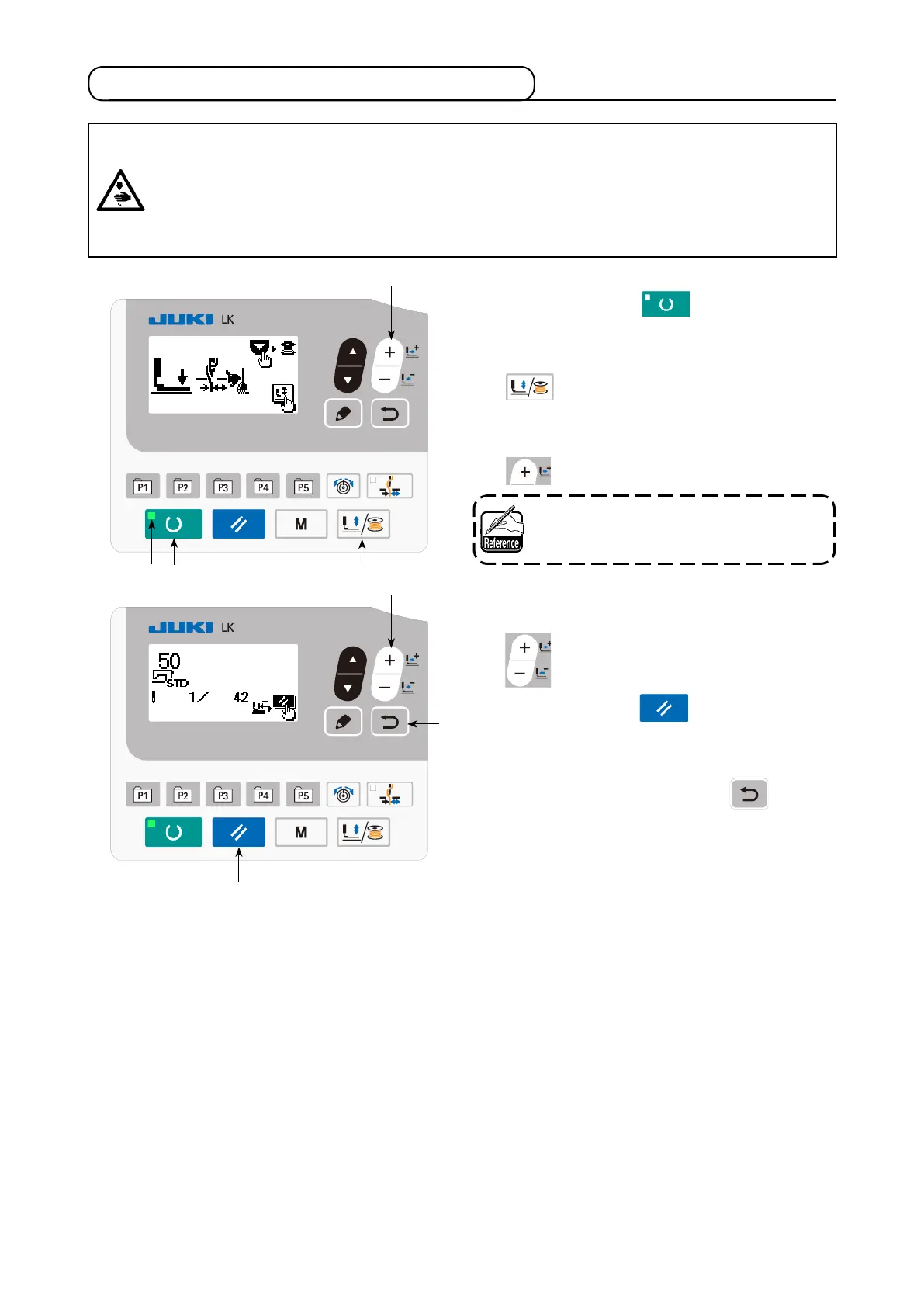
5-5. Checking the contour of a sewing pattern
❼
❷ ❺
1) Press READY key
❷
to light up the
SET READY LED
.
2) Press work PRESSER and WINDER key
❺
to display "work clamp lowering
screen".
3) Display the shape check screen with + key
❼
.
❼
❾
❸
Under this mode, the sewing machine will
not start running even if you depress the
pedal.
4) Check the shape with DATA CHANGE key
❼
.
5) Press RESET key
❸
to return to the
sewing starting position and lift the work
clamp.
When you press RETURN key
❾
, the
sewing screen is displayed at the current
position.
When you depress the pedal in the afore-
mentioned state, the sewing machine starts
sewing from the current position.
WARNING :
1. Make sure without fail of the contour of the sewing pattern after selection of the sewing pattern.
If the sewing pattern extends outside the work clamp feet, the needle will interfere with the work
clamp feet during sewing, causing dangerous troubles including needle breakage.
2. When making sure of the contour of the sewing pattern, press + / - key with the needle bar lowered,
and the work clamp feet move after automatically making the needle bar return to the upper posi-
tion.



 To Next Page