-
59
-
Error
code
Indication
Description of error Corrective measure Remarks
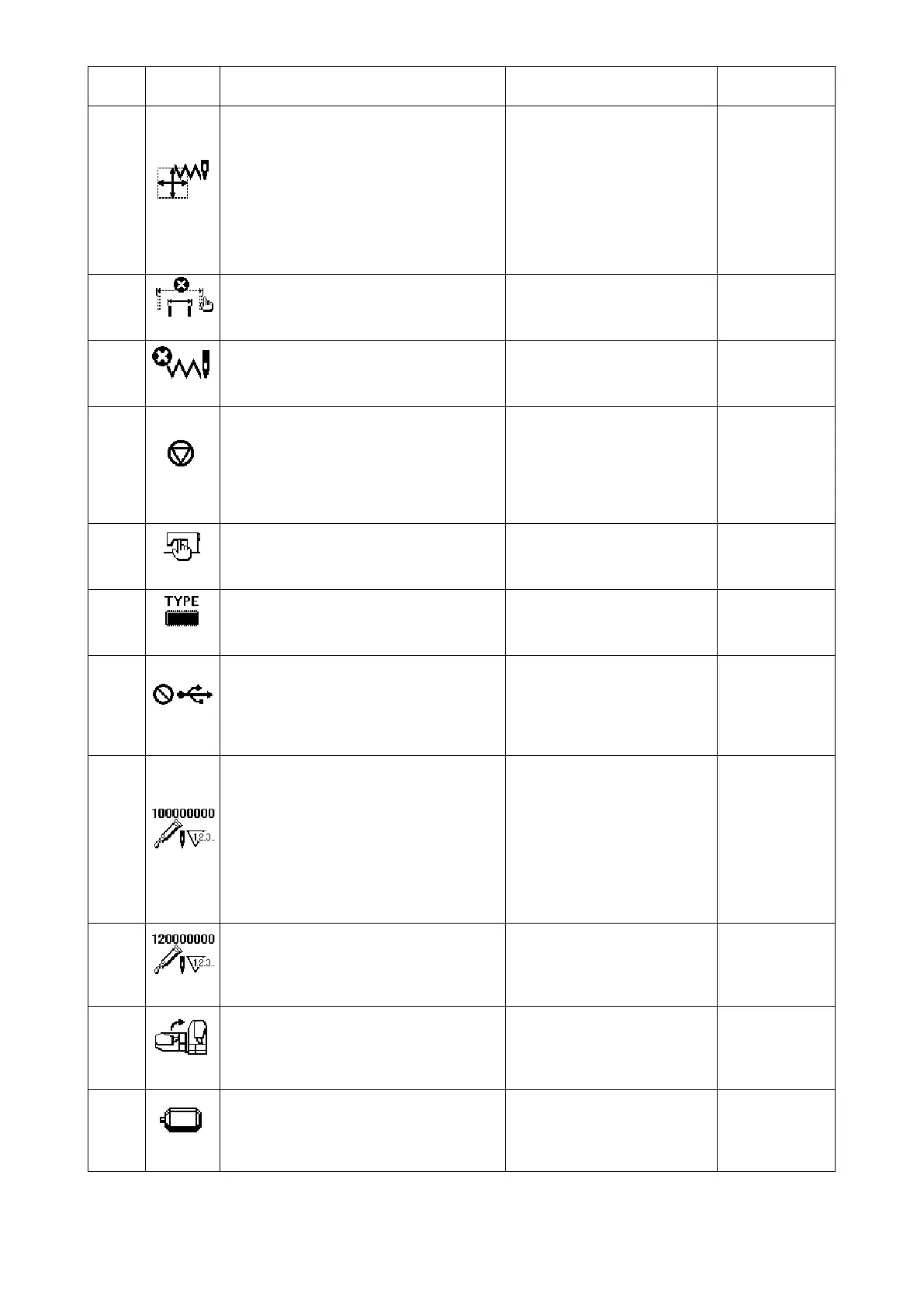
E040
Sewing area over
The pattern size exceeds the sewing range.
Press the RESET key. Then,
check the pattern and the X/Y
scale.
This error is
output when
max. sewing
area, 100 × 50
is over. Inter-
ference of the
work clamp foot
with needle is
not protected.
E043
Enlargement error
The sewing pitch is beyond 10 mm.
Press the reset key and check
the pattern and X/Y scale rate.
E045
Pattern data error
The pattern data cannot be adopted.
Re-operation is enabled after
resetting.
E050
Temporary stop
Temporary stop by operating the reset key
while the sewing machine is running. (Refer
to memory switch No. 31.)
Re-start or return-to-origin after
thread trimming by means of
the reset key (For the details,
refer to the item
"6-4. How
to use the temporary stop"
p.38
).
E061
Memory switch data error
Memory switch data is broken or revision is
old.
Re-operation is enabled after
resetting.
E063
Machine head identication error
The type of machine head and the type of
control box do not match.
Turn the power OFF and con-
tact JUKI or your distributor.
E204
Connection alert for the USB thumb
drive which is used for sewing
Sewing has been carried out by 10 or more
times with the USB thumb drive inserted in
the USB port.
Re-operation is enabled after
resetting.
E220
Grease replenishing time information
Information as to the time of replenishing
the designated places with grease.
Replenish the designated plac-
es with grease and set mem-
ory switch No. 245 to "0" with
the RESET key. Error can be
released with the RESET key
when immediate replenishing
with grease cannot be per-
formed during sewing opera-
tion.
E221
Grease replenishing warning error
Sewing machine has stopped since the
time of replenishing the designated places
with grease has come.
Immediately perform replen-
ishing with grease and set
memory switch No. 245 to "0"
with the RESET key.
E302
Head tilt error
Head tilt detection switch is turned OFF.
The sewing machine cannot be
operated with the head tilted.
Return the sewing machine
head to its proper position.
E303
Z phase detection error
Detection of the upper dead point of the
sewing machine cannot be performed.
Turn OFF the power switch.
Check whether the pin of the
SDC board CN15 has come off
or has loosened.



 To Next Page