E 9
0999.GB
4.3 Picking up or lowering load units
f
Before a load unit is picked up, the driver has to make sure that it is properly palletised
and does not exceed the permitted bearing capacity of the truck.
Do not grab into the hoist frame during lifting and lowering.
– Drive the truck with the fork tines as far as possible below the load unit.
It is not permitted to pick up long goods with the truck driving transversally below
the good.
A
The double-two lifting hoist frame (ZZ) and the triple-two hoist frame (DZ) the first lif-
ting movement of the load carriage (free lifting capacity) is realised without changing
the overall height with the help of a short free-lifting cylinder which is centrally arran-
ged.
Lifting
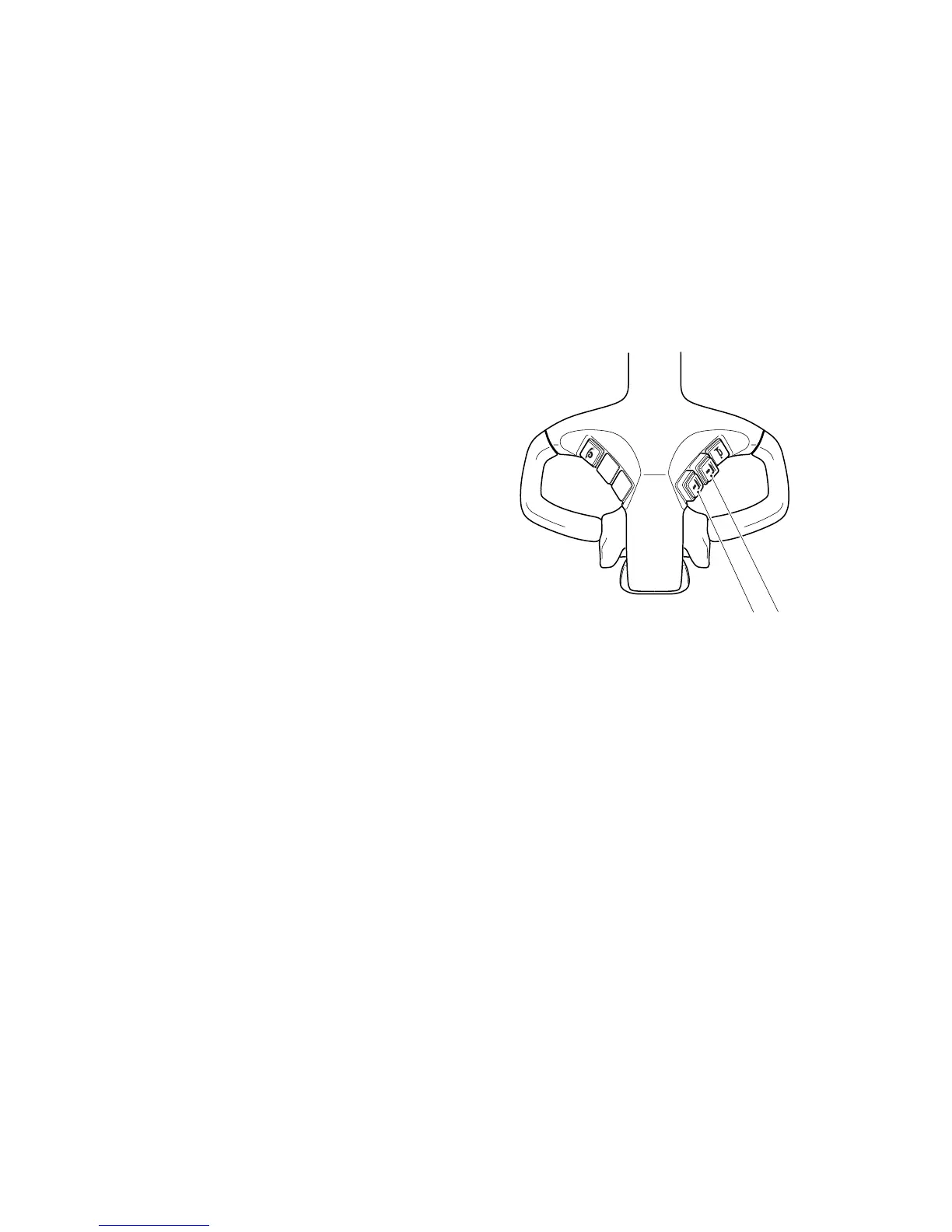
– Press the "Lift the lifting device" button
(8) until the desired height has been
reached.
Lowering
– Press the "Lower the lifting device"
button (9) until the desired height has
been reached.
A
The lifting/lowering speed can be conti-
nuously adjusted with this button (adju-
stment range 8 mm).
Small button adjustment range= slow lifting/lowering
Large button adjustment range= fast lifting/lowering
m
Avoid any abrupt lowering of the load unit.
89
E 9
0999.GB
4.3 Picking up or lowering load units
f
Before a load unit is picked up, the driver has to make sure that it is properly palletised
and does not exceed the permitted bearing capacity of the truck.
Do not grab into the hoist frame during lifting and lowering.
– Drive the truck with the fork tines as far as possible below the load unit.
It is not permitted to pick up long goods with the truck driving transversally below
the good.
A
The double-two lifting hoist frame (ZZ) and the triple-two hoist frame (DZ) the first lif-
ting movement of the load carriage (free lifting capacity) is realised without changing
the overall height with the help of a short free-lifting cylinder which is centrally arran-
ged.
Lifting
– Press the "Lift the lifting device" button
(8) until the desired height has been
reached.
Lowering
– Press the "Lower the lifting device"
button (9) until the desired height has
been reached.
A
The lifting/lowering speed can be conti-
nuously adjusted with this button (adju-
stment range 8 mm).
Small button adjustment range= slow lifting/lowering
Large button adjustment range= fast lifting/lowering
m
Avoid any abrupt lowering of the load unit.
89


 To Next Page
 Loading...