34
LT-Z37DX5 / LCT1961-001A / English
ENGLISH
SET UP menu
AUTO PROGRAM
You can again perform the AUTO
PROGRAM function TV channel automatic
registration which was performed in the
“Initial settings (Setup tour)” (page 7).
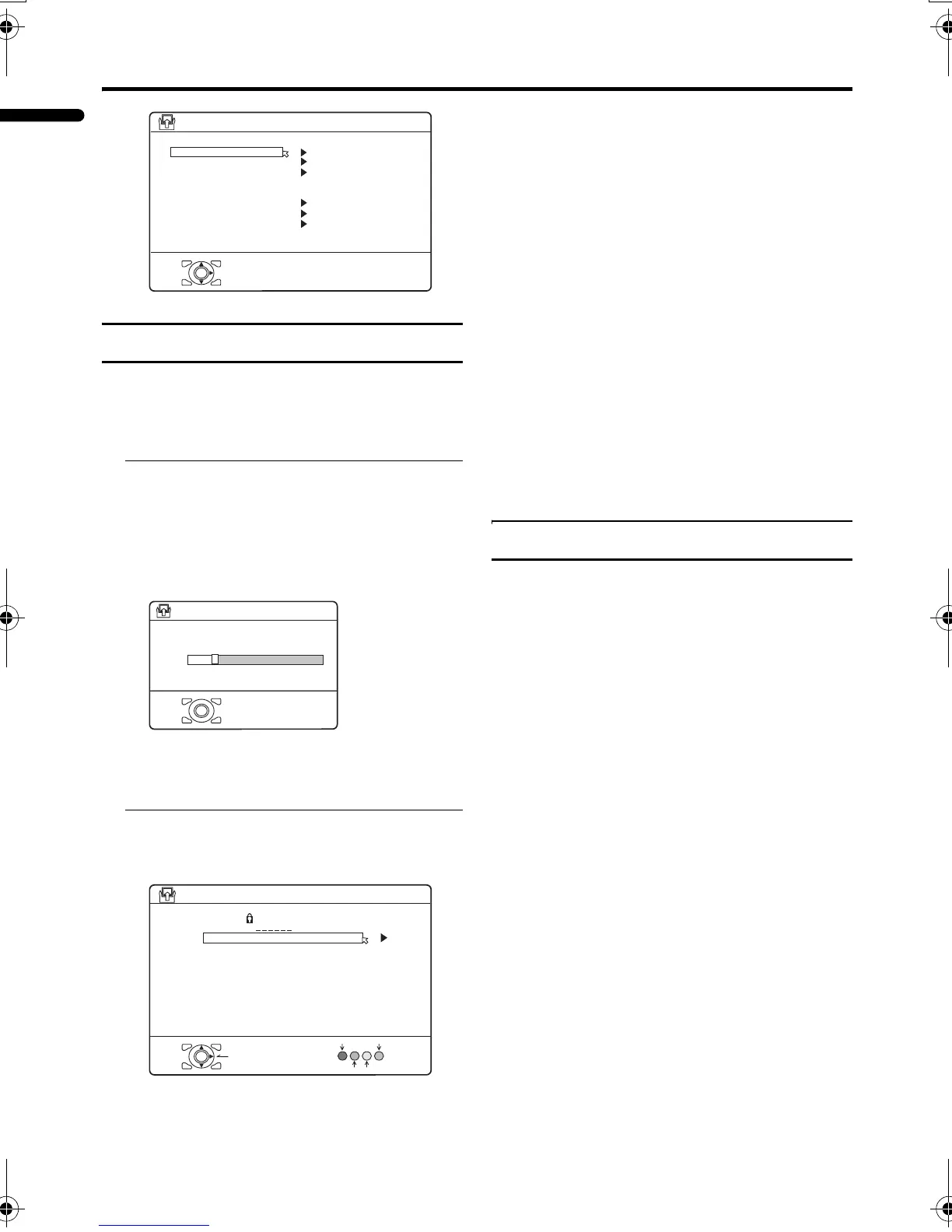
1 Choose AUTO PROGRAM, then
press the a or 3 button
The AUTO PROGRAM function starts.
The TV channels you receive are
automatically stored in the programme
numbers list.
• To stop the AUTO PROGRAM
function, press the a button.
2 After the TV channels have been
stored in the programme number
list, the EDIT menu appears
• You can proceed to edit the
programme numbers list using the
EDIT/MANUAL function. For details,
see “EDIT/MANUAL” on page 34.
• If a TV channel you want to view is
not stored in the programme numbers
list, you can register it using the
MANUAL function.
For details, see “EDIT/MANUAL” on
page 34.
• The AUTO PROGRAM function does
not store a TV channel to the
programme number PR 0 (AV).
• If you do not need to use the EDIT/
MANUAL function, press the a
button to exit the EDIT menu.
• Starting the AUTO PROGRAM
deletes the registered favourite
channel.
EDIT/MANUAL
The EDIT/MANUAL functions are divided
into two types:
• editing the current programme numbers
(PR) (EDIT functions); and
• manually storing a TV channel you want
to view on a particular programme
number (PR) (MANUAL function).
Here are the details about these functions:
MOVE:
This function changes the programme
number (PR) of a TV channel.
ID:
This function registers a channel name (ID)
to a TV channel.
INSERT:
This function adds a new TV channel in the
current programme numbers (PR) list by
using the CH/CC number.
• You cannot use the INSERT function if
you do not know the channel number of a
TV channel. Use the MANUAL function
to register a TV channel in the programme
number (PR).
D0029
SET UP
AUTO PROGRAM
OK
OFF
VIDEO
VIDEO
EDIT/MANUAL
LANGUAGE
VIDEO-1 SETTING
VIDEO-3 SETTING
AI VOLUME
TELETEXT LANGUAGE
-EN
HDMI SETTING
CH
>>
14%
D0004
OK
28
AUTO PROGRAM
-EN
>
PR ID
AV
21
22
23
24
25
26
D0038
OK
DELETE
MANUAL
ID
MOVE
INSERT
CC
CC
CC
01
02
03
CH
CH
CH
CH
CH
CH
CH/CC
EDIT
02
03
05
04
06
07
08
09
01
-EN
LT-Z37DX5_Eng.book Page 34 Tuesday, September 27, 2005 5:01 PM



 To Next Page
 Loading...