Maintenance
9 --- 36
9.5 Cleaning or Replacing the Filter Mat
Clean the filter mat every week depending on the dust content of the intake air and replace
if necessary as detailed in the maintenance schedule (see chapter 9.3).
Switch off the compressor package (see chapter 8.4).
Lock the main disconnect switch in the ”off” position in accordance
with applicable lockout/tagout procedures to ensure the compressor
does not restart.
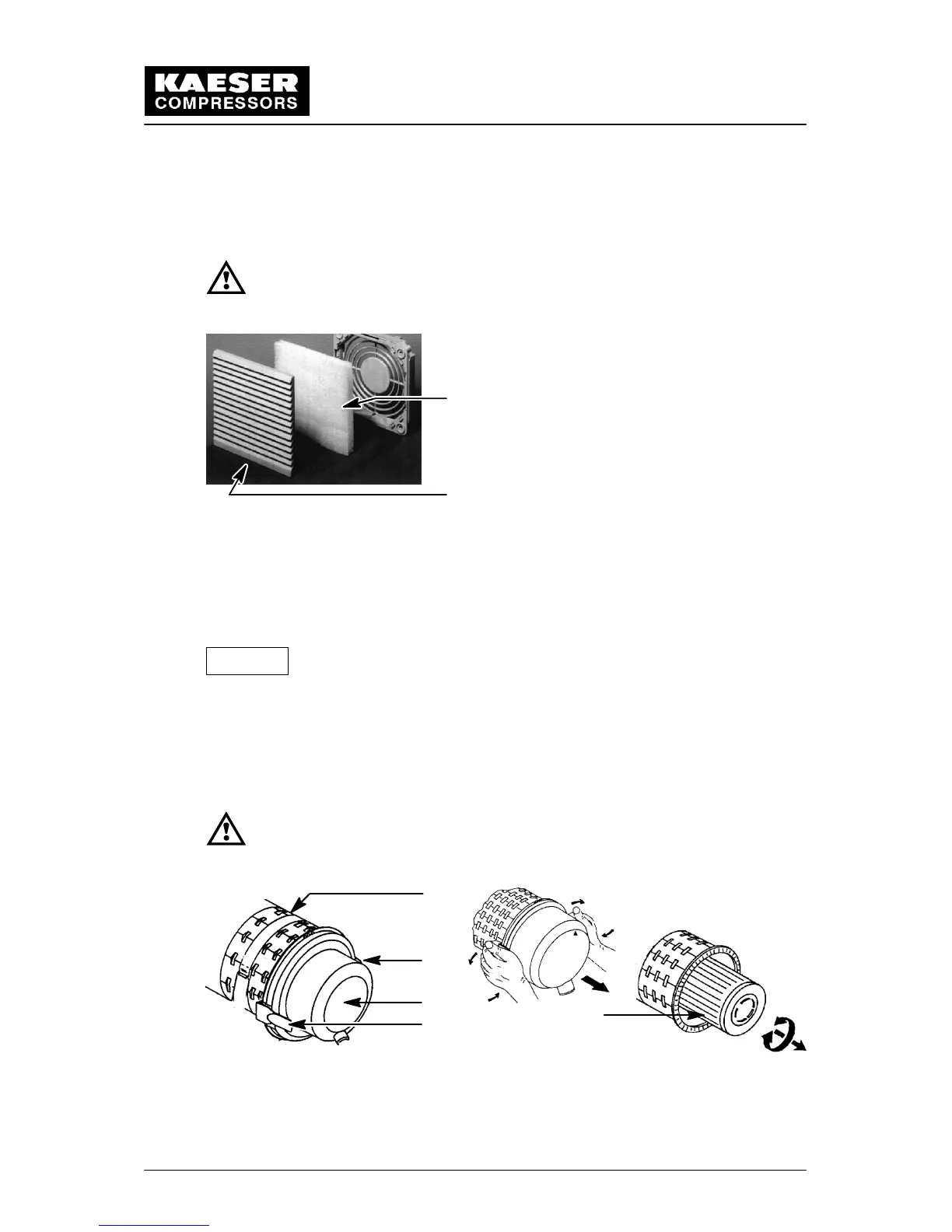
1
2
1 Filter mat, control cabinet fan
2 Plastic covering
Cleaning:
Rinse the mat in warm water ( approximately 105F), if necessary, use a mild detergent
soap to rinse out oily dust. The mat can also be tapped, vacuum cleaned or blown out with
compressed air (not in excess of 30 psig).
If the mat is heavily soiled or has been cleaned often (maximum five
times), replace it.
9.6 Cleaning or Replacing the Air Filter
Clean the air filter when the corresponding indicator on the SIGMA CONTROL illuminates
(see chapter 8.1). Change the air filter cartridge no later than two years.
Stop the compressor unit (see chapter 8.4).
Lock the main disconnect in the ”off” position in accordance with ap-
plicable lock out/tag out procedures to ensure the compressor does
not restart.
2
3
4
1
1
1 Remove fastening clips to open the filter housing
2 Air filter
3 Dust collector
4 Air filter cartridge
Attention!


 To Next Page