–10–
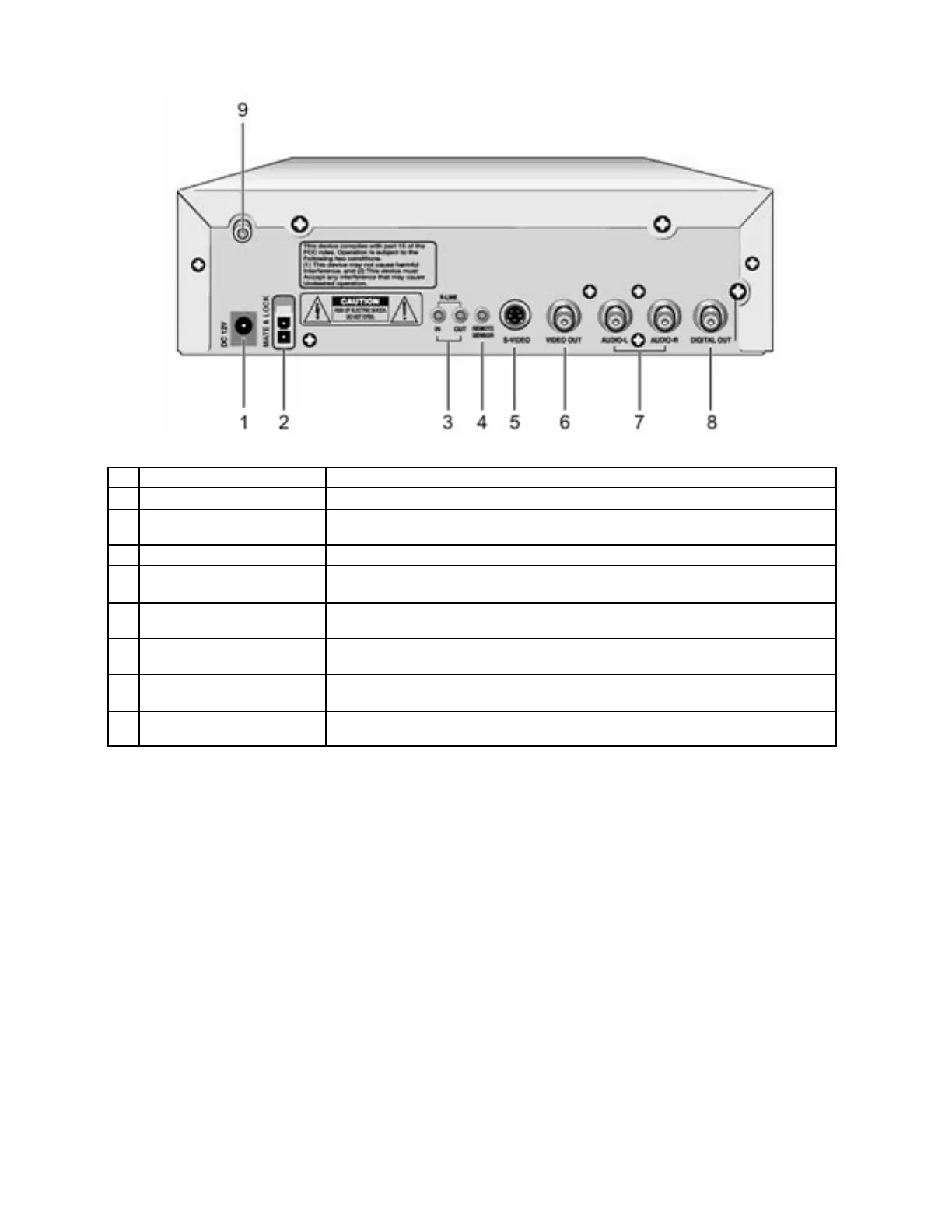
DESCRIPTION – REAR PANEL
1
12V DC INPUT For use with optional 12V DC cigar jack cable
2
MAIN 12V DC INPUT Connect to source of 12V DC power with the supplied cable
3 R- LI NK I N/ OUT
Allows remote control of any KEC Mobile Applicat ions video product in
the R-LINK chain even if it is hidden from view.
4
EXTERNAL REMO TE For connection of the optional RE5MC Remote Sensor Cable
5 S- VI DEO
Use an S-Video Cable (n ot su ppli ed) to this jack to the S-Video jack on
your TV/Moni tor
6 VIDEO OUT
Connect a video cable from this jack to the Video Input jack on your
TV /Mo nit or
7 AUDIO OUT
Connect RCA audio cabl es (left & ri ght) f rom these jacks to the
corresponding Audio Input jacks on your TV/Monitor
8 DIGITAL AUDIO OUT
Use a digital coaxial cabl e (not pr ovided) to connect the player to a
compatible Dolby Digital and/ or DTS Decoder
9
ANTENNA INPUT JACK
(DVD-2T ONLY)
75Ω Connector for a TV Antenna


 To Next Page