–22–
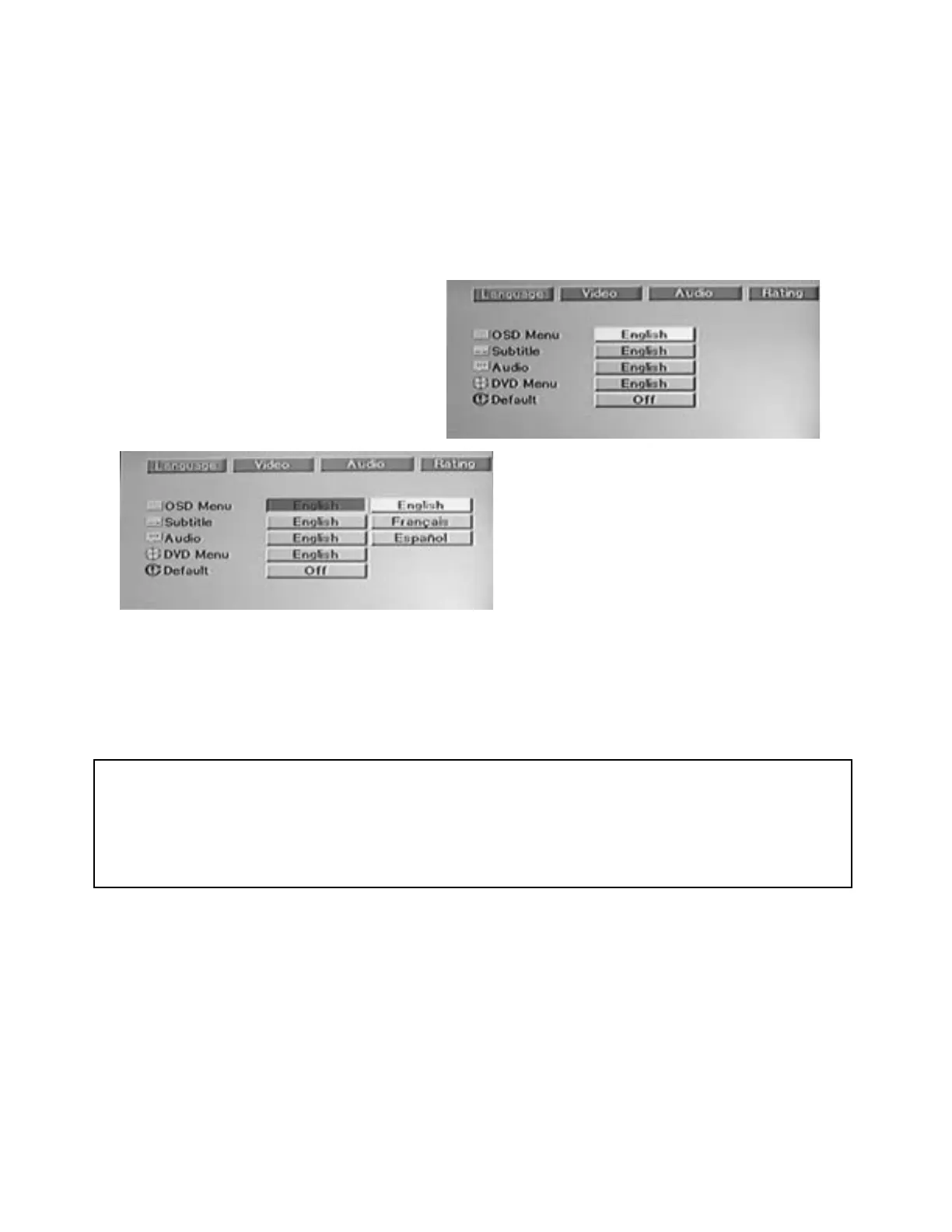
DVD-2 SETU P MENU – LANGUAGE
The Language Menu let s you sel ect t he audio soundt rack language as well as the language shown in
subtitles, on-screen displays (OSD) and DVD disc menus.
You may also use this menu to reset all of the DVD-2 Setup Menus to the manufacturer's initial (default)
se t t ing s.
When you play a DVD, the DVD-2 will automatically display the pre-selected language you have chosen
(unless it is not available on the disc you are playing).
Procedure:
1. Press the SETUP button.
Since LANGUAGE is the first item in the
Setup Menu, it wil l already be highlight ed.
2. Press the ENTER button.
The LANGUAGE sub-menu will be
displayed.
3. Use the ARROW buttons to move to the
desired item.
4. Use the ENTER button to display the
available languages.
5. Use the ARROW buttons to highlight the
desired language, then press the ENTER
button to select it.
Follow the pr ocedur e outli ned above t o set each of these avail able items:
OSD Men u: Set the on-screen display (OSD) menu language (English, French or Spanish).
Subt itl e: Set the preferr ed di sc subt itl e l anguage (English, French, Spanish, Auto or Off ).
Audi o: Set the preferred audio soundt rack language ( Engl ish, French or Spani sh).
DV D Me nu: Setting the preferred DVD Disc Menu language (English, French or Spanish).
Defaul t: Restores t he fact ory’s initial settings (refer to the following sect ion).
IMPORTANT NOTE:
1. Regardless of the selecti ons made in t he setup menu, you can always change t he subtit le language
while playing any DVD di sc by pressing t he S-TITLE butt on on t heDVD-2 r emot e cont roller. Press the
button repeat edly to cycle t hrough all availabl e subtitle languages recorded on t he disc.
2. Regardless of the selecti ons made in t he setup menu, you can always change t he audio soundtrack
language while playing any DVD disc by pressing the LANGUAGE button on theDVD-2 remote
control ler. Press it repeat edly to cycl e t hr ough all avail able soundt rack languages recorded on t he disc.
RESTORING FACTORY DEFAULTS
The last item in the LANGUAGE menu is “Default”. It is normally set to OFF.
To restore ALL DVD-2 Menu settings to their original factory defaults:
1. Use the ARROW buttons to highlight the Default sub-menu.
2. Press t he ENTER button and then press the ARROW button to hi ghlight “On”.
3. Press the ENTER button.
4. All fact ory def aults will be rest ored and the Setup menu will be cleared from t he screen.
Note:
The Setup Menu selections set the default (or initial) operating conditions for the DVD Player.
Most of these settings can be overridden for each DVD disc you view via the selection menus provided on
each individual DVD disc.


 To Next Page