–20–
PLAYING AN MP3 OR WMA AUDIO FILE
Insert the MP3 or WMA disc.
• Make sure that the disc's label is facing up (r ecor ded side facing down).
• Insert the disc into the slot.
As t he disc is being scanned, “Loading” will be displayed. In approximat ely 25 seconds (longer with
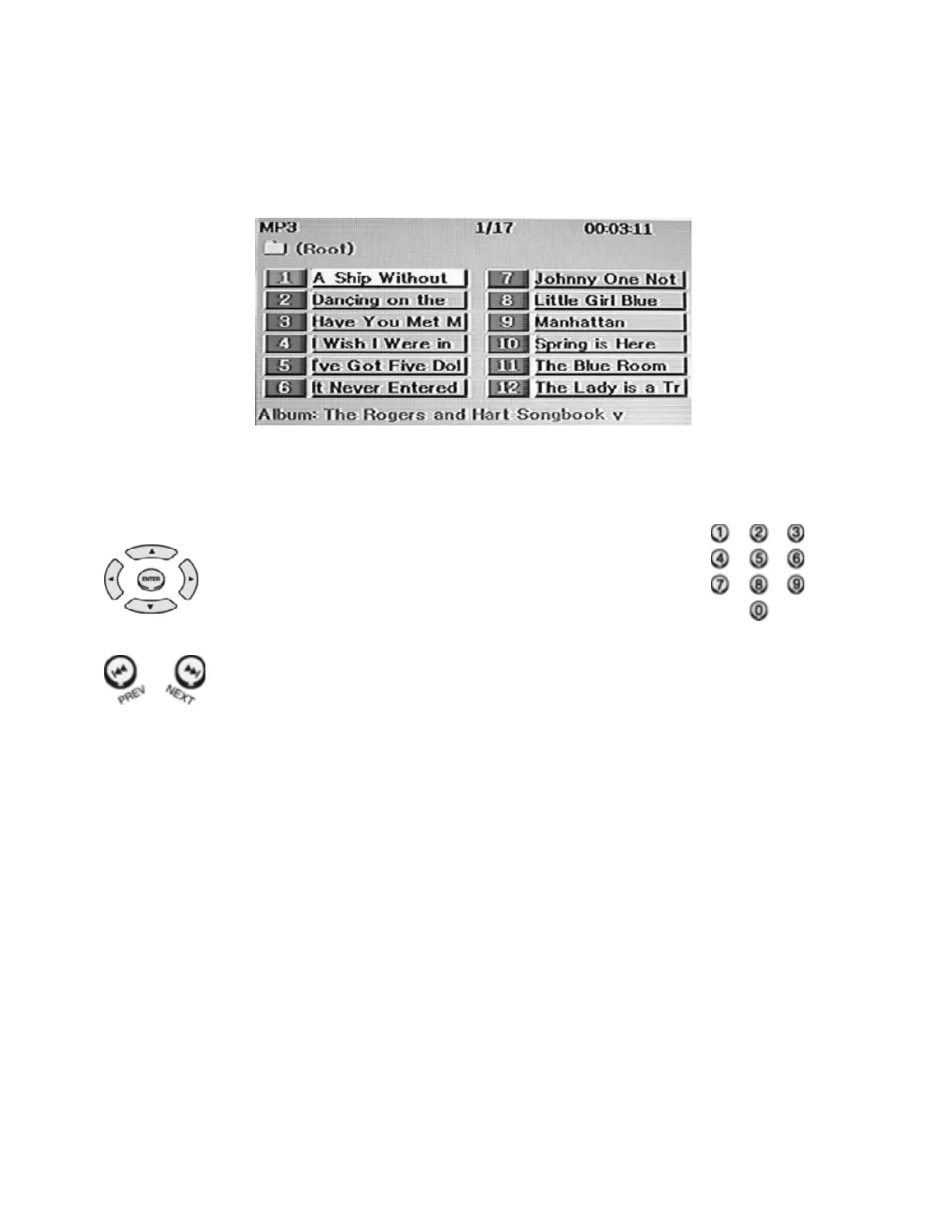
more comple x discs), it will be recognized as an MP3 or WMA disc, a directory will be displayed on
screen and the 1
st
song will automatically be played
• Press the STOP button to stop play.
• Press the PAUSE but ton t o t emporarily stop pl ay. To resume play, press t he PLAY butt on again.
To Play a Desired Track
1. Use t he ARROW butt ons to hi ghlight the song or tr ack that you
want, then press the ENTER but ton. The selected song will be
played.
2. You can also use the NUMERIC (0~9) buttons to directly select a
song by entering its number.
• 12 tracks can be displayed on the screen.
To see additional tracks, use the ARROW buttons.
• Press the PREV/NEXT buttons to play the previous or next track.
• Navi gate to select ions in other fol ders by using the ARROW and ENTER but tons.
Notes Concerning MP3 Files
• MP3 files must have been recorded on the disc in ISO 9660 or JOLIET format.
• The following charact ers will not be recognized in MP3 filenames:
(\ / : * ! " < > | )
• Some MP3 discs may not be recognized depending on the recording conditions.


 To Next Page