36
Table of ContentsSetting Up the LSXUsing the KEF Control AppPlayback and StreamingFAQ and Troubleshooting
9. Playback and Streaming
9.1 Playback with Wi-Fi
9.1.1 Using the KEF Stream App
The KEF Stream app allows you to access to and play back your locally or network
stored music as well as music from streaming services (Spotify and Tidal).
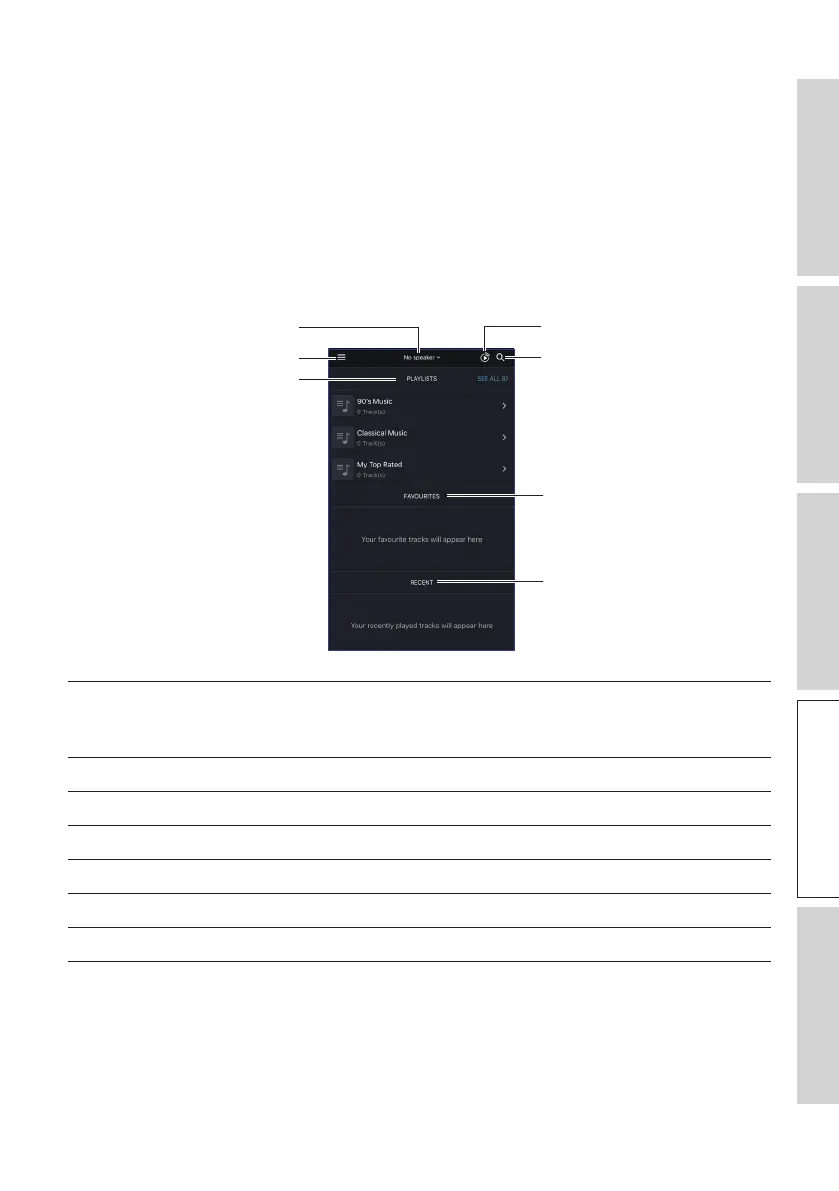
9.1.1.1 Home Screen
Search
KEF Control app
Favourites
Recent
Playlists
Main menu
Speaker selection
Speaker selection Shows the list of speakers available for streaming through the
KEF Stream app. You can also add a new pair of compatible
speakers by selecting “Add new speaker”.
Main menu Accesses the main menu.
Playlists Shows the playlists you have recently played.
KEF Control app Prompts to the KEF Control app.
Search Looks for a particular track from the local library.
Favourites Shows the tracks you have added as favourites.
Recent Shows the tracks you have recently played.



 To Next Page