20
Table of ContentsSetting Up the LSXUsing the KEF Control AppPlayback and StreamingFAQ and Troubleshooting
7.4. 3 iOS (Airplay 2) Method
Once your speakers are upgraded with Airplay 2, iOS users can use this method to
connect the speakers to your network.
1. To get the speakers connected to a network, connect the power cables to the AC
input connectors at the back of the speakers. The LED indicator on the Master
Speaker will ash orange and white.
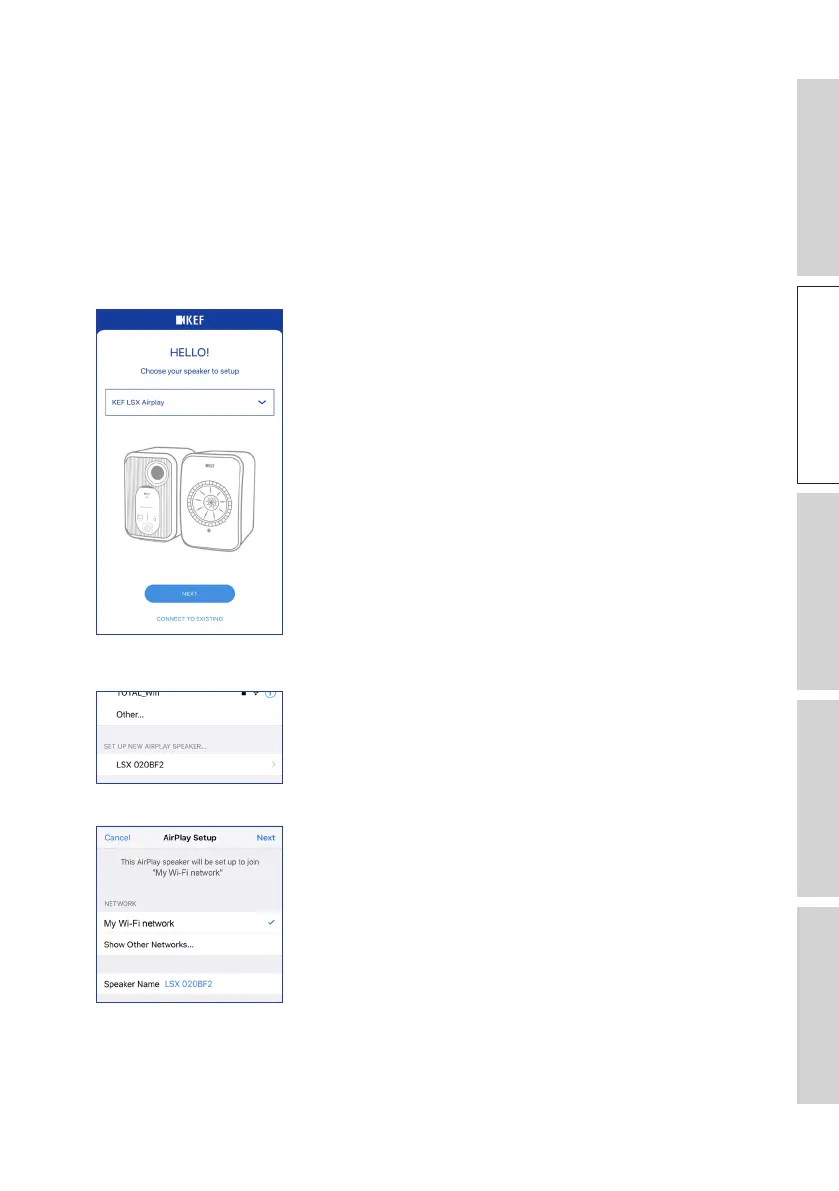
2. Open the KEF Control app on your device. Select “KEF LSX Airplay” from the
selection menu and then tap “Next”.
3. Select “LSX_XXX” under “Set up new airplay speaker...”.
4. Select the network to join and then tap “Next”.
The onboarding process will be automatically completed. The LED indicator on the
Master Speaker will light solid white when the connection is successful. The Slave
Speaker will be automatically and wirelessly connected to the Master Speaker.



 To Next Page