38
Table of ContentsSetting Up the LSXUsing the KEF Control AppPlayback and StreamingFAQ and Troubleshooting
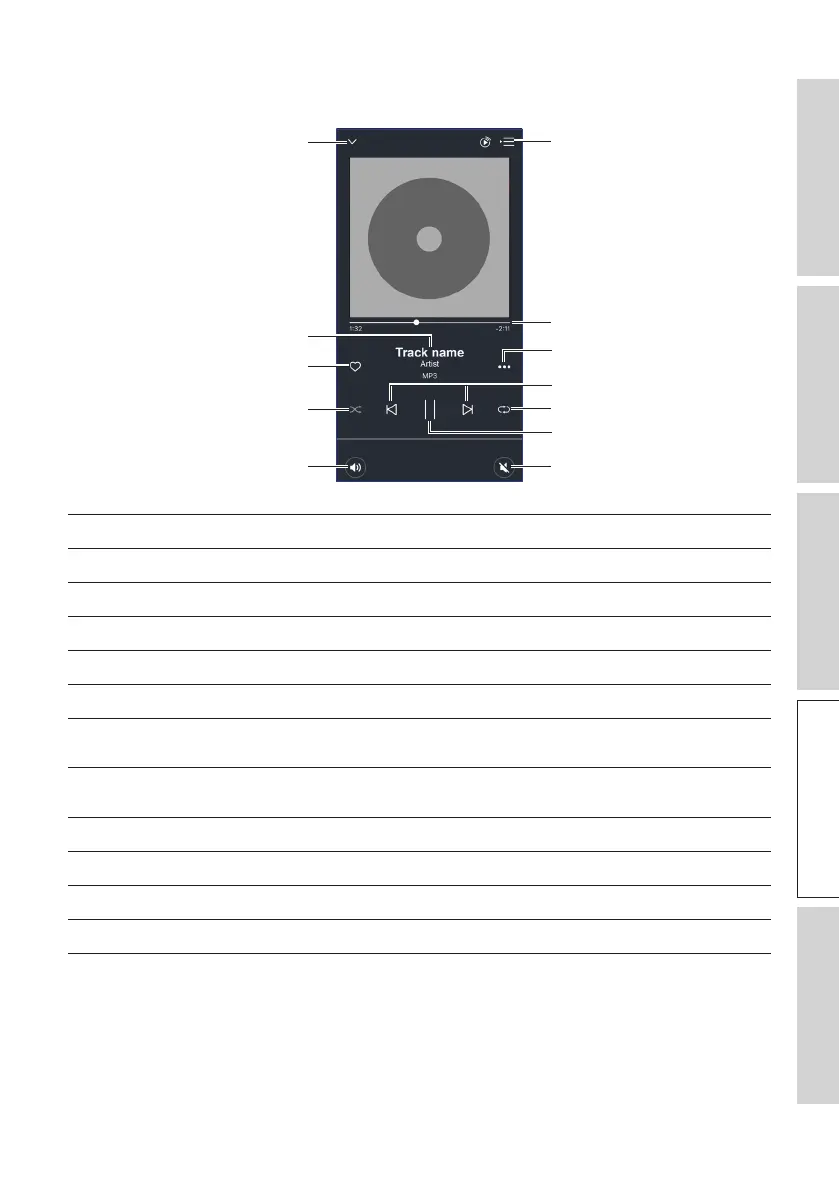
9.1.1.3 Playback Screen
Previous/next
Play/pause
Track scroll
Option
Repeat
Mute
Hide playback screen
Shuffle
Volume control
Favourites
Track metadata
Queue
Hide playback screen Hides the playback screen.
Track metadata Shows the metadata (e.g. song name) of the track.
Favourites Adds the track to favourites.
Shuffle Activates/deactivates the random playback of tracks.
Volume control Tap once and then use the volume slider to adjust the volume.
Queue Accesses the queue.
Track scroll Shows the playback progress. Drag the dot along the bar to
skip to a particular point of the track.
Option Adds/removes the track as favourites, adds the track to a
playlist, or goes to the album/artist of the track.
Previous/next Goes the previous or next track.
Repeat Selects a repeat mode (repeat 1, repeat all) for playback.
Play/pause Starts or pauses the playback.
Mute Mutes or restores the sound output.



 To Next Page