English
|
11
1 Select the source for adjustment
Press the [SRC] button.
2 Enter Audio Control mode
Press the [VOL] knob.
3 Select the Basic Audio item for adjustment
Press the [VOL] knob.
Each time the knob is pressed, the items that can
be adjusted switch as shown below.
4 Adjust the Basic Audio item
Turn the [VOL] knob.
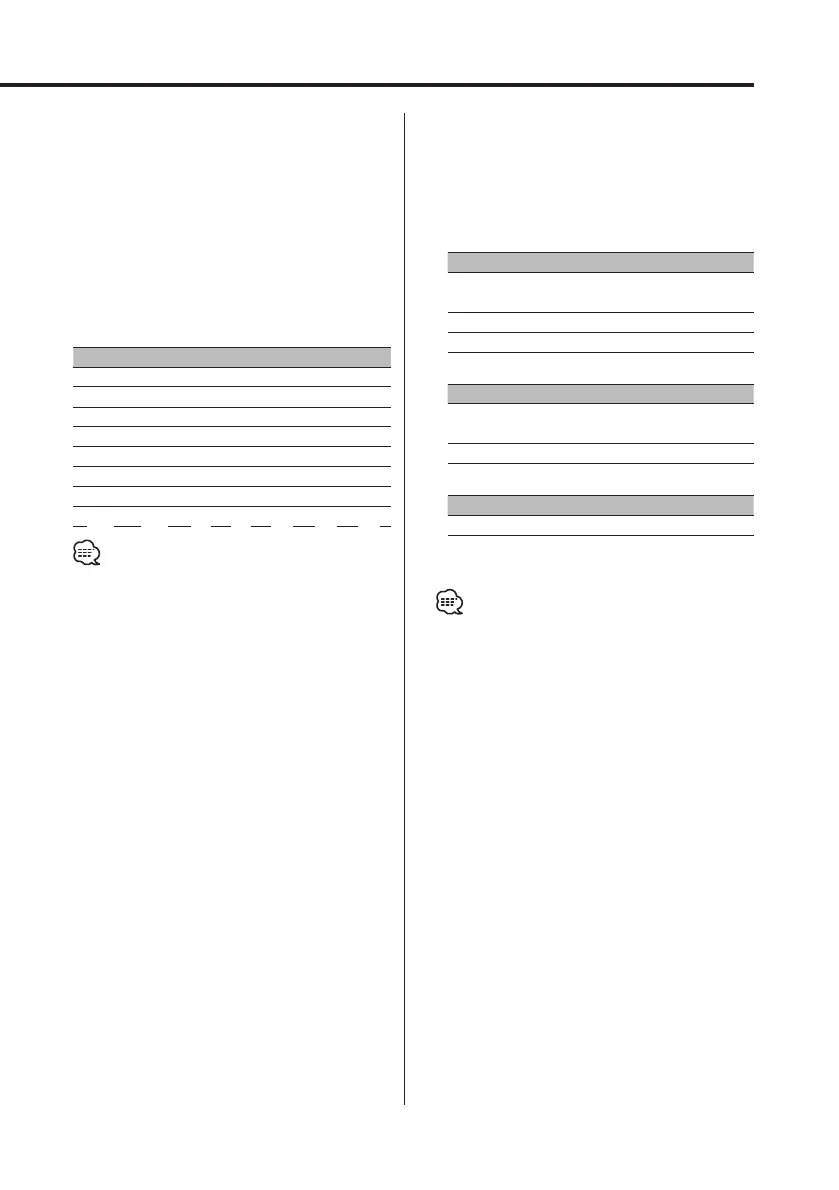
Adjustment Item Display Range
Rear Volume *
1
"Rear Volume" 0 — 35
Subwoofer level*
2,3,4
"Sub-WLevel" –15 — +15
Bass level*
5
"Bass Level" –8 — +8
Middle level*
5
"Middle Level" –8 — +8
Treble level*
5
"Treble Level" –8 — +8
Balance "Balance" Left 15 — Right 15
Fader*
4
"Fader" Rear 15 — Front 15
Exit Audio Control mode
• *
1
You can control this item when "2 ZONE" of <Audio
Setup> (page 12) is set to "ON".
• *
2
You can control this item when <Switching preout>
(page 43) is set to "SWPRE Sub-W". (KDC-MP728/
KDC-MP628 only)
• *
3
You can control this item when <Subwoofer
Output> (page 14) is set to "SW ON".
• *
4
You can control this item when "2 ZONE" of <Audio
Setup> (page 12) is set to "OFF".
• *
5
These items can be adjusted in detail by the
following methods. (Function of the KDC-X789)
• *
5
Source tone memory: The set up value is put in the
memory per source. (Detail Audio item is included)
5 Exit Audio Control mode
Press any button.
Press the button which is not [VOL] knob and
[ATT]/[ANG] button.
Adjust the detail of Audio Control
(Function of the KDC-X789)
1 Select the Audio item for adjustment
By referring to the step 1 — 3 above, select the
desired item to be set in detail from the items
marked with *
5
.
2 Enter Detail adjustment mode of Audio
Control
Press the [VOL] knob for at least 1 second.
3 Select the Detail Audio item for adjustment
Press the [VOL] knob.
Each time the knob is pressed, the items that
can be adjusted switch as shown below.
4 Adjust the Detail Audio item
Turn the [VOL] knob.
Bass level
Adjustment Item Display Range
Bass Center Frequency "Bass FRQ" 40/50/60/70/80/100/
120/150 Hz
Bass Q Factor "Bass Q Factor" 1.00/1.25/1.50/2.00
Bass Extend "Bass EXT" OFF/ON
Middle level
Adjustment Item Display Range
Middle Center
Frequency
"Middle FRQ" 0.5/1.0/1.5/2.0 kHz
Middle Q Factor "Middle Q Factor" 1.00/2.00
Treble level
Adjustment Item Display Range
Treble Center Frequency "Treble FRQ" 10.0/12.5/15.0/17.5 kHz
5 Exit the Detail Audio Control mode
Press the [VOL] knob for at least 1 second.
• When the Bass Extend is set to ON, low frequency
response is extended by 20%.
• You can exit the Audio Control mode at anytime by
pressing any button except for [VOL] and [ATT]/[ANG]
buttons.
B64-2962-00Kr4English.Indd11B64-2962-00Kr4English.Indd11 04.11.1111:30:32AM04.11.1111:30:32AM



 To Next Page
 Loading...







