English
|
9
Notes on Multi-function Key System
Multi-function Key System serves to control various
functions with the [1] — [6] buttons.
The basic operation of the Multi-function Key
System is described below.
What’s the Multi-function Key System?
This unit is equipped with the Multi-function Key
System that enables the operation of multiple
functions with one button.
For example, you can enter the Display Control
Mode or turn ON/OFF the Random Play by pressing
the [3] button during CD play.
Setting each function
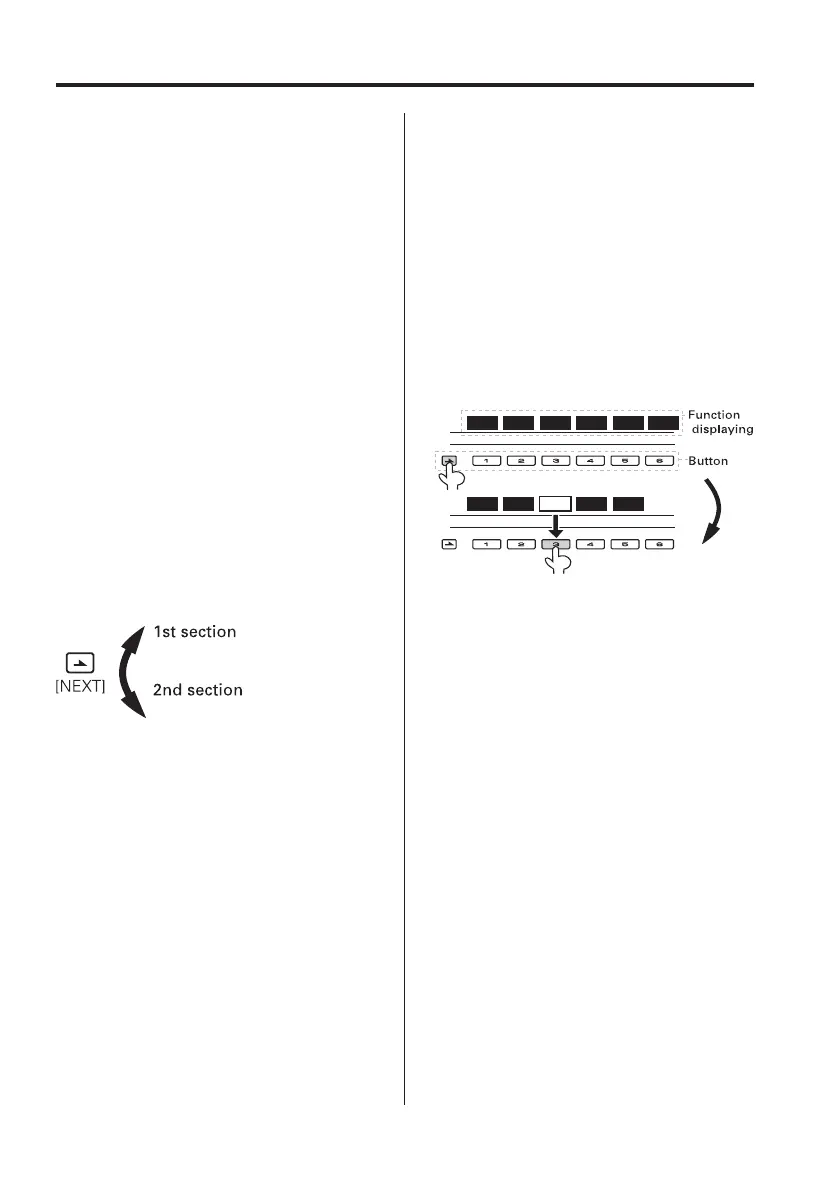
The function display will show the controllable
function of the [1] — [6] button above the button.
Pressing the [1] — [6] button below the desired
function enables the setting of the function.
Displaying the desired function
If five or more functions are available to be set with
the [1] — [6] button, they are divided into multiple
function groups (referred to as sections in this
manual) for registration.
Press the [NEXT] button to switch the sections.
Example: Function display of CD & External disc
source
Example: KDC-X889/MP828
Real operational example of the Multi-
function Key System
Example: Turning ON/OFF the Random Play during
CD play.
1. Show the function display of the Random Play.
If "RDM" is not shown in the display, press the
[NEXT] button to switch the sections until the
"RDM" function display is shown above the [3]
button.
2. Turn ON/OFF the Random Play.
Press the [3] button.
Each time the [3] button under the "RDM"
function display is pressed the Random Play is
turned ON/OFF.
Example: KDC-X889/MP828
S.MODE
SCAN RDM REP FSEL
S.F.C S.M.S EQ WOW
On Off
DISP
XT
S.F.C S.M.S EQ WOW
On Off
DISP
S.MODE
SCAN RDM REP
F SEL
B64-2962-00Kr4English.Indd9B64-2962-00Kr4English.Indd9 04.11.1111:30:30AM04.11.1111:30:30AM



 To Next Page
 Loading...







