English
|
15
Function of the KDC-X889/KDC-MP828
Sound Management system
1
Select the source for adjustment
Press the [SRC] button.
2 Select the key function section
Press the [NEXT] button.
Repeatedly press the button until "S.M.S" is
displayed above the [2] button.
Refer to <Notes on Multi-function Key System>
(page 9).
3 Enter Sound Management mode
Press the [2] ("S.M.S") button.
• When "2 ZONE" of <Audio Setup> (page 13) is ON,
you cannot select "S.M.S".
4 Select the Sound Management item for
adjustment
Press the [1] — [5] button.
Multi-function key operation Sound Management Item
[1] "CABIN" Cabin Setting
[2] "F" Speaker Select Front
[3] "R" Speaker Select Rear
[4] "SW" Speaker Select Subwoofer
[5] "Preset" [1] "CALL"
[2] "MEM"
Call mode
Memory mode
• "Preset": You can store an adjusted sound
management system value by selecting
"MEM". Refer to <Memory mode> (page 18).
Also, you can recall it by selecting "CALL".
Refer to <Memory Recall mode> (page 18).
5 Adjust the Sound Management item
Push the Control knob to [4] or [¢].
Each time the knob is pushed, the setting
switches as shown below.
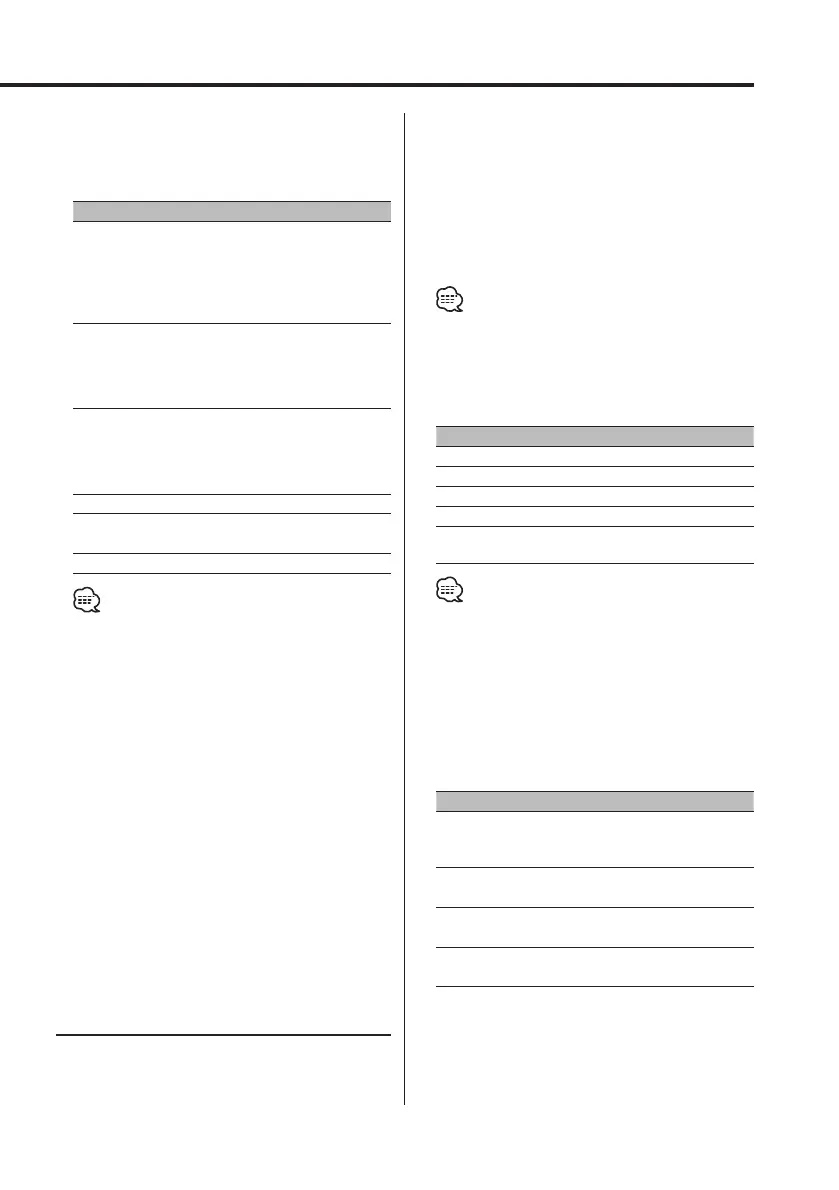
Sound Managemnt Item Range
Cabin Setting OFF/ COMPACT/ FULL SIZE CAR/
WAGON1/ WAGON2/ MINI VAN1/
MINI VAN2/ SUV/ MINI VAN LONG
Speaker Select Front 6 ½ / 6 ¾ / 7/ 4x6/ 5x7/ 6x8/ 6x9/
7x10/ OEM/ 4/ 5 (inch)
Speaker Select Rear 6 ½ / 6 ¾ / 7/ 4x6/ 5x7/ 6x8/ 6x9/
7x10/ None/ OEM/ 4/ 5 (inch)
Speaker Select Subwoofer 8/ 10/ 12/ 15over/ None/
6 ½ (inch)
6 Exit Sound Managemnt mode
Press the [6] ("RTN") button.
5 Adjust the Sound Field Control item
Push the Control knob to [4] or [¢].
Each time the knob is pushed, the setting
switches as shown below.
Sound Field Control Item Range
Front High Pass Filter Center/
Rear High Pass Filter Center
(KDC-X889)
(KDC-MP828)
Through/30 — 100/120/150/
180/220/250 (Hz)
Through/40/60/80/100/120/
150/180/220 (Hz)
Front High Pass Filter Slope/
Rear High Pass Filter Slope/
Subwoofer Low Pass Filter Slope*
(KDC-X889)
(KDC-MP828)
-12/-18/-24 dB/oct
-12/-18 dB/oct
Subwoofer Low Pass Filter Center*
(KDC-X889)
(KDC-MP828)
30 — 100/120/150/180/220/
250 (Hz)/Through
40/60/80/100/120/150/180/
220 (Hz)/Through
Subwoofer Low Pass Filter Phase*
Reverse/ Normal
DTA Front/DTA Rear
DTA Subwoofer*
0 — 20.33 (feet)
Position Setting Front-L/ Front-R/ Front/ ALL
• To get the best sound, first set the Cabin Setting
and Speaker Select Front/Rear parameters using the
<Sound Management system> (page 15).
• When the "2 ZONE" of <Audio Setup> (page 13) is
"ON", each of the following setup is ignored.
- "Xover"
- "DTA"
- "POSI"
- "Preset"
• * You can control this item when <Subwoofer
Output> (page 14) is set to "SW ON".
• * You can control this item when Speaker Select
Subwoofer of <Sound Management system> (page
15) is set to any item other than "None".
6 Exit Sound Field Control mode
Press the [6] ("RTN") button.
B64-2962-00Kr4English.Indd15B64-2962-00Kr4English.Indd15 04.11.117:34:26PM04.11.117:34:26PM



 To Next Page
 Loading...







