28
|
English
Tuner features
Tuning
Selecting the station.
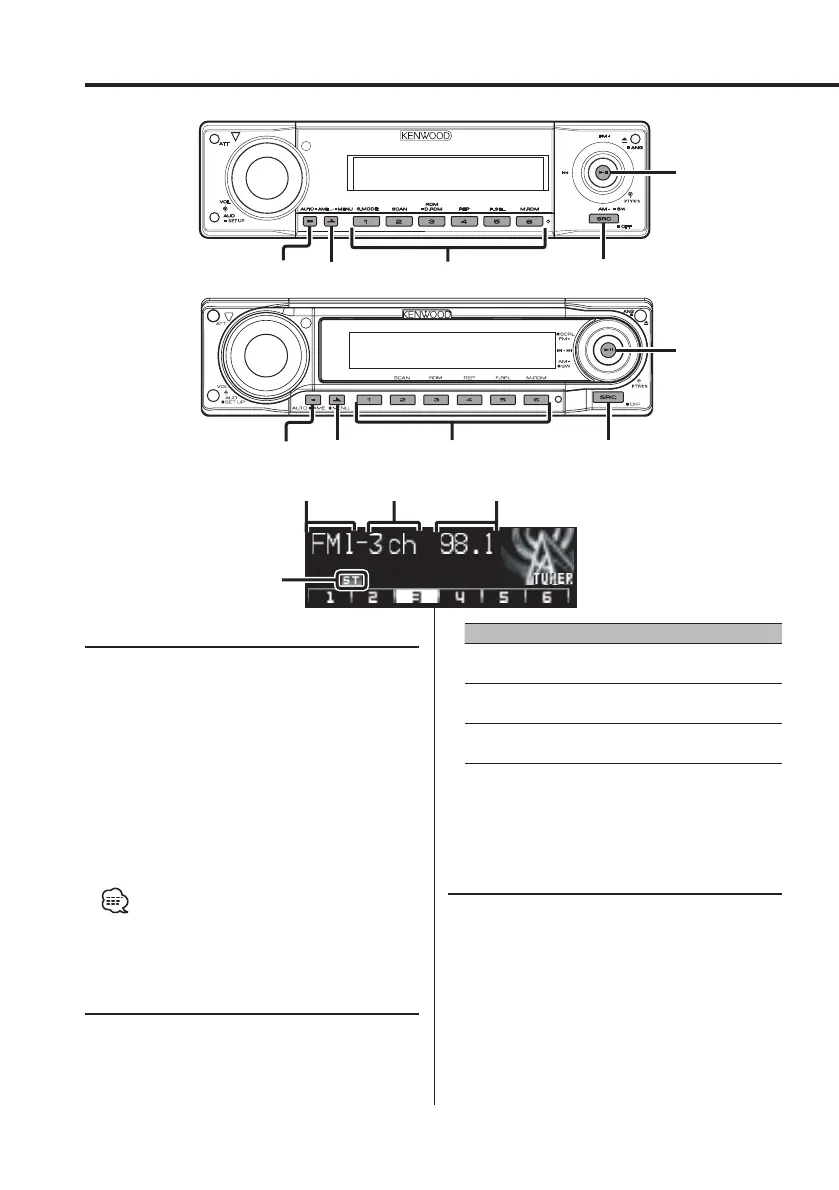
1 Select tuner source
Press the [SRC] button.
Select the "TUNER" display.
2 Select the band
Push the Control knob to [FM] or [AM].
Each time the knob is pushed to [FM], it switches
between the FM1, FM2, and FM3 bands.
3 Tune up or down band
Push the Control knob to [4] or [¢].
• During reception of stereo stations the "ST" indicator
is ON.
Tuning Mode
Choose the tuning mode.
Press the [AUTO] button.
Each time the button is pressed, the Tuning
mode switches as shown below.
Tuning mode Display Operation
Auto seek " Seek Mode
Auto 1"
Automatic search for a station.
Preset station seek " Seek Mode
Auto 2"
Search in order of the stations in
the Preset memory.
Manual " Seek Mode
Manual"
Normal manual tuning control.
Function of remote
Direct Access Tuning
Entering the frequency and tuning.
1 Select the band
Press the [FM] or [AM] button.
2 Enter Direct Access Tuning mode
Press the [DIRECT] button on the remote.
"– – – –" is displayed.
3 Enter the frequency
Press the number buttons on the remote.
NEXT
AUTO
/AME
1 – 6
SRC
Control knob
AUTO
/AME
SRCNEXT
1 – 6
Control knob
Frequency displayBand display
Preset station
number
ST indicator
B64-2962-00Kr4English.Indd28B64-2962-00Kr4English.Indd28 04.11.1111:30:42AM04.11.1111:30:42AM



 To Next Page
 Loading...







