4 Verification
40 Keysight 11713D/E Operating and Service Manual
Operator’s Check for Local Operation
Recommended test equipment
Table 4-1 lists the test equipment required for performance test verification and equipment
troubleshooting. Equipment other than the recommended models can be used, provided minimum
specifications are satisfied.
Procedure
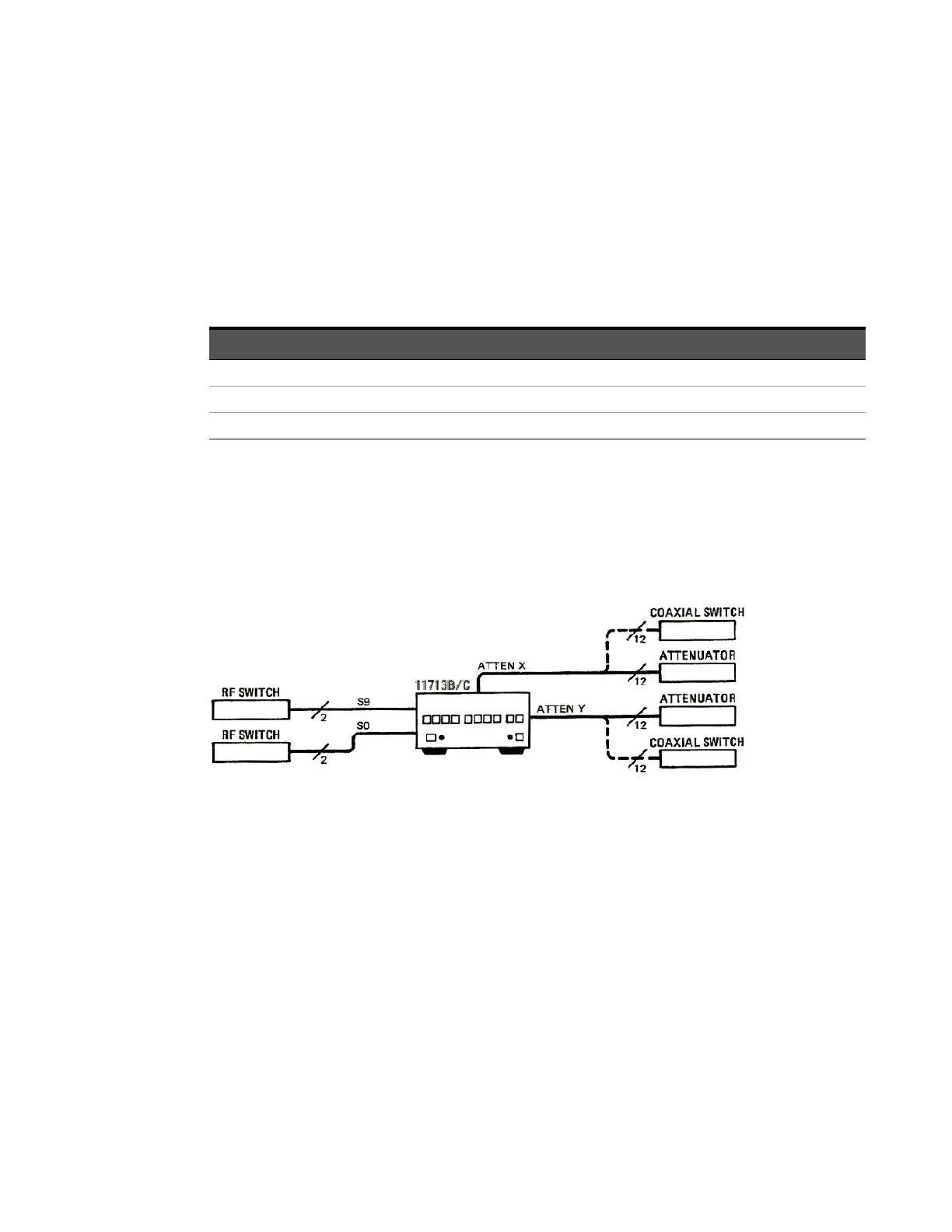
1 Configure the switching system as illustrated in Figure 4-1 by following all steps described in
Chapter 5, "Local Operations".
Figure 4-1 Switching system for verification
2 Once configuration is completed, press and depress the 10 numbered pushbuttons on the
driver front panel. Each LED should alternate between off and on as each key is pressed.
3 In addition, if any switching devices is connected (attenuators, relays, or switches), an audible
click should be heard from the unit actuated. Pressing any numbered pushbutton should not
cause any other pushbutton to change state.
Table 4-1 Recommended test equipment
Instrument type Critical specifications
Use
[a]
[a] P = Performance, T = Troubleshooting
Digital voltmeter 0 to +30 Vdc T
Attenuators (2 required) Programmable, 4 sections P, T
Switches (2 required) +5 Vdc, +15 Vdc, or +24 Vdc drive source P, T



 To Next Page