Local Operations 5
Keysight 11713D/E Operating and Service Manual 53
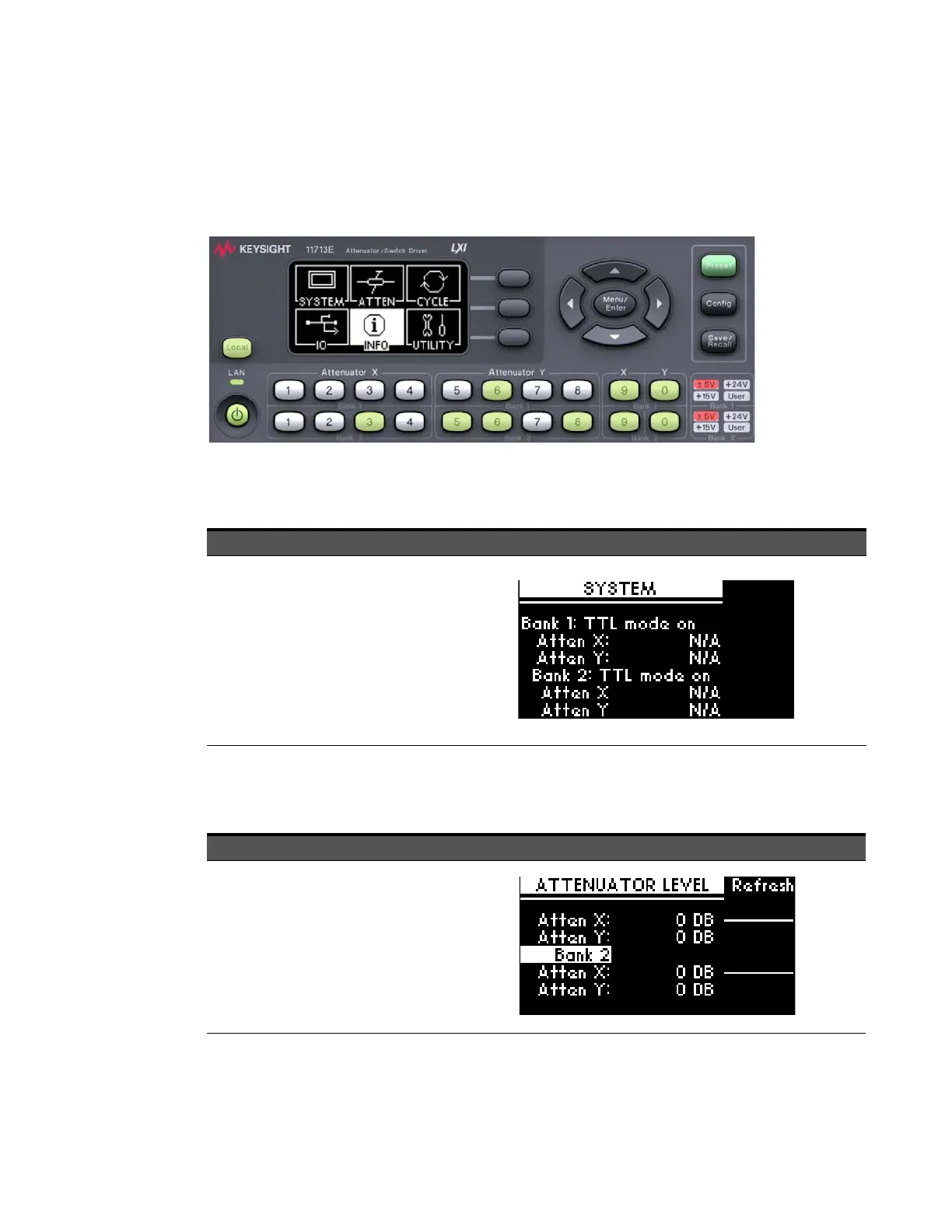
Main Menu of the 11713D/E
The main menu can be displayed on the LCD screen by pressing the Menu/Enter button. The six
submenus, each with their own functionality, are described in the subsequent sections.
SYSTEM menu
ATTEN menu
Attenuation value on display changes according to the input from the front panel pushbuttons or
through the virtual web interface:
Function Action Illustration
Display attenuator
type(s) configured
for
11713D/E
a Navigate to the SYSTEM icon using
the navigation keys.
b Press Menu/Enter button when
SYSTEM icon is highlighted.
c On display are attenuator models
assigned to ATTEN X and ATTEN Y
for each bank (e.g. 8494G/H,
8496G/H, N/A, N/A).
d Press Menu/Enter button again to
return to main menu.
Function Action Illustration
Display
attenuation
levels of each
bank
a Navigate to the ATTEN icon using
the navigation keys.
b Press Menu/Enter button when
ATTEN icon is highlighted.
c On display are attenuation levels for
ATTEN X and ATTEN Y (e.g. 11 dB,
110 dB, 0, 0).
d Press Menu/Enter button again to
return to main menu.



 To Next Page