Introduction 1
Keysight 11713D/E Operating and Service Manual 21
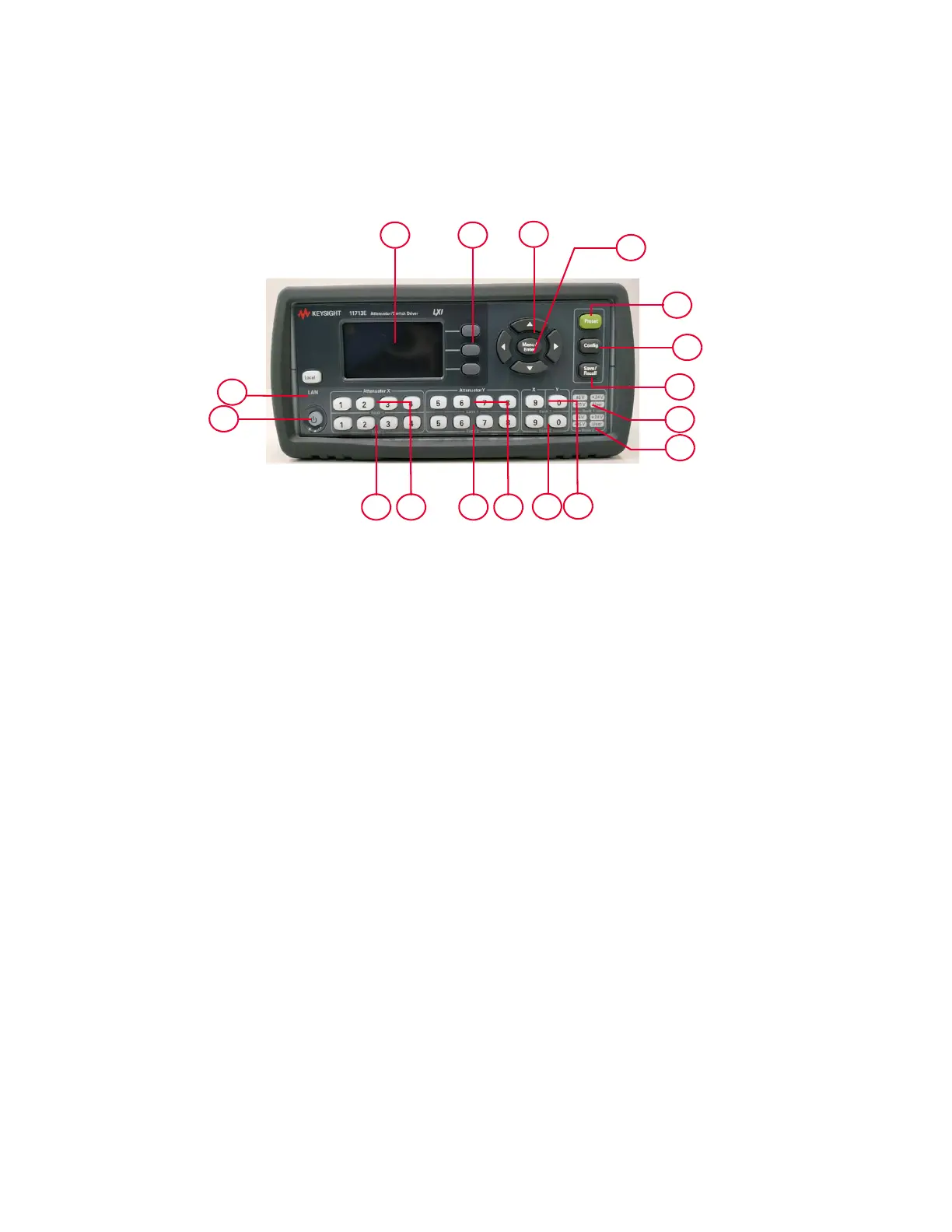
11713E Front and Rear Panels at a Glance
This section briefly describes the function of the front panel keys of 11713E.
Figure 1-3 11713E front panel features
1 LCD screen
2Softkeys: These unmarked keys are referred to by the text on display next to them.
3Navigation buttons: The arrow keys are used to navigate parameters displayed on the LCD
screen or change parameters such as GPIB address.
4Menu/Enter: Press this key to select the highlighted parameter On/Off or select the highlighted
field or go back to the main menu.
5Preset: Press this key to preset the driver.
6Config: Press this key to access the configuration menu. You can set the attenuator type, supply
voltage, and TTL condition through this menu.
7Save/Recall: Press this key to save current settings or recall saved settings.
8 Supply Voltage for Bank 1: Indicates supply voltage setting (background LED in red) for bank
1.
9 Supply Voltage for Bank 2: Indicates supply voltage setting (background LED in red) for bank
2.
10 Switches for Bank 1: In the local mode, pushbutton switches 9 and 0 change the position of a
coaxial switch connected to rear panel banana jacks S9 A/B and S0 A/B respectively, for bank
1.
11 Switches for Bank 2: In the local mode, pushbutton switches 9 and 0 change the position of a
coaxial switch connected to rear panel banana jacks S9 A/B and S0 A/B respectively for, bank
2.
12 Attenuator Y for Bank 1: In the local mode, pushbuttons 5, 6, 7, and 8 change the attenuation
setting of an attenuator or change the position of coaxial switch(es) connected to the ATTEN Y
connector on the rear panel, for bank 1.
1 2
3
4
5
6
7
8
9
10
11
12131415
16
17



 To Next Page