Local Operations 5
Keysight 11713D/E Operating and Service Manual 55
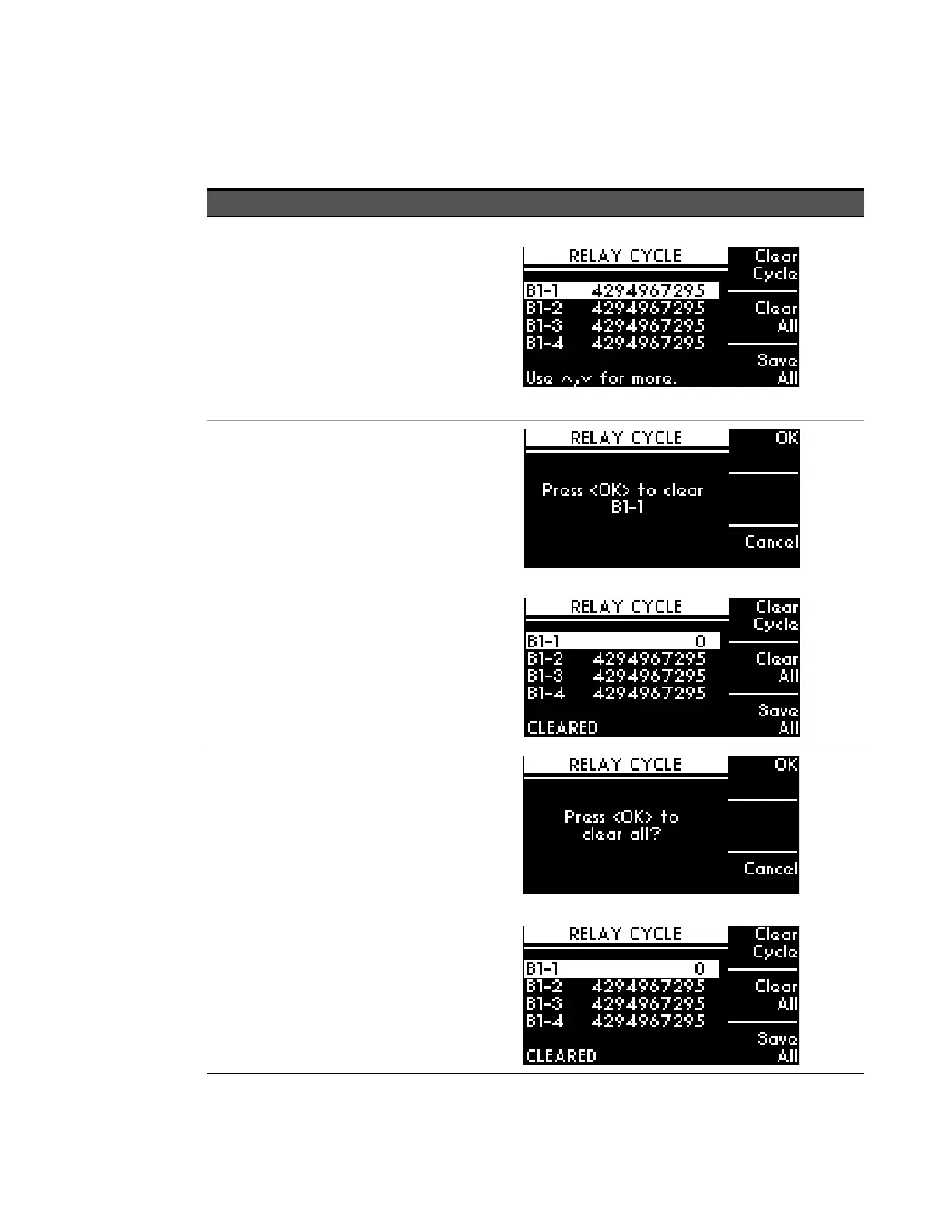
CYCLE menu
Function Action Illustration
Display number of
cycles of switching
path for each
channel
– 10 channels for
11713D (CH1 to
CH9, CH0)
– 20 channels for
11713E (B1-1 to
B1-10, B2-1 to
B2-10)
a Navigate to the CYCLE icon using
the navigation keys.
b Press Menu/Enter button when
CYCLE icon is highlighted.
c On display are number of relay
cycles for each channel.
d Press Menu/Enter button again to
return to main menu.
Clear cycle for
selected channel(s)
a Scroll to the desired bank-channel
(e.g. B1-1) using the navigation
keys.
b Press Clear Cycle.
c On the next screen, press OK
softkey to confirm decision or
press Cancel softkey to cancel.
d.Note that relay cycle for B1-1 is 0
and below screen indicates
CLEARED.
Clear cycle for all
channels
a Press Clear All.
b On the next screen, press OK
softkey to confirm decision or
press Cancel softkey to cancel.
c.Note that relay cycle for all
channels is 0.



 To Next Page