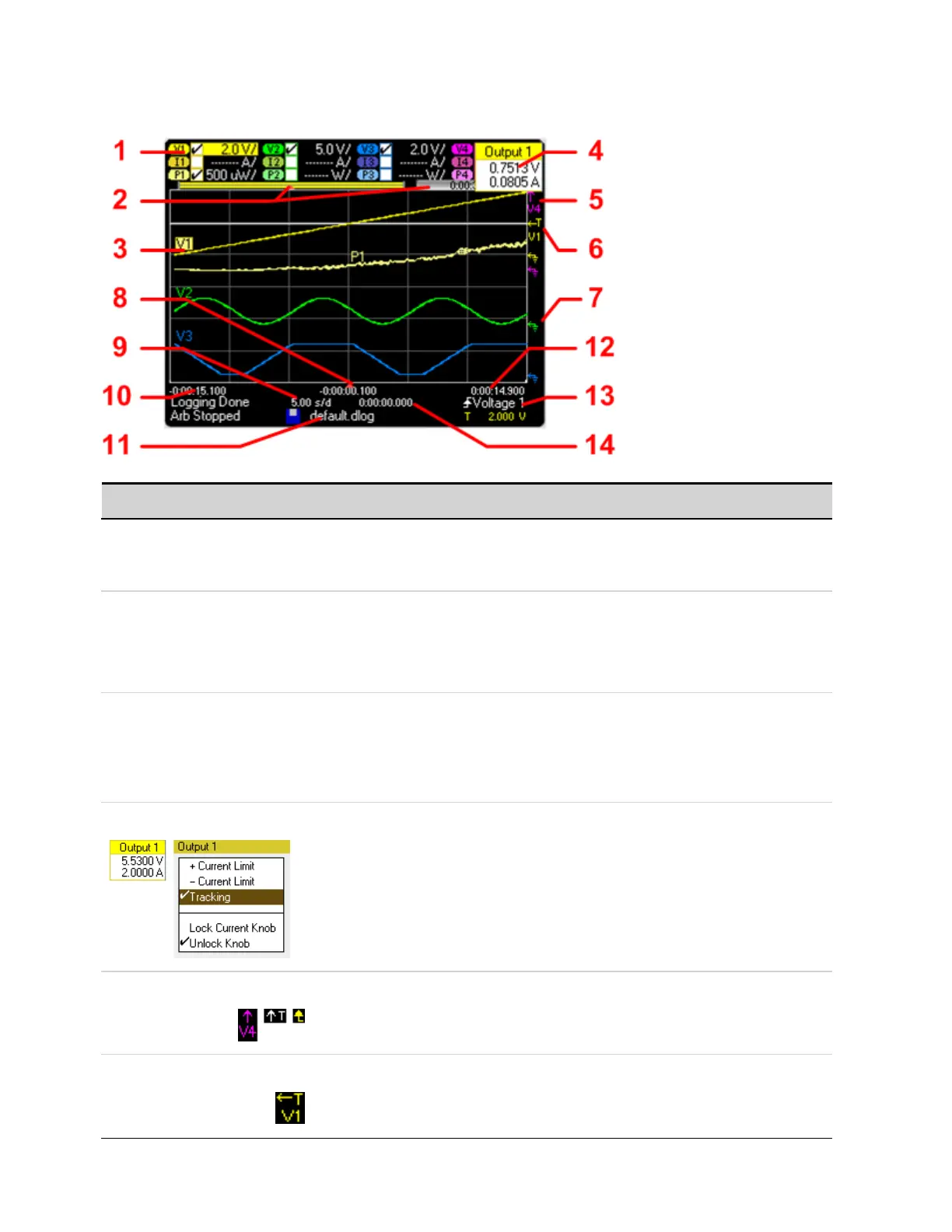
Standard View
Symbol/Field Description
1 Trace Controls Identifies the volt/div. or curr/div. setting. √ indicates the traceis on.
Dashes (----) indicatethe traceis off.
Selectthe traceand press Enter to turn iton or off.
2 Data Bar
Time Elapsed
The data bar represents all of the logged data. The yellow part indicates the portion of the data that
is visible on the display. The black part represents the data that is not visible.
Indicates the time elapsed during the data log and the total duration. The values match when data
logging finishes.
3 Data Traces Voltage tracelabels appear on the left side of the grid (V1 V2, V3, V4).
Current tracelabels appear on the right side of the grid (I1, I2, I3, I4).
Power trace labels appear on the center of the grid (P1, P2, P3, P4).
If a portion of a traceis red, itmeans that portion of the trace is out of range.
Push the Trigger Level knob to auto-scale the data traces.
4 Output Pop-ups Turning the voltage and current knobs displays a pop-up dialog showing the present output
settings.
Pushing the voltage and current knobs displays a pop-up dialog allowing the following actions:
• Lock/Unlock the voltage or current knobs.
• On Models N678xA, select a limit parameter to control or select limittracking.
5 Out of ViewArrows Indicate that the trace, V4 in the figure, is out of view.
Use the Vertical Volt/Div knob or the Vertical Offsetknob to bring the trace into view.
Push the Trigger Level knob to autoscale the data traces.
7 Trigger Level Shows the location of the voltage or current trigger level and output. In this example, the voltage
trigger level of output 1 is shown. The trigger source and amplitude are shown atthe bottom right
of the display.
4 Using the Measurement Functions
148 Keysight N6705C Operating and Service Guide








 To Next Page