Symbol/Field Description
6 Ground Reference The ground reference of the trace. Ground references are offsetso that they do not overlap. The
ground reference offset value is referenced to the horizontal center line of the grid.
8 Trigger Point Indicator Indicates the trigger position in the data log. In this example the trigger point was offsetby 50%,
and the pre trigger data and the post trigger data was logged. The time atthe trigger point is
always zero. Change the trigger offsetin the Datalogger Trigger Properties window.
9 Time/Div. Identifies the horizontal time-base setting. This can be adjusted using the front panel Horizontal
Time/Div knob.
10 Left-Grid Time Identifies the time at the left gridline in relation to the trigger point. If the trigger is atthe leftof the
grid, the time will be zero.
11 Filename Indicates the filename of the data that is being displayed.
12 Right-Grid Time Identifies the time at the right gridline in relation to the trigger point. If the trigger point is at the
start of the data log, the time will equal the total duration of the data log.
13 Trigger Source
Amplitude
In the figure, the trigger source is a voltage level on output 1. The Data Logger starts logging data
when the indicated level is reached.
Up trigger indicates the data logger will be triggered on the up-slope (positive).
Down trigger indicates the data logger will be triggered on the down-slope (negative).
If the trigger source is setto a voltage or current level, the amplitude of the trigger level is
indicated below the trigger source. In the figure, the voltage trigger level is setto 2 V.
14 OffsetTime Indicates the time that the right gridline is offsetor away from the end of the data log. When this
value is zero, itmeans that the right gridline is positioned at the end of the data log. Turning the
offsetknob will move the grid away from the end of the data log, as indicated by the OffsetTime.
The yellow part of the bar represents the data that is visible on the display. The black part
represents the offsettime.
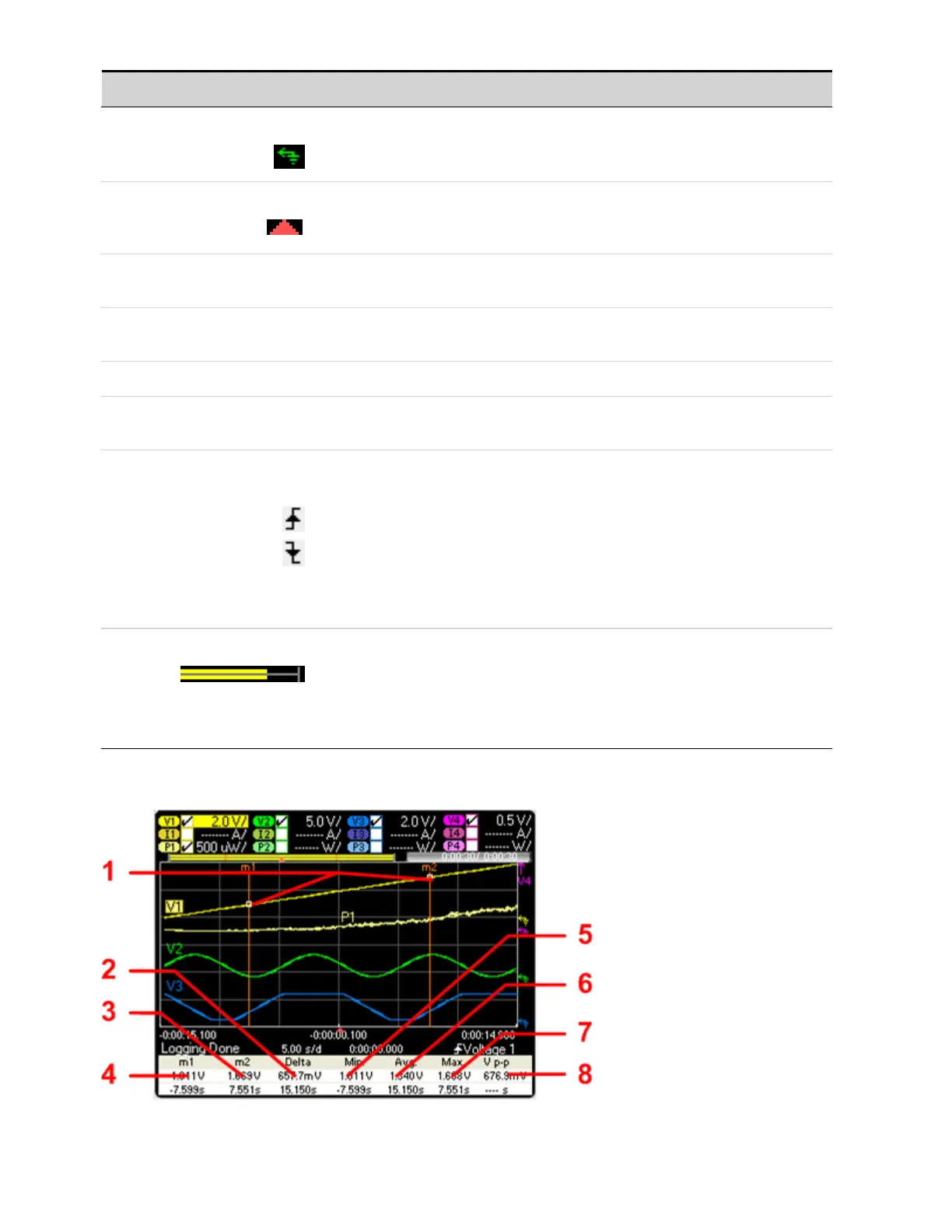
Marker View
Keysight N6705C Operating and Service Guide 149
4 Using the Measurement Functions








 To Next Page