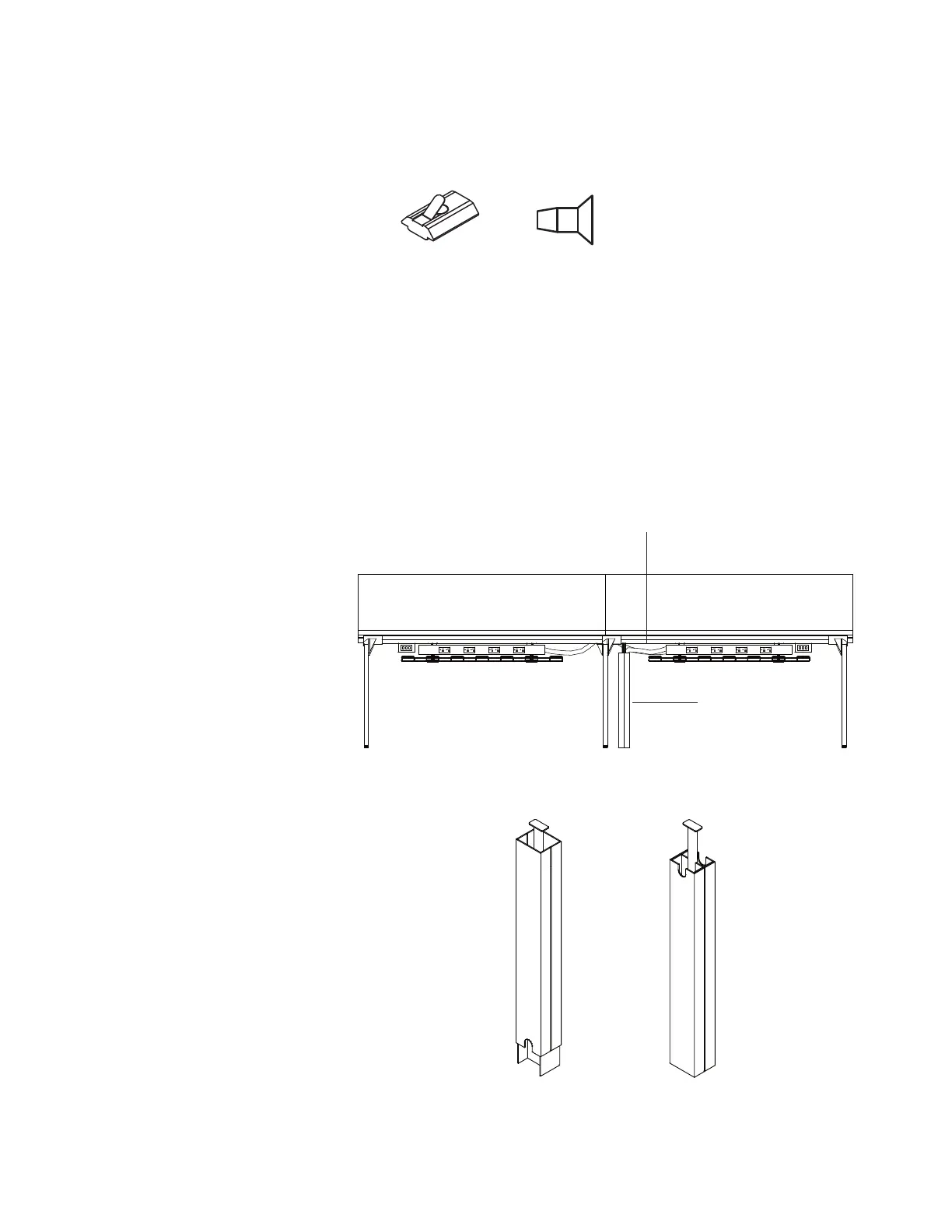
STEPS:
1. Insert (2) spring nuts (A) into the bottom slot
in the center beam of the Big Table, in desired
location for wire management or infeed.
2. Position the vertical wire management conduit
assembly under the center beam, aligning the
holes in the assembly with the spring nuts (A).
3. Fasten the vertical wire management
conduit assembly to the spring nuts using
(2) M6 x14mm machine screws (B).
4. Place cables, power conduit, and wires
in side cavities of conduit assembly,
separating data from power, if desired.
5. Select preferred orientation of vertical wire
manager assembly covers, and pressure
fit a cover on each side of the assembly.
NOTE: Covers will slide up/ down to
meet the floor.
NOTE: If installing the vertical wire manager
under a desk without a center beam, attach
the vertical wire manager conduit assembly
with wood screws (not provided) instead
of machine screws referenced in step 3.
Vertical Wire and Infeed Manager
Pattern Number Represented:
Vertical Infeed/ Wire Manager, YR1VWM323
Parts List:
Spring Nut (A)
M6 x 14mm Machine Screw (B)
Vertical Wire Manager Conduit Assembly
Vertical Wire Manager Assembly Covers
Tools Needed:
Drill
Phillips #2 and #3 bits
(A) 3AB402196 (B) 3AB405640
Antenna
™
Workspaces Planning Guide
February 2011
45
Antenna
™
Workspaces
Introduction Tops FenceSupports Electrical Screens Storage
Electrical
Cable Management
Electrical
Cable baskets are available to manage both
excess power cords under harnesses, and for
data/communications cable distribution. For
desks a single 69" wide, 6" deep, 1" high cable
basket can be suspended below the desk
power adapter, if specified 12" wider than the
harness and covers, or from the underside of
the top. Baskets can be trimmed in length to
fit between desk legs or legs and storage.
For big tables two types of cable basket
are available: a 12" deep, 1" high, excess
cable basket manages power cords directly
below the harness, and a second basket,
6" deep, manages data/communications
distribution for the width of the big table.
The excess cord basket is available in 27"
width for the 12" harness, and 39" width
corresponding to the 24" harness. All cable
baskets include appropriate mounting hardware.
Cables can be trimmed in length onsite.
For desks and big tables, cables can be
managed from the floor up to the cable basket
by the vertical wire manager. The H-shape
internal frame is suspended from the desktop or
adapter bracket, and provides lay-in channels
separating power from data communication
cables. U-shape side covers snap on to the
frame to manage and conceal cables.
The cable basket alternate mount kit is available
for desk applications when the cable basket is
required to attach directly to the underside of the
top, instead of attaching to the power harness
mounting bracket. When a single cable basket
is cut into two smaller baskets, a cable basket
mount kit should be specified. This mounting kit
provides the additional hardware necessary for
both baskets to be attached to either the center
beam or the power harness mounting bracket.
Vertical Wire Manager
Exploded Detail
Vertical Wire Manager
Assembly Options
Big Table with Vertical Wire Manager Elevation
ante_pg_d_100811.eps scale: 1” = 1mm
revised 100716
Bucket 72
Antenna Electrical detail
Big Table with Cable Baskets End Elevation Detail
Center Beam of Big table
Power Harness and Covers
Data Cable Distribution
Basket, 1"h x 12"d
Power Cord Management
Basket, 1"h x 12"d
Antenna
™
Workspaces Planning Guide
February 2011
45
Antenna
™
Workspaces
Introduction Tops FenceSupports Electrical Screens Storage
Electrical
Cable Management
Electrical
Cable baskets are available to manage both
excess power cords under harnesses, and for
data/communications cable distribution. For
desks a single 69" wide, 6" deep, 1" high cable
basket can be suspended below the desk
power adapter, if specified 12" wider than the
harness and covers, or from the underside of
the top. Baskets can be trimmed in length to
fit between desk legs or legs and storage.
For big tables two types of cable basket
are available: a 12" deep, 1" high, excess
cable basket manages power cords directly
below the harness, and a second basket,
6" deep, manages data/communications
distribution for the width of the big table.
The excess cord basket is available in 27"
width for the 12" harness, and 39" width
corresponding to the 24" harness. All cable
baskets include appropriate mounting hardware.
Cables can be trimmed in length onsite.
For desks and big tables, cables can be
managed from the floor up to the cable basket
by the vertical wire manager. The H-shape
internal frame is suspended from the desktop or
adapter bracket, and provides lay-in channels
separating power from data communication
cables. U-shape side covers snap on to the
frame to manage and conceal cables.
The cable basket alternate mount kit is available
for desk applications when the cable basket is
required to attach directly to the underside of the
top, instead of attaching to the power harness
mounting bracket. When a single cable basket
is cut into two smaller baskets, a cable basket
mount kit should be specified. This mounting kit
provides the additional hardware necessary for
both baskets to be attached to either the center
beam or the power harness mounting bracket.
Vertical Wire Manager
Exploded Detail
Vertical Wire Manager
Assembly Options
Big Table with Vertical Wire Manager Elevation
ante_pg_d_100811.eps scale: 1” = 1mm
revised 100716
Bucket 72
Antenna Electrical detail
Big Table with Cable Baskets End Elevation Detail
Center Beam of Big table
Power Harness and Covers
Data Cable Distribution
Basket, 1"h x 12"d
Power Cord Management
Basket, 1"h x 12"d
Infeed
Vertical Wire Manager
Big Table with Vertical Wire Manager Elevation
Vertical Wire Manager Assembly Options


 To Next Page