wire and insulation waste. (previously insulation waste removing
mode)
When《Front End Special Strip》 is enabled, values are
automatically entered in the half-strip setting even if it is a full-
strip setting.
This function prevents troubles caused by insulation waste
remaining on the blade if waste removal air is not available.
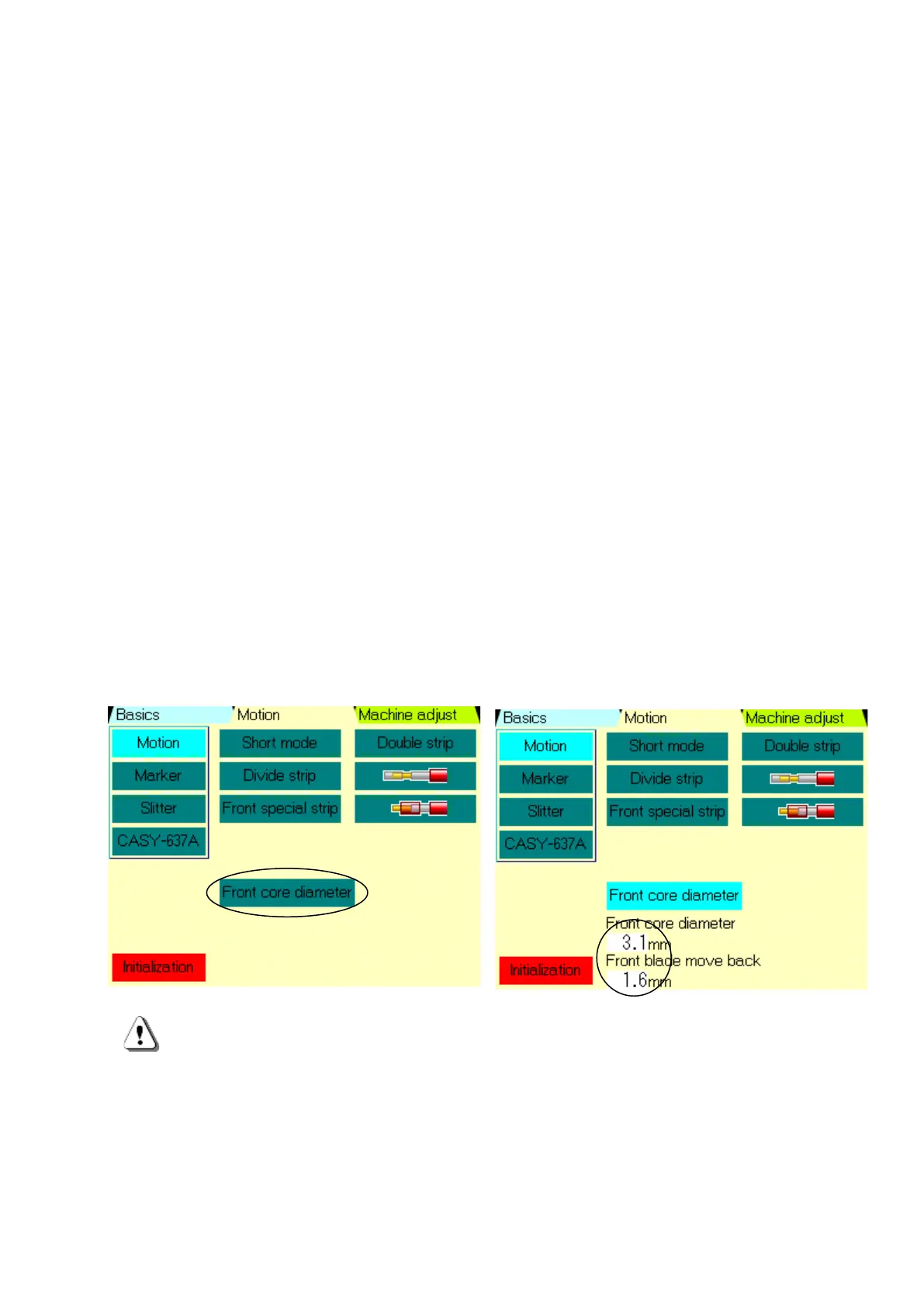
⑧《Front End Core Wire Diameter》: It is used for setting the numerical value of blade, both
front end stripping and rear end stripping individually.
Normally, the 《Wire Core Diameter 》 and 《Blade Move Back》 settings on the 《Basics》
screen are both applied to the front end and rear end, but they can also be set individually.
It uses this when some problems occur caused by the front end and rear end values are the
same due to the characteristics of the wire material.
Example: The front end insulation cannot be stripped, but the rear end can be stripped
without any problem.
→In this case, the stripping finish quality can be improved by setting the rear end 《Core
Wire Diameter》and 《Blade Move Back》to the same setting, and reducing only the front
end 《Core Wire Diameter》.
Touch the 《Core Wire Diameter》, indicated 《Front End Core Wire Diameter》 and 《Blade
Move Back》.
Please set the values referencing 《Basics》screen《Core Wire Diameter》and《Blade Move
Back》 , and P.10-2. (unit 0.01mm)
When the 《Front End Core Wire Diameter》setting is enabled, the settings of 《Basics》
screen⑥《Core Wire Diameter》and⑦《Blade Move Back》 are applied to the rear end core
wire processing.
When the 《Front End Core Wire Diameter》setting is enabled due to an incorrect
operation, such troubles may occur 「only front end insulation can’t be stripped」or 「only
front end cuts the wire at the strip position」.
When changing the processing material wire, we recommend to confirm whether the
《Front End Core Wire Diameter》 function is valid or invalid as well.


 To Next Page