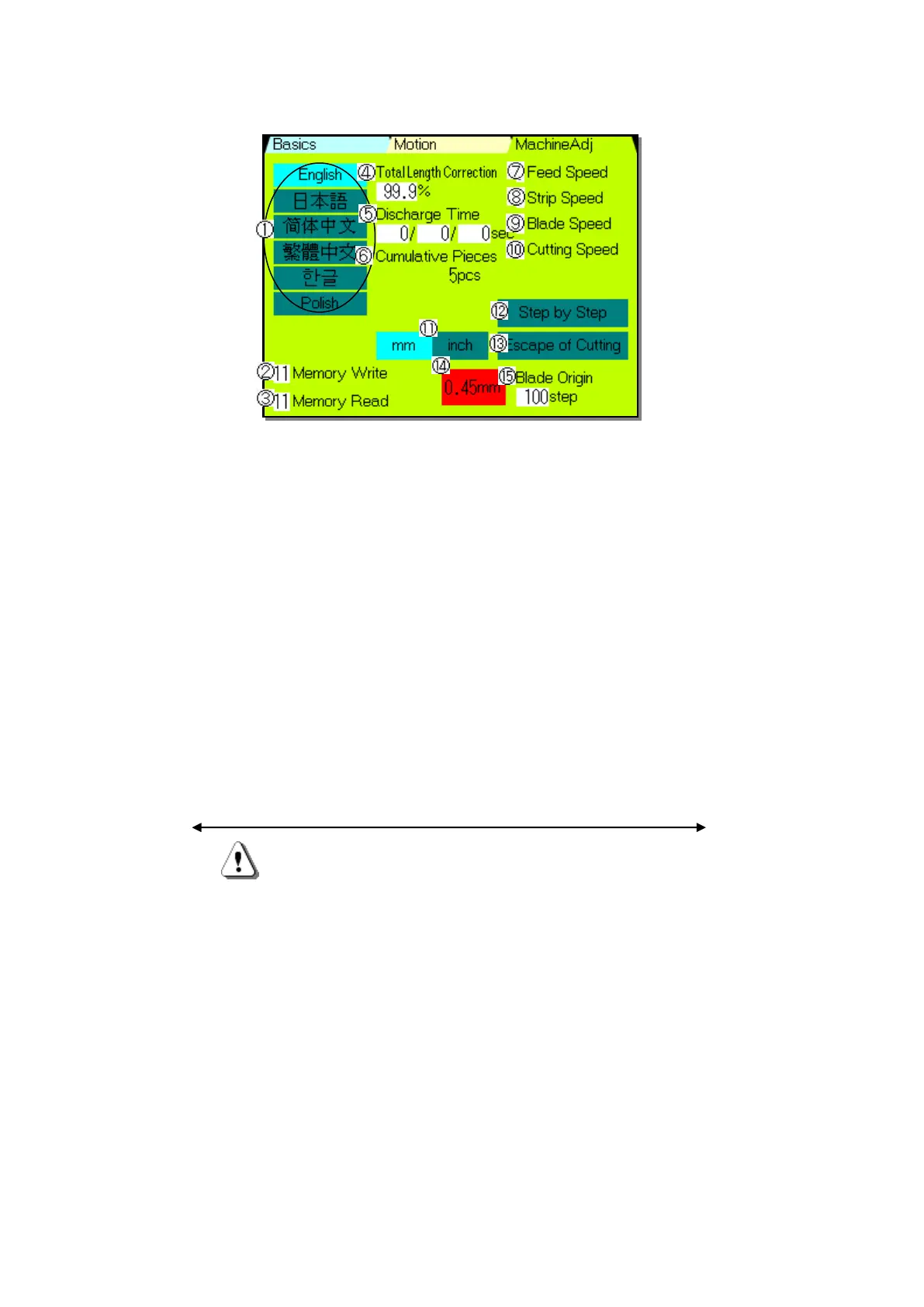
《Machine Adj》 Screen
From any screen, by touching 《Machine Adj》, it will be displayed.
①Language Selection:Selection of language displayed on the operation panel of C371A.
②《Memory Write》: From “0” to “500”
③《Memory Read》: From “0” to “500”
④《Total Length Correction》:Only the cutting length is corrected.
⑤《Discharge Time》: Use this function when optional CC-100 (conveyer) is attached.
Minimum unit:0.1second
Left side is 「Timer 1」: Time from discharging the wire to starting the motion of
the Push Out Cover , after finishing of CASTING processing.
Center is 「Timer 2」: Time when the Push Out Cover is out.
Right side is 「Timer 3」: Time from returning to the original position of the Push
Out Cover to starting the processing of CASTING
⑥《Cumulative Pieces》:Number of pieces which have been Processed by C371A. Reset is
possible.
Depending on the wire, it may step out when the processing speed is too fast. In this case,
you can singly change the speed of the motor which activates each motion.
Depending on software , it is "1-5" five phases。
⑦《Feed Speed》:Setting of the speed of the roller except during stripping the insulation.
⑧《Strip Speed》:Setting of the speed of the roller when stripping the insulation.
⑨《Blade Speed》:Setting of blade speed except when cutting wire.
⑩《Cutting Speed》:Setting of the blade speed when cutting wire.
⑪《mm/inch》:Switches the input unit of the machine. mm → inch → mm →
⑫《Step by Step》:Each time when pressing [START] key, it processes one operation
( frame by frame advance). When around the 《Step by Step》 is blue, it
indicates step by step mode.
⑬《Escape Of Cutting》:When cutting, roller rotates to pull away the wire.
It is useful when the wire is too thick to cut.
*Followings have been adjusted when shipping this device. Customers are not allowed to
change.
⑭《0.45》:This is used when the blade is original position.
⑮《Blade Original Point》: Adjustment of the original point of the blade.


 To Next Page