20
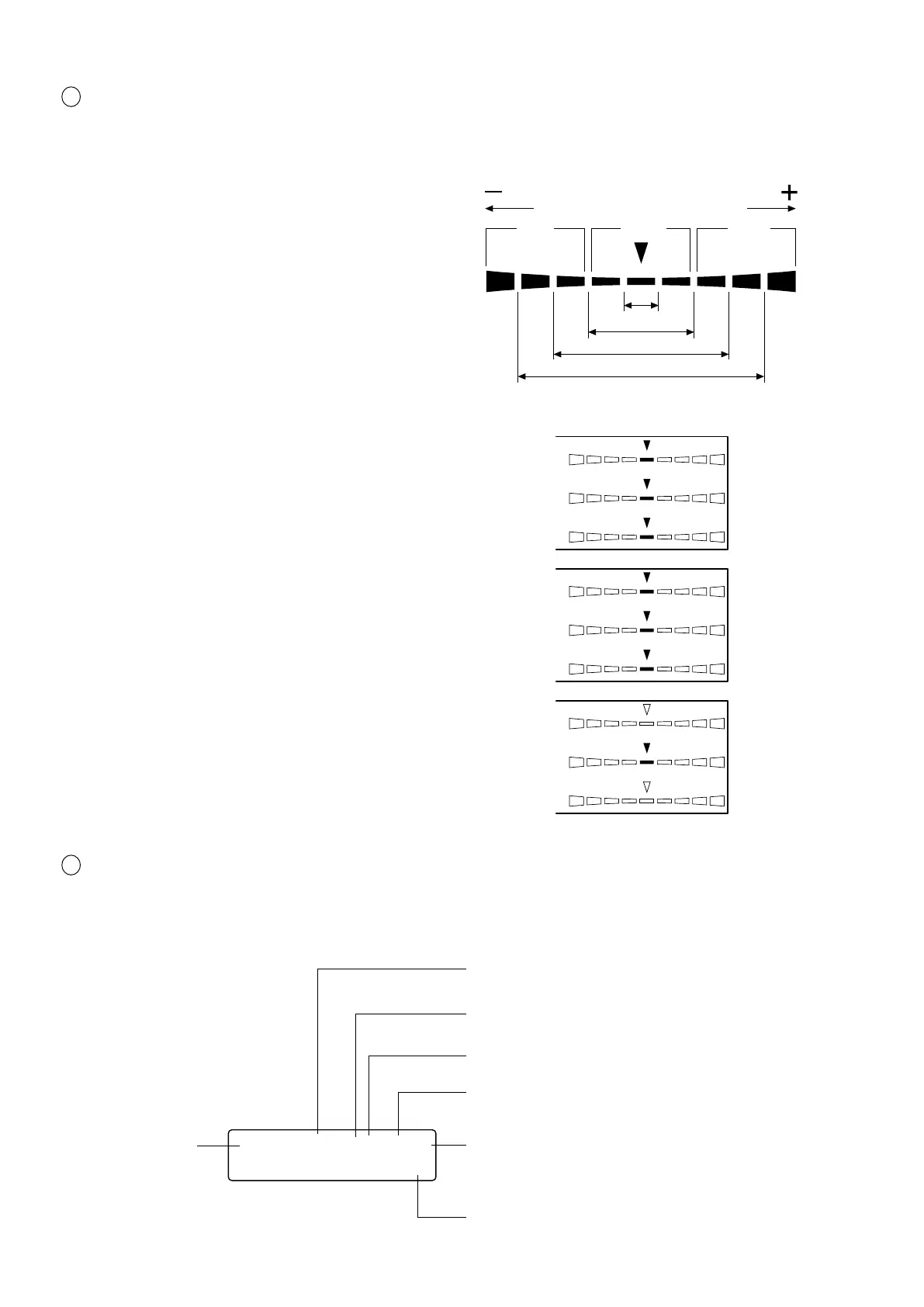
3 Analog display section ............................ Displays the difference (%) between the measured value and the tar-
get color or the difference (%) between measured values.
The range for each dot can be set between 0.1 and 99%. (Page 69)
● How to read/when the range is set in “n” %
except flicker mode
For a description of flicker mode refer to page 69.
The range has been set to 10% prior to factory ship-
ment.
● When xylv, T∆uvLv, u'v'Lv or XYZ measurement
mode is selected
∆x, ∆y and ∆Lv are displayed.
● When an analyzer measurement mode is selected
For G-reference R/G, B/G and ∆G are displayed.
For R-reference ∆R, B/R and G/R are displayed
● When flicker mode* *is selected Flicker is dis-
played.
4 LCD display section ................................ Displays the memory channel, probe no., ID name, warning and set-
tings.
In case of error, an error message will appear.
(For a description of what to do in case of error, refer to page 103.)
∆x
∆y
∆Lv
R/G
B/G
∆G
+n×8% or
higher
Red Green Red
-
n×8%
or lower
Below ±n%
Below ±n×2%
Below ±n×4%
Below ±n×8%
CH00 EXT Ad P1A
[MINOLTA ]
Displays the currently selected SYNC mode. (NTSC,
PAL, EXT, UNIV, INT) (Page 38)
Displays the currently selected measurement speed.
(A.F.S) (Page 36)
Displays the calibration mode for the currently se-
lected memory channel. (d.h.a.m) (Page 57)
Probe no. (Page 43)
Probe type (A, B, C, D) (Page 43)
ID name display area (Page 67)
Memory channel
(Page 48)















 To Next Page