101
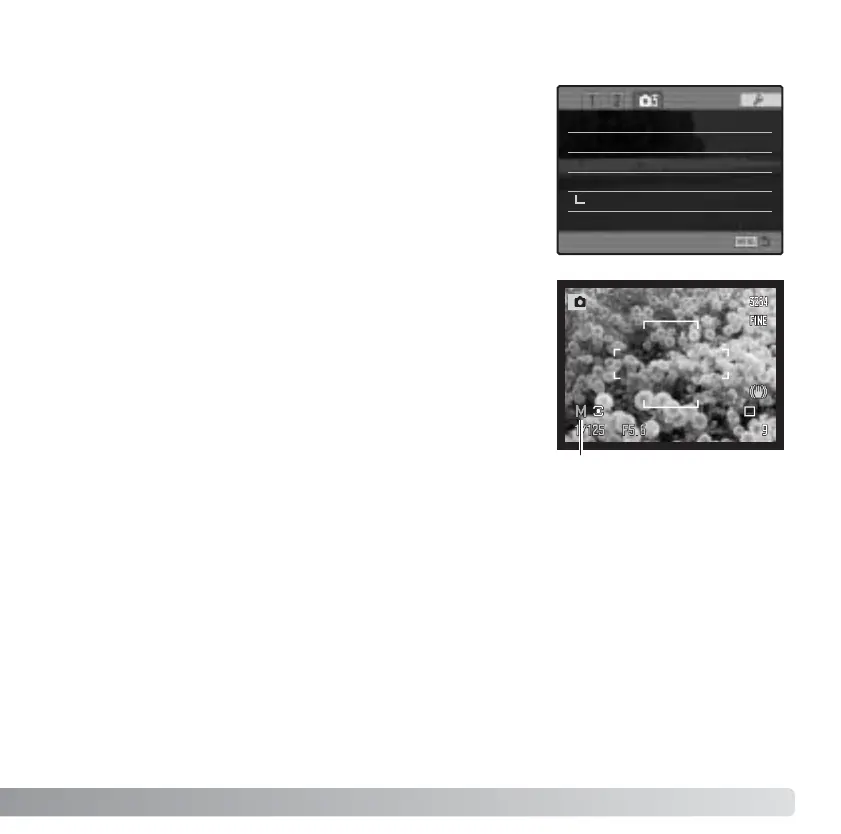
The monitor amplification options control the display of the
live image. Monitor amplification has two settings:
Auto - in low-light conditions when the camera-sensitivity
gain has reached its limit, the automatic monitor-
amplification function will intensify the monitor image.
If the real-time histogram (p. 43) is used, it will reflect the
amplified image and not the final values of the exposure.
Normal - the monitor image is not amplified in low light.
When using the manual (M) exposure mode (p. 56), two
other options are available:
Exposure priority - the live image reflects the set
exposure. Automatic monitor amplification is disabled.
Display priority - the live images is displayed regardless
of the exposure settings. This allows the image to be
composed on the monitor when using a flash as the main
light source. When selected, the manual exposure mode indicator turns red on the
monitor.
MONITOR AMPLIFICATION
Display-priority indicator
Memory –
DSP set DSP
Noise reductn On
Monitor amp. Auto
Digital zoom
Interpolate
Manual exp. Exp. priority





 To Next Page