129
SETUP MENU
The setup menu controls camera operations. The menu
navigation section covers basic menu operation. It is
followed by detailed descriptions of the menu settings.
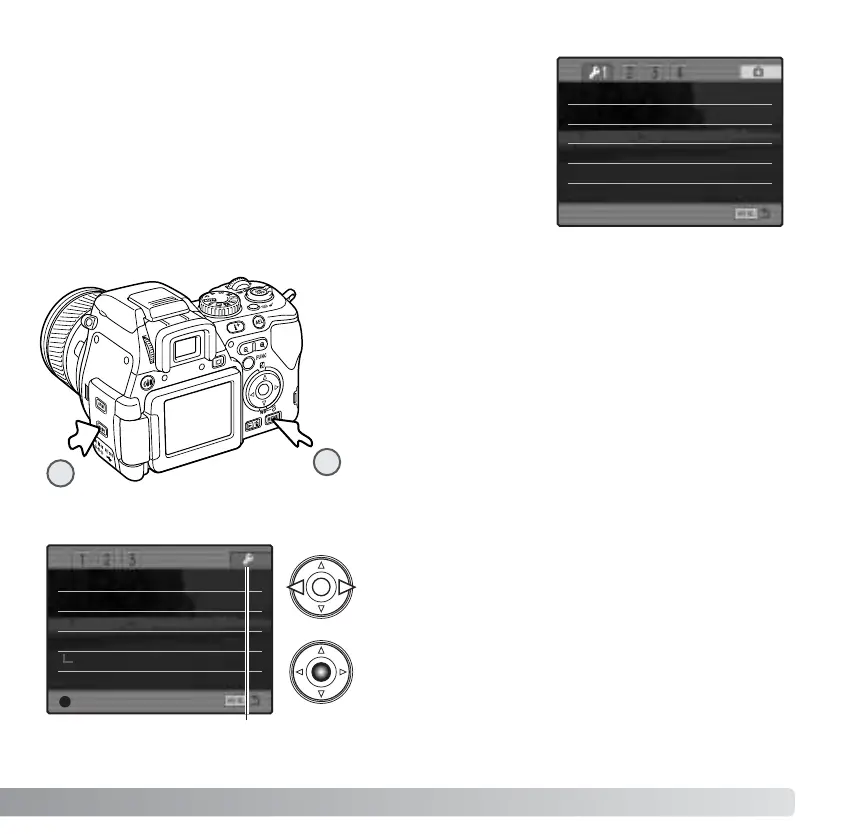
OPENING THE SETUP MENU
The setup menu can be opened two ways.
To access the menu directly, hold down the shift
button (1) and press the menu button (2) to open the
setup menu.
Memory
DSP set
Noise reductn
Monitor amp.
Digital zoom
The setup menu can be accessed from the
recording, movie, or playback menus.
Use the left/right keys of the controller to highlight
the setup tab. Press the central button of the
controller to open the setup menu.
Setup tab
Interpolate
Auto
On
DSP
–
Enter
LCDbrightness –
Transfer mode Data storage
Video output NTSC
Language English
Lens acc. None
Date/Time set –
2
1
Manual exp. Exp. priority














 To Next Page