26
G
ETTING UP AND RUNNING
LCD MONITOR SET UP
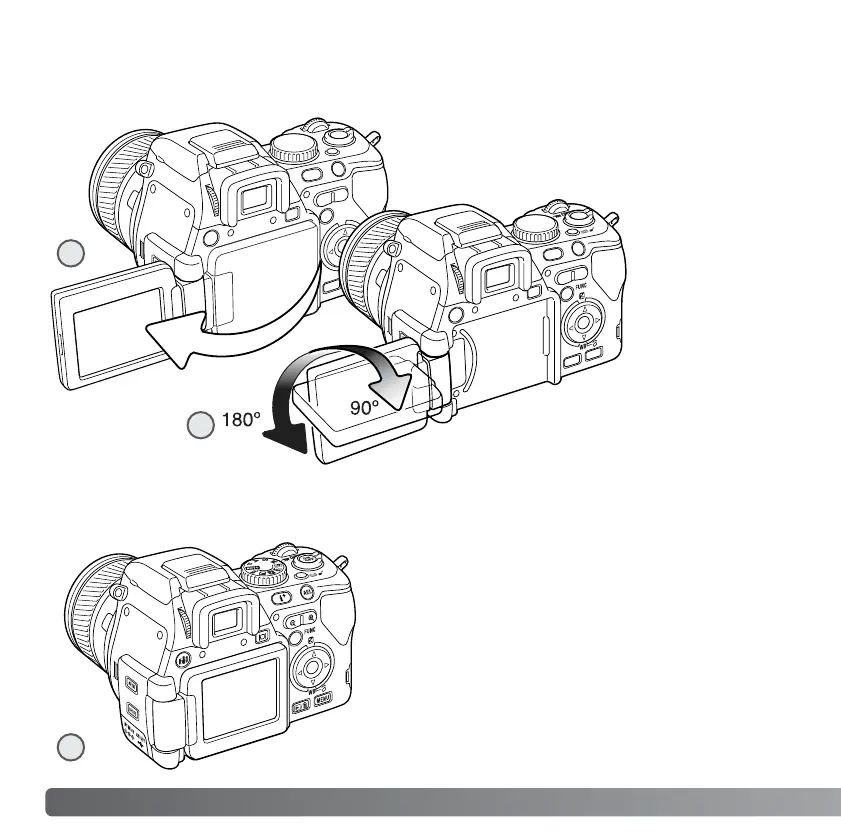
To set the monitor against the body, open
the monitor unit to the left (1), rotate it 180°
forward (2), and fold the monitor against
the back of the camera (3).
Open the LCD monitor from the right. The
monitor unit can be opened up to 180° to the
left (1).
This camera has a swiveling LCD monitor.
There is a clickstop every 90°.
When opened,
the LCD monitor
can be rotated
90° downward
and 180° forward
(2). Never force
the monitor
beyond this; the
hinge will be
damaged.
When the monitor is rotated 180° forward, the
image is rotated automatically so that it is
oriented correctly. If the monitor image
appears up-side-down, check it has been
rotated completely.
2
3
1














 To Next Page