Continuous
82
A
DVANCED RECORDING
Continuous-advance mode allows a series of images to be captured while holding down
the shutter-release button. Continuous advance acts like a motor drive on a film camera.
RAW & JPEG image quality cannot be used. RAW cannot be used with UHS continuous
advance.
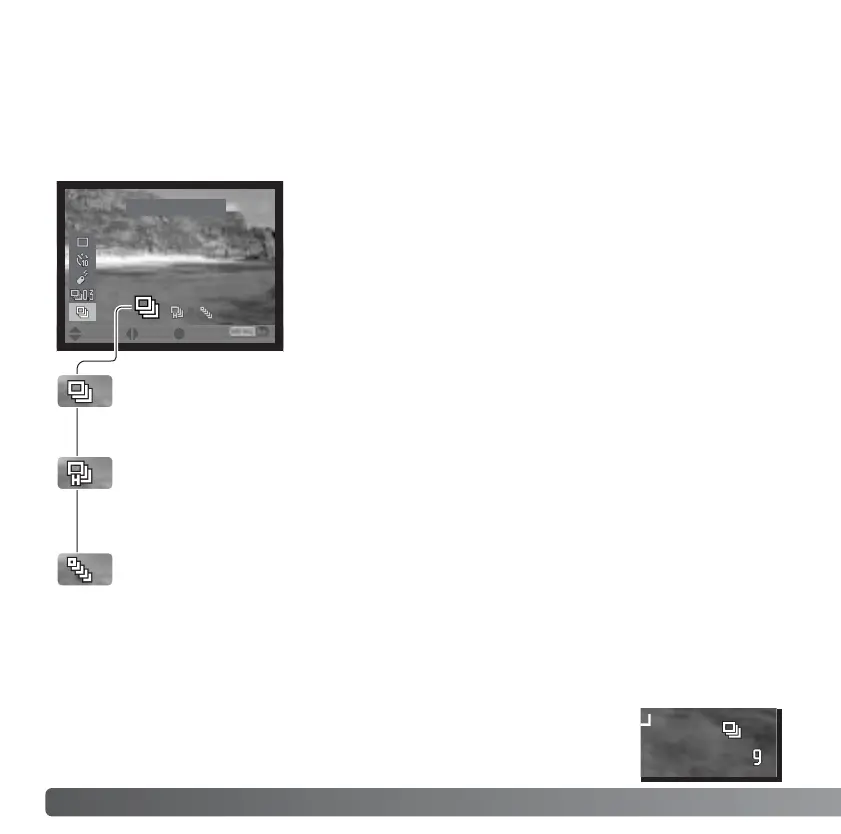
CONTINUOUS ADVANCE
Continuous advance - captures a maximum of five images at 2 fps. When used
with continuous autofocus, the camera adjusts the focus during the series. The
live image is briefly displayed between frames.
High-speed continuous advance - captures a maximum of five full-size images
at 2.3fps. Focus is locked with the first frame regardless of the focusing mode.
The monitor turns off during the series.
UHS continuous advance - captures forty 640 X 480 size images at 10fps
regardless of the image-quality setting. Focus is locked with the first frame
regardless of the focusing mode. The digital zoom and flash cannot be used.
Shutter speeds must be 1/30 second or faster. Very bright light sources within
the image may cause streaking. Black areas caused by a loss of data may be
apparent. When the red low-battery warning is displayed, this drive mode cannot
be used.
Continuous-advance mode is set using the drive-mode
button and the controller (p. 76).
When a continuous-advance drive mode is set, an indicator
appears on the monitors.
:enter:sel.:move














 To Next Page