134
S
ETUP MENU
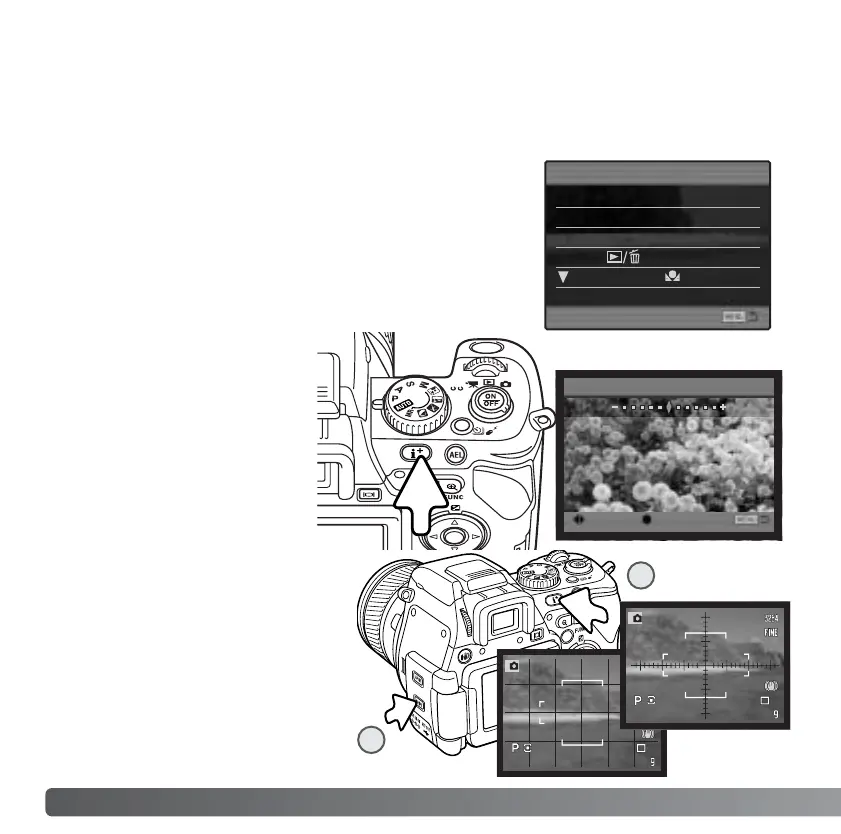
Grid
To display a grid or scale over the
display formats, press and hold
the shift button (1) and press the
display information button (2) to
cycle through the options: grid,
scale, and off. For more on the
displays format, see page 43.
SHORTCUT HELP
Press and hold the display
information button to open the
LCD brightness screen.
:adjust :enter
Set LCD brightness
High
Low
SHIFT+i button
SHIFT+
Shortcut help
i button LCDbrightness
Focus screens
Reset camera
WB. set
Setup menu
SHIFT+MenuButt
controller
LANGUAGE
The language used in the menus can be changed in section 1 of the setup menu. See
page 29 on how to set the language.
The shortcut help in section 2 of the setup menu shows
button commands to open the LCD brightness screen,
change the focusing screens, open the setup menu, reset
the camera, or open the custom white-balance calibration
screen. To close the help screen, press the menu button.
The following shortcuts can be used:
Scale
2
1



 To Next Page
 Loading...









