47
SPOT AF AREAS
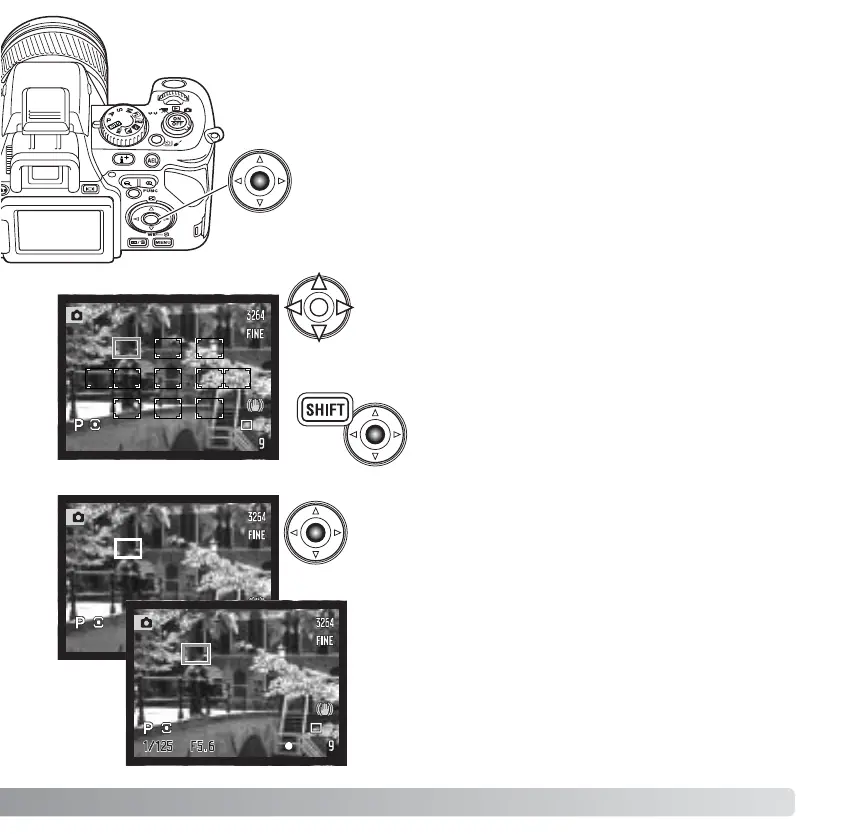
One of the eleven spot AF areas can be selected. Spot AF areas
cannot be used with the digital zoom or movie recording.
When the spot AF area mode is selected, eleven
spot AF areas are displayed. The active AF area is
blue. Use the controller’s four-way keys (1) to
select a new area.
Pressing the center button of the controller
while pressing the shift button resets the AF
area to the center.
Press the central button of the controller to select
the area; the other ten areas disappear. Only
when a focus area has been selected, can the
controller be used for other camera operations.
Pressing the shutter-release button partway down
also completes the operation; the spot AF area
turns red briefly to confirm focus.
Once a focus area is selected, it remains active
even after the picture has been taken. Press the
center of the controller to select another area.
Press the central button of the controller and select the
spot AF area mode using the control dial as described on
the previous page.














 To Next Page