4-2
Cycle / piston setting
®,l
#
...
- .....
~
•
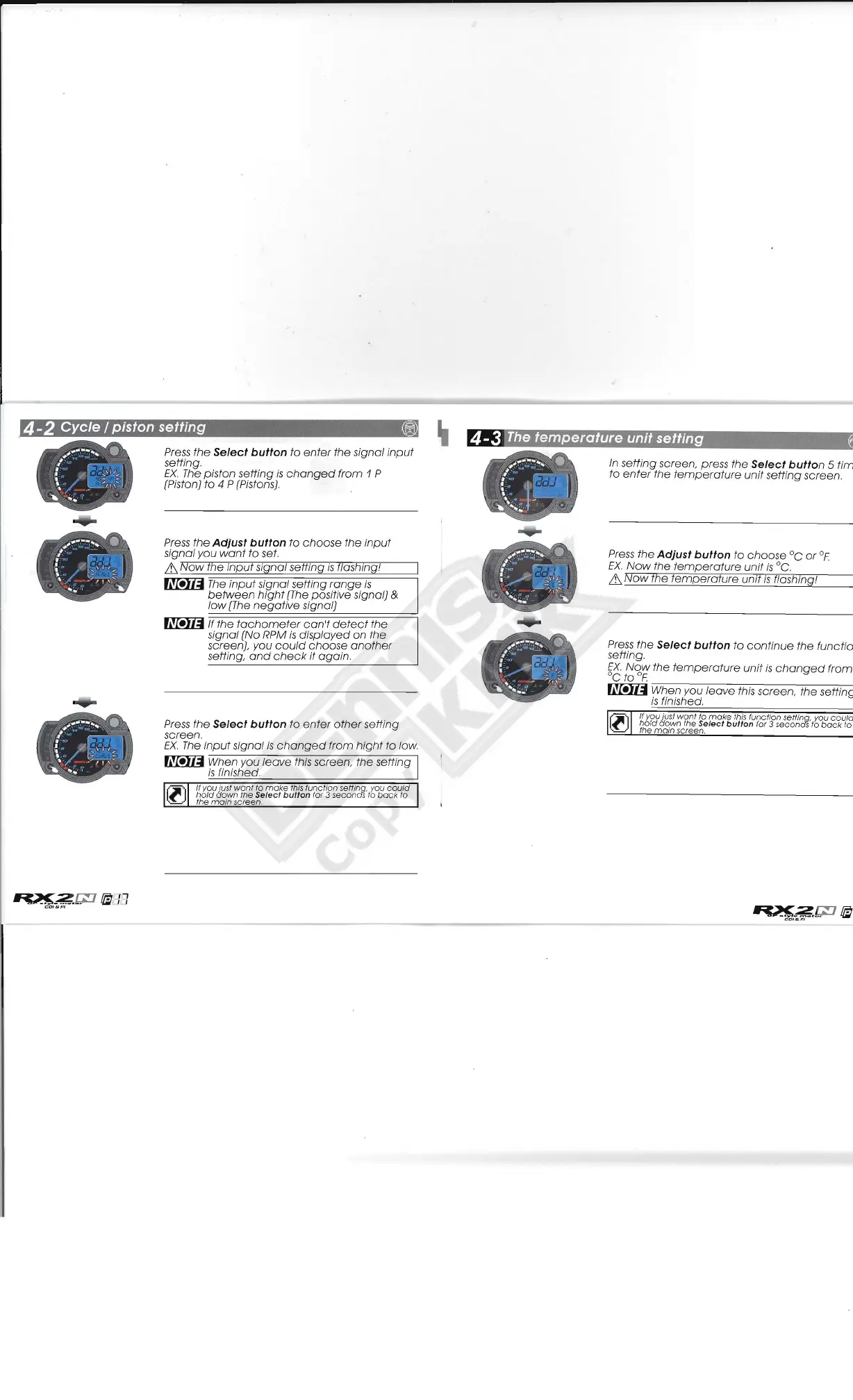
Press
the
Select
button
to
enter
the signal
input
setting.
EX.
The
piston setting
is
changed
from
1 P
/' o
"-
. '
'J
-
[Piston) to 4 P (Pistons),
',.
-
I.
"
.....
'"
.....
' '
Press
the
Adjust
button
to
choose
the
input
signal you
want
to set,
it.
Now
the
input
signal setting
is
flashing!
~
The
input
signal setting
range
is
between
hight
(The
positive signal) &
low
(The
negative
signal)
~
If the
tachometer
can't
detect
the
signal [No RPM
is
displayed
on the
screen), you
could
choose
another
setting,
and
check
it
again.
Press
the
Select
button
to
enter
other
setting
screen.
EX.
The
input
signal
is
changed
from
hight
to low.
~
When you
leave
this screen; the setting
is
finished.
If you just
want
to
make
this function settinq, you
could
<I[ ,
hold
down
the Select button for 3 secondS to
back
to
~
the
main
screen.
4-3
The
temperature unit setting
In
setting screen, press the
Select
button
5
tim
to
enter
the
temperature
unit
setting screen.
Press
the
Adjust
button
to
choose
°c
or
OF
EX.
Now
the
temperature
unit
is
0c.
it.
Now
the
temperature
unit
is
flashingI
Press
the
Select
button
to
continue
the
functio
setting,
EX.
Now
the
temperature
unit
is
changed
from
°c to
OF
~
;-;W-;;h:-:e:-:n:-y-o::-u--'-/e-a-v-e---'-;th--:is-s-c-r-e-e-n-,
--:th:-e-s-eCCtt"-in-g
is
finished,
If you jusf
want
fa
make
fhis
function settinq, you
could
'I[
,
hold
down
the Select button for 3 secondS to
back
to
~
the mom screen.



 To Next Page