EasyManua.ls Logo

Koso RX2N GP - 4-7 Tire Circumference and Sensor Point Setting

Koso RX2N GP
22 pages
Print Icon
To Next Page IconTo Next Page
To Previous Page IconTo Previous Page
Loading...
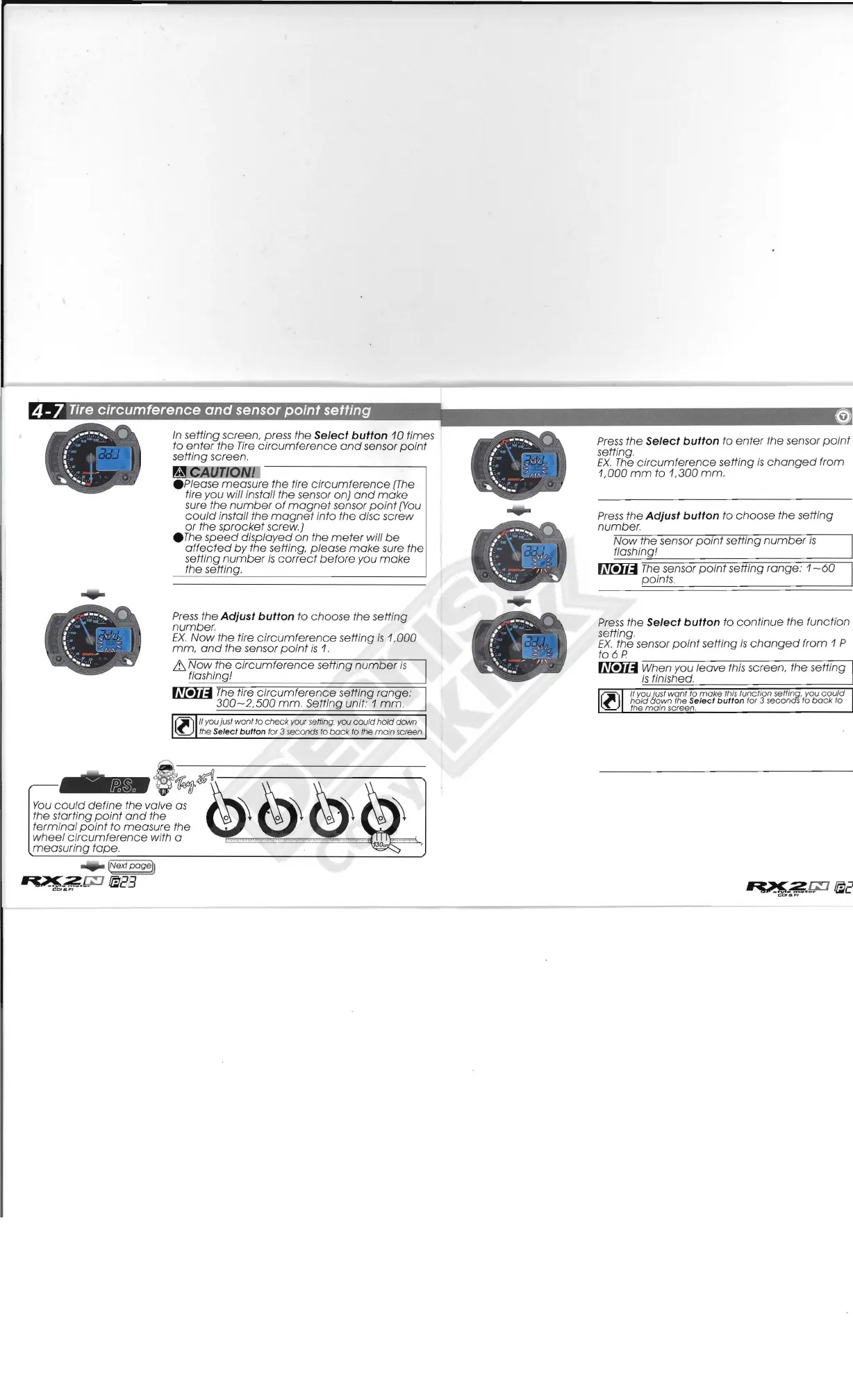
4
-7
Tire
circumference
and
sensor point setting
In
setting screen, press the Select button
10
times
to
enter
the
Tire
circumference
and
sensor
point
setting screen,
~CAan::Q
Please
measure
the tire
circumference
[The
tire you will install
the
sensor on}
and
make
sure the
number
of
magnet
sensor
point
[You
could
install
the
magnet
into
the
disc screw
or
the
sprocket
screw.)
.The
speed
displayed
on
the
meter
will
be
affected
by
the
setting,
please
make
sure the
setting
number
is
correct
before
you
make
the setting.
Press
the
Adjust button
to
choose
the
setting
number,
EX.
Now
the tire
circumference
setting
is
1,000
mm,
and
the
sensor pOint
is
1,
it.
Now
the
circumference
setting
number
is
flashing!
~
The
tire
circumference
setting range:
300-2,500
mm. Setting unit,' 1 mm.
(ji)
If you just want fa
check
your
setting, you
could
hold
down
~
the
Setect
bullon
tor 3 seconds fa
back
to the
main
screen.
#
..........
.
l '
~
: \
E-
J
'
,
' -
-
...
'''1110
,,
~
.
~
""'
....
,
...........
.
,
l G
,
1
\
~
I
\,..
,,'"
....
,"':
...
""
...
e
Press
the
Select
button to
enter
the
sensor
point
setting,
EX.
The
circumference
setting
is
changed
from
1,000
mm
to
1,300
mm.
Press
the Adjust button to
choose
the
se
tting
number.
Now
the
sensor
point
setting
number
is
flashing!
~
The
sensor
point
setting
range:
1-60
paints,
Press
the
Select
button
to
continue
the function
setting,
EX,
the sensor
point
setting
is
changed
from 1 P
to
6 P
~
When you
leave
this screen,
the
setting
is
finished.
ll)
It you just
wont
to
make
this function selting. you
could
hold
{jown the Sefect
button
for 3 secondS
to
bOCk fa
the main screen

Related product manuals