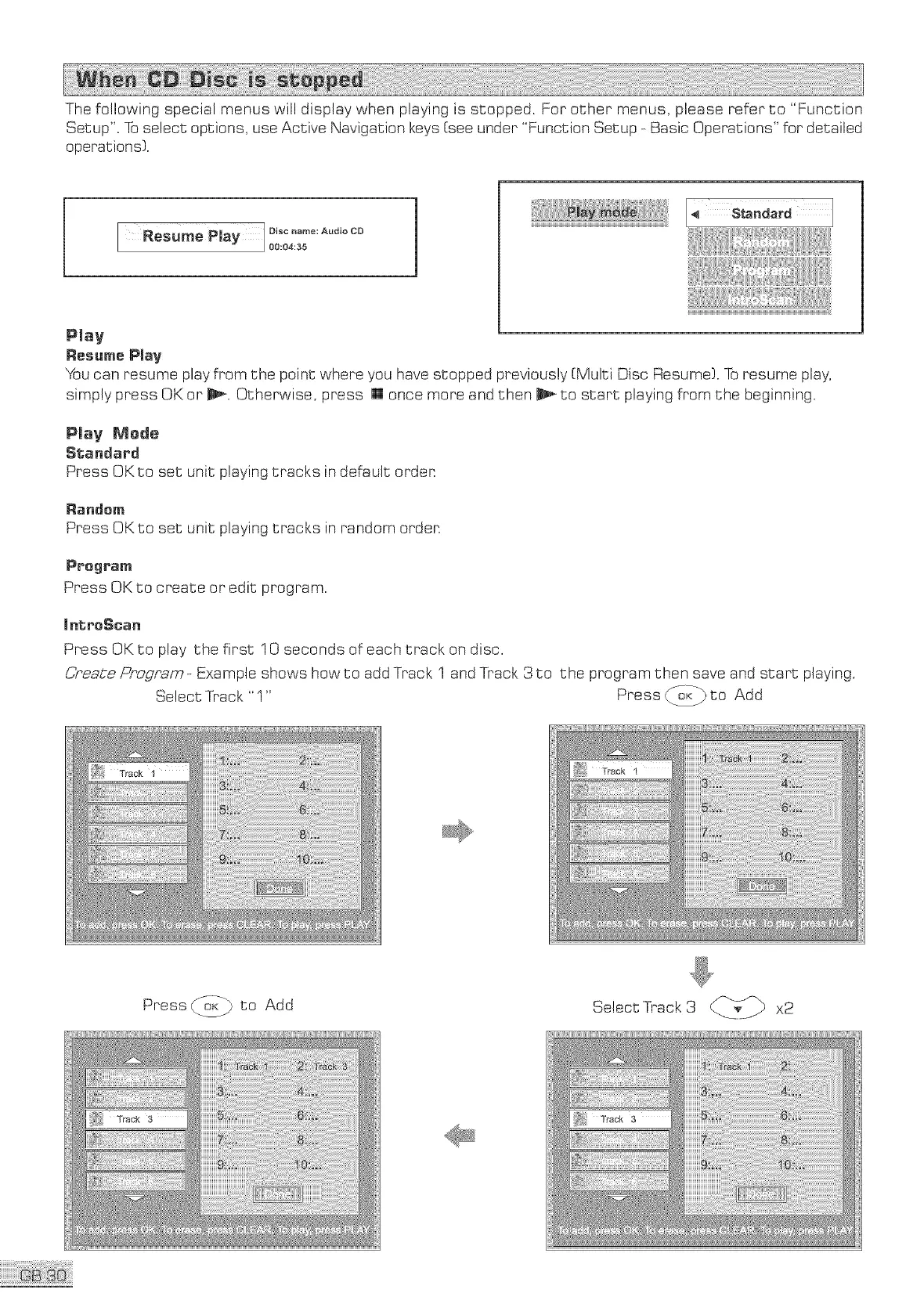
Thefollowingspecialmenuswilldisplaywhenplayingis stopped.Forothermenus,pleasereferto "Function
Setup".Toselectoptions,useActiveNavigationkeys[seeunder"FunctionSetup-BasicOperations"fordetailed
operations).
ResumePlay Discname:AudioCD
00:04:35
Play
Resume P_ay
You can resume play from the point where you have stopped previously [Multi Disc Resume). To resume play,
simply press OK or _. Otherwise, press [] once more and then _ to start playing from the beginning.
Plav Merle
Standard
Press OKto set unit playing tracks in default orden
Randem
Press OK to set unit playing tracks in random orden
Program
Press OK to create or edit program.
mntreScan
Press OK to play the first 10 seconds of each track on disc.
C,,,_eate_ogram _Example shows how to add Track 1 and Track 3 to the program then save and start playing.
" Press d_,,:_ to Add
Select Track
Press _ to Add
Select Track3 ___Tv_ x2


 To Next Page