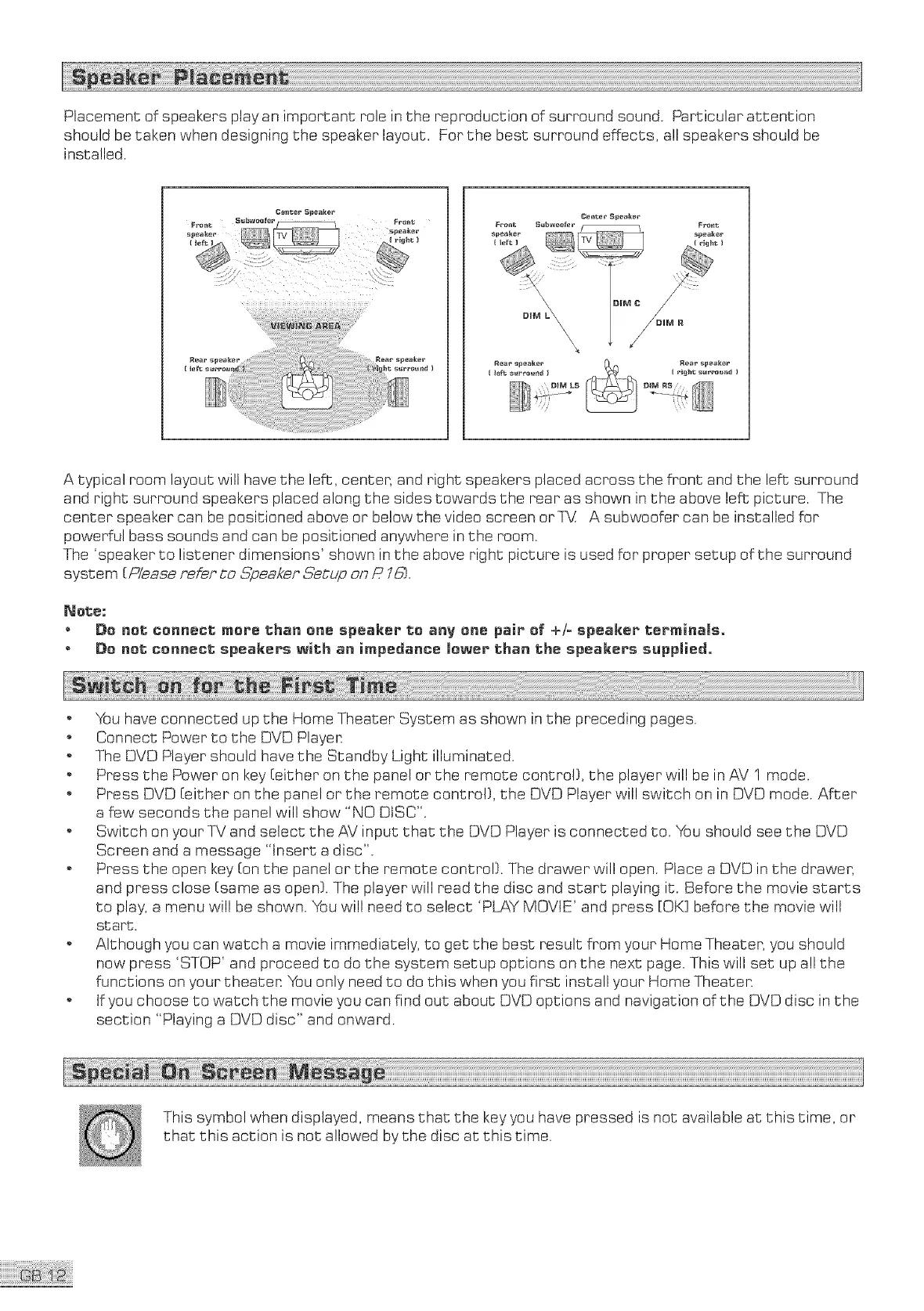
Placementofspeakersplayanimportantroleinshereproductionofsurroundsound.Particularattention
shouldbetakenwhendesigningthe speakerlayout.Forthebestsurroundeffects,allspeakersshouldbe
installed.
CeJ_ter S _eak_r
Fro_t
speaker
DIM L\\ R
\\\\
Rear speaker Rear speaker
[ left surround _ ( r_h_ surround )
A typical room layout will have the lefts, censer, and right speakers placed across the front and the leftssurround
and right surround speakers placed along She sides towards She rear as shown in the above left picture. The
center speaker can be positioned above or below the video screen orTV A subwoofer can be installed for
powerful bass sounds and can be positioned anywhere in the room.
The 'speaker to listener dimensions' shown in the above right picture is used for proper setup of the surround
system [_,'ease refer Co ,5_peakerSetup on/? l&].
_ote;
o Be not connect mare than one speaker to anv one pair of +/= speaker terminals_
o Do not co_ec_ speakers with a_ impedance lower tha_ the speakers s_pplied,
o You have connected up the Home Theater System as shown in the preceding pages.
o Connect Power to the DVD Playen
o The DVD Player should have the Standby Light illuminated.
o Press the Power on key [either on the panel or the remote control}, the player will be in AV 1 mode.
o Press DVD [either on the panel or she remote control}, the DVD Player will switch on in DVD mode. After
a few seconds she panel will show "NO DISC".
o Switch on your *P_/andselect the AV input that the DVD Player is connected to. You should see the DVD
Screen and a message "Insert a disc".
o Press She open key [on the panel or the remote control}. The drawer will open. Place a DVD in She drawer,
and press close [same as open}. The player will read She disc and start playing iS. Before the movie starts
to play, a menu will be shown. You will need to select 'PLAY MOVIE' and press [OK] before the movie will
st art.
o Although you can watch a movie immediately, to get the bess result from your Home Theater, you should
now press 'STOP' and proceed So do She system setup options on the next page. This will set up all the
functions on your theater You only need So do this when you first install your Home Theaten
o tf you choose to watch the movie you can find out about DVD options and navigation of the DVD disc in the
section "Playing a DVD disc" and onward.
This symbol when displayed, means that the key you have pressed is not available at this time, or
that this action is not allowed by the disc at this time.



 To Next Page