,
2.
3.
4.
,
G,
7.
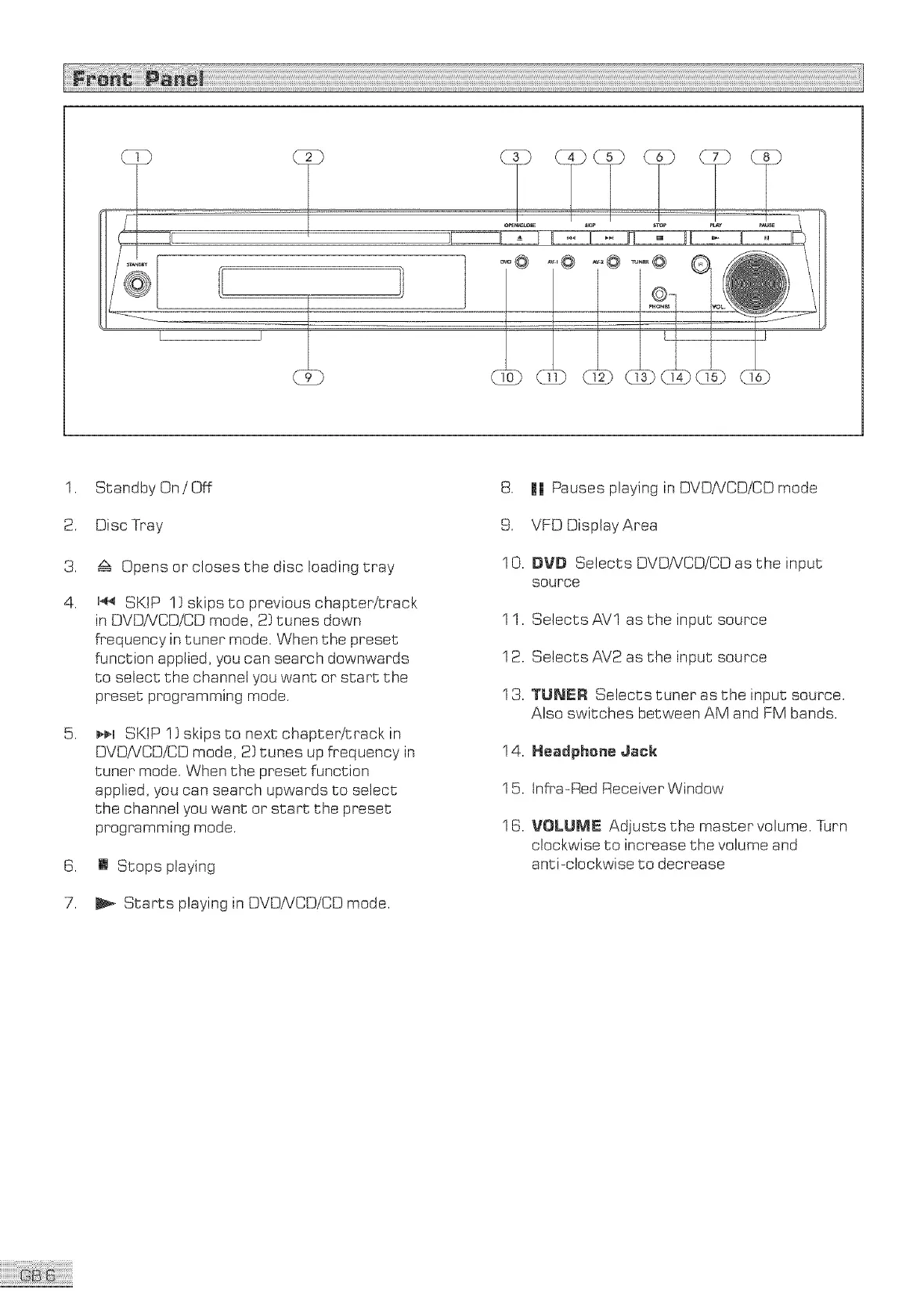
Standby On / Off
Disc Tray
z_ Opens or closes the disc loading tray
u_ SKIP 1} skips to previous chapter/track
in DVDNCD/CD mode, 2} tunes down
frequency in tuner mode. When the preset
function applied, you can search downwards
to select the channel you want or start the
preset programming mode.
_¢q SKIP ! } skips to next chapter/track in
DVDiVCD/CD mode, 2} tunes up frequency in
tuner mode. When the preset function
applied, you can search upwards to select
the channel you want or start the preset
programming mode.
[] Stops playing
Starts playing in OVOiVCOiCD mode.
8. || Pauses playing in DVDNCDiCD mode
9. VFD Display Area
10. BVB Selects DVDiVCDiCD as the input
source
1 1. Selects AVl as the input source
12. Selects AV2 as the input source
13. TUNER Selects tuner as the input source.
Also switches between AM and FM bands.
14. Headphene Jack
15. Infra-Red ReceiverWindow
16. VOLUME Adjusts the master volume. [urn
clockwise to increase the volume and
anti-clockwise to decrease



 To Next Page