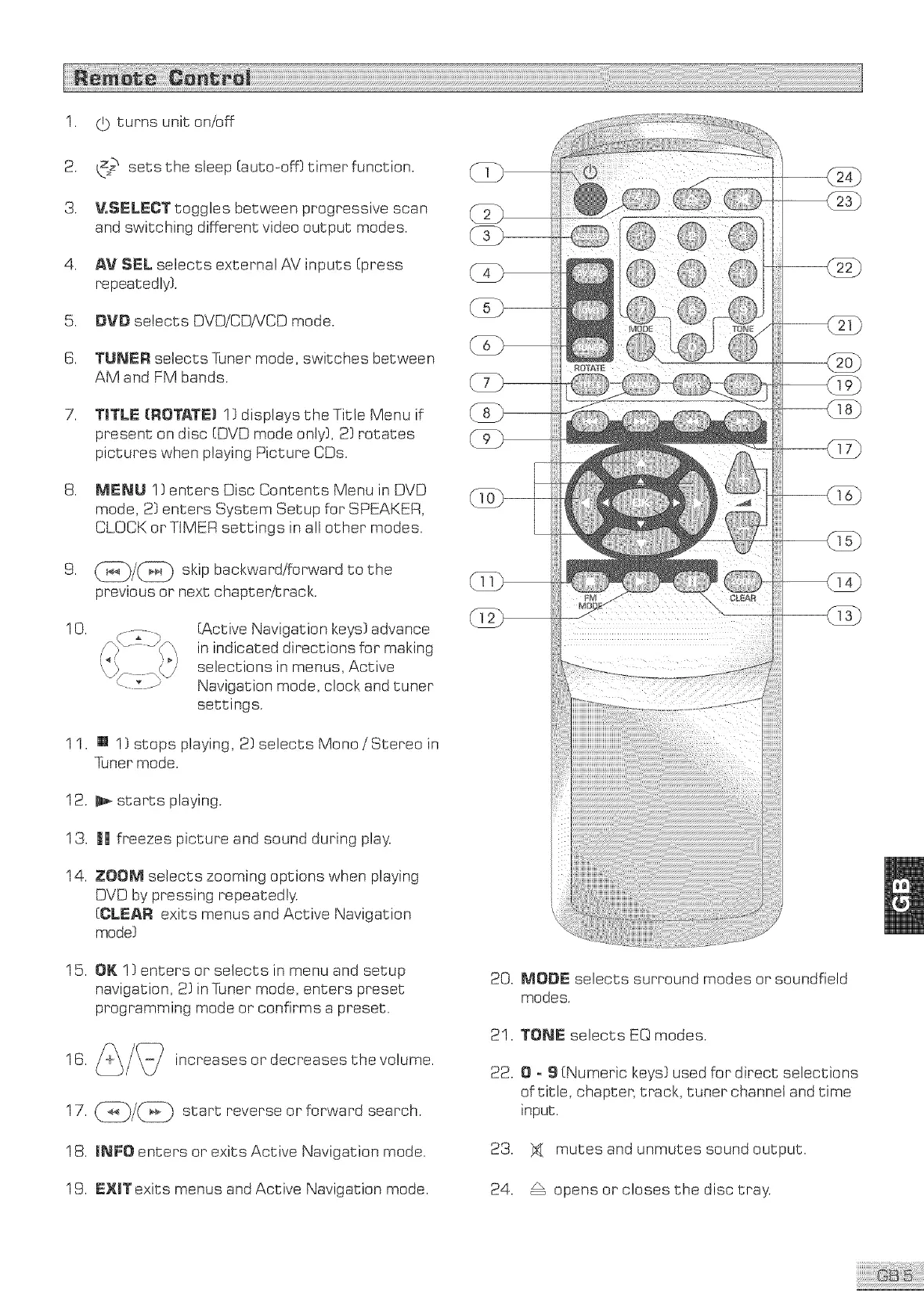
1. (} turns uniton/off
2. _ setsthe sleep(auto-off}timerfunction.
3. VoSELECTtogglesbetweenprogressivescan
andswitchingdifferentvideooutputmodes.
4. AV SEL selects external AV' inputs (press
repeatedly}.
5. DVD selects DVD/CDNCD mode.
S. TUNER selects Tuner mode, switches between
AM and FM bands.
7. TITLE {ROTATE) !} displays the Title Menu if
present on disc (OVO mode only}, 2) rotates
pictures when playing Picture CDs.
8. MENU I} enters Disc Contents Menu in DVD
mode, 2} enters System Setup for SPEAKER,
CLOCK or TtMER settings in all other modes.
9. skipbackward/forwardtothe
previous or next chapter/track.
10.
(Active Navigation keys} advance
in indicated directions for making
selections in menus, Active
Navigation mode, clock and tuner
settings.
11. [] 1} stops playing, 2} selects Mono/Stereo in
Tuner mode.
12. _ starts playing.
13. || freezes picture and sound during play.
14. ZOOM selects zooming options when playing
DVD by pressing repeatedly.
(CLEAR exits menus and Active Navigation
mode}
15. OK ! } enters or selects in menu and setup
navigation, 2} inTuner mode, enters preset
programming mode or confirms a preset.
17. _/_ start reverse or forward search.
18. mNFOenters or exits Active Navigation mode.
19. EXITexits menus and Active Navigation mode.
iiiii'ii,'iiiii'!i !i !i !i !i !i !i !i ii,'iiiii'ii,'iiiii'ii,'iiiii!
!!_ii_ !Jiiii!_))ili_i!i!iiiiiiiiiiii!!i;;;iiiiiiiii ;;);!;jj! !!!! !;:;;!! 11 iJ;!;;; _ii;_
20. MODE selects surround modes or soundfield
modes.
21. TONE selects EQ modes.
22. 0 = S (Numeric keys} used for direct selections
of title, chapter, track, tuner channel and time
input.
23. _ mutes and unmutes sound output.
24. _ opens or closes the disc tray.



 To Next Page