5 Installation/ Commissioning
30 of 50
KSB Guard
4079.83/01-EN
Performing the commissioning procedure
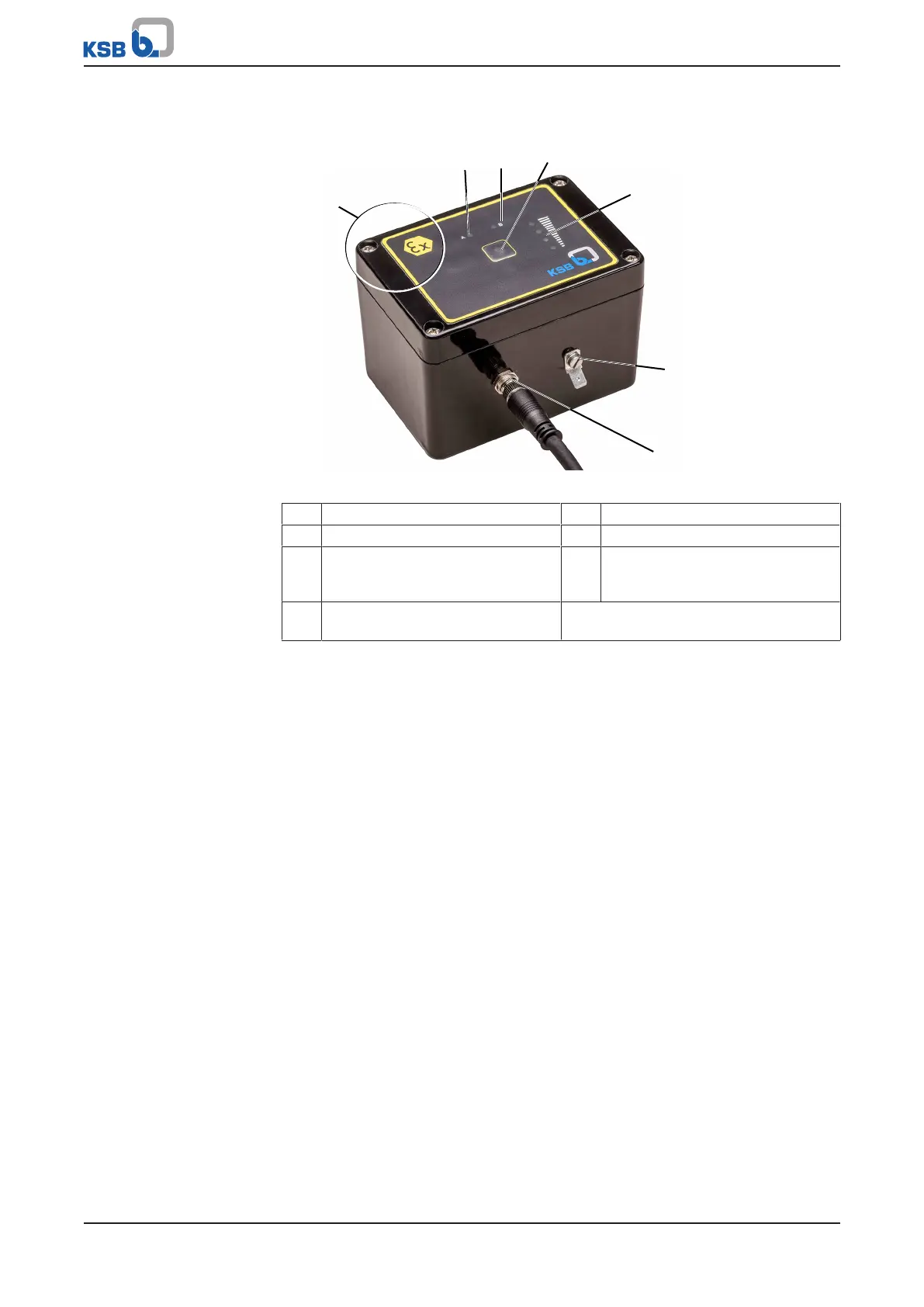
Fig.15: Transmission and battery unit
1 Position of internal antenna 2 Status LED A (red)
3 Status LED B (green) 4 Pushbutton
5 Level LEDs for indicating the signal
strength of the KSBGuardGateway
connection
6 Earthing connection
7 Connection for the connecting
cable to the sensor unit
ü KSBGuardGateway has been installed and the signal strength indicated is
sufficient.
ü The system has been energised.
1. Press and hold the pushbutton (2) on the transmission and battery unit for 2-
3seconds. Release the pushbutton as soon as status LEDs A and B of the
transmission and battery unit briefly light up simultaneously.
ð This activates the Set-up mode. (ðSection5.2.2,Page22)
ð If commissioning was successful, status LEDB lights up in green (for approx.
10seconds) approx. 40seconds after the Set-up mode has stopped.
ð If a different light signal or no flashing signal is displayed, try to identify the
source of error.
The device switches to Automatic Measuring Operation operating mode.



 To Next Page