5 Installation/ Commissioning
29 of 50
KSB Guard
4079.83/01-EN
Required data Example Notes
Optional: Optimum flow rate 50m³/h
Optional: Specification of 7 reference points on
the characteristic curve
25kW, 25m³/h, 25 m;
20kW…
5.3.2 Adding the pump
ü Access to the KSBGuard system has been set up. (ðSection5.1,Page18)
ü The data indicated in (ðTable11) is available.
1. Start the KSBGuard app or open the KSBGuard web portal
(www.ksbguard.net).
2. Select the Add Pump function in the app menu or on the web portal.
3. Follow the instructions in the app dialogue or on the web portal and enter the
requested information.
4. Save the assignment.
NOTE
The limit values for the pump set are set automatically. Default values can be
checked and, if necessary, changed in the individual view screen of the pump.
NOTE
After the assignment, it takes three measuring cycles until the data transferred
from the pump set can be viewed on the web portal or in the app. Initial data can
be seen after approx. 15minutes if the assignment took place within 120minutes
after commissioning. If this is not the case, it can take up to three hours from the
time of assignment until the first data is displayed.
5.4 Commissioning/ start-up
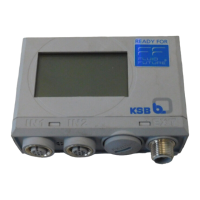
As-supplied condition The Transmission and battery unit is supplied in Deep Sleep mode
(ðSection6.1,Page31) . This operating mode remains active until commissioning
has been completed successfully.
During commissioning, a sensor unit must be detected and a functioning
KSBGuardGateway found within wireless range.
If commissioning is not successful, the device remains in Deep Sleep mode until it is
woken up by pressing and holding down the pushbutton.
In the first two hours following commissioning the device frequently (every five
minutes) checks if a pump set has been assigned to the sensor unit in the KSB Cloud.
After a successful assignment, five measurements are automatically conducted in
shortened intervals.



 To Next Page