4 Description
16 of 50
KSB Guard
4079.83/01-EN
No. LED Status Description
2 Connection status
S1
OFF Device waiting for mobile data connection
Flashing in yellow, double
pulse signal (approx. 3min
after switch-on)
Problems with Internet connection
Green Mobile network and Internet accessible
Green, flashing slowly New firmware found. Internal firmware update started.
3 Mobile network
signal strength
4th LED green Signal strength > -75dBm
3rd LED green Signal strength > -85dBm
2nd LED green Signal strength > -95dBm
1st LED green Signal strength < -95dBm
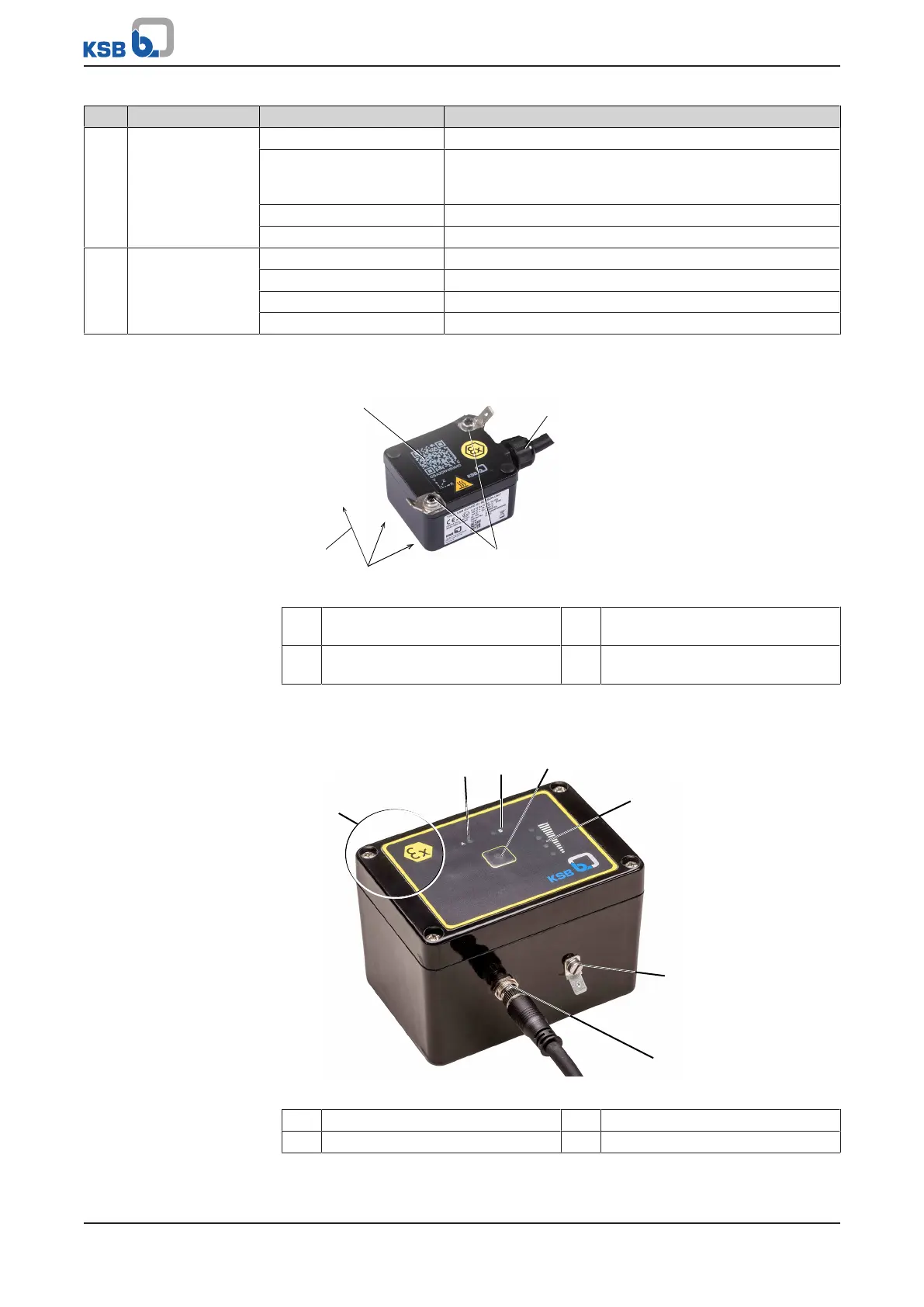
4.8 Sensor unit
Fig.6: Sensor unit with coordinate system
1 Coordinate system (for vibration
measurement)
2 QR code
3 Connecting cable to transmission
and battery unit
4 Earthing connections
4.9 Transmission and battery unit
Fig.7: Transmission and battery unit
1 Position of internal antenna 2 Status LED A (red)
3 Status LED B (green) 4 Pushbutton



 To Next Page