13CHECKS BEFORE START
BReordering the year/month/day and
Changing the AM/PM System to the 24-
hour One
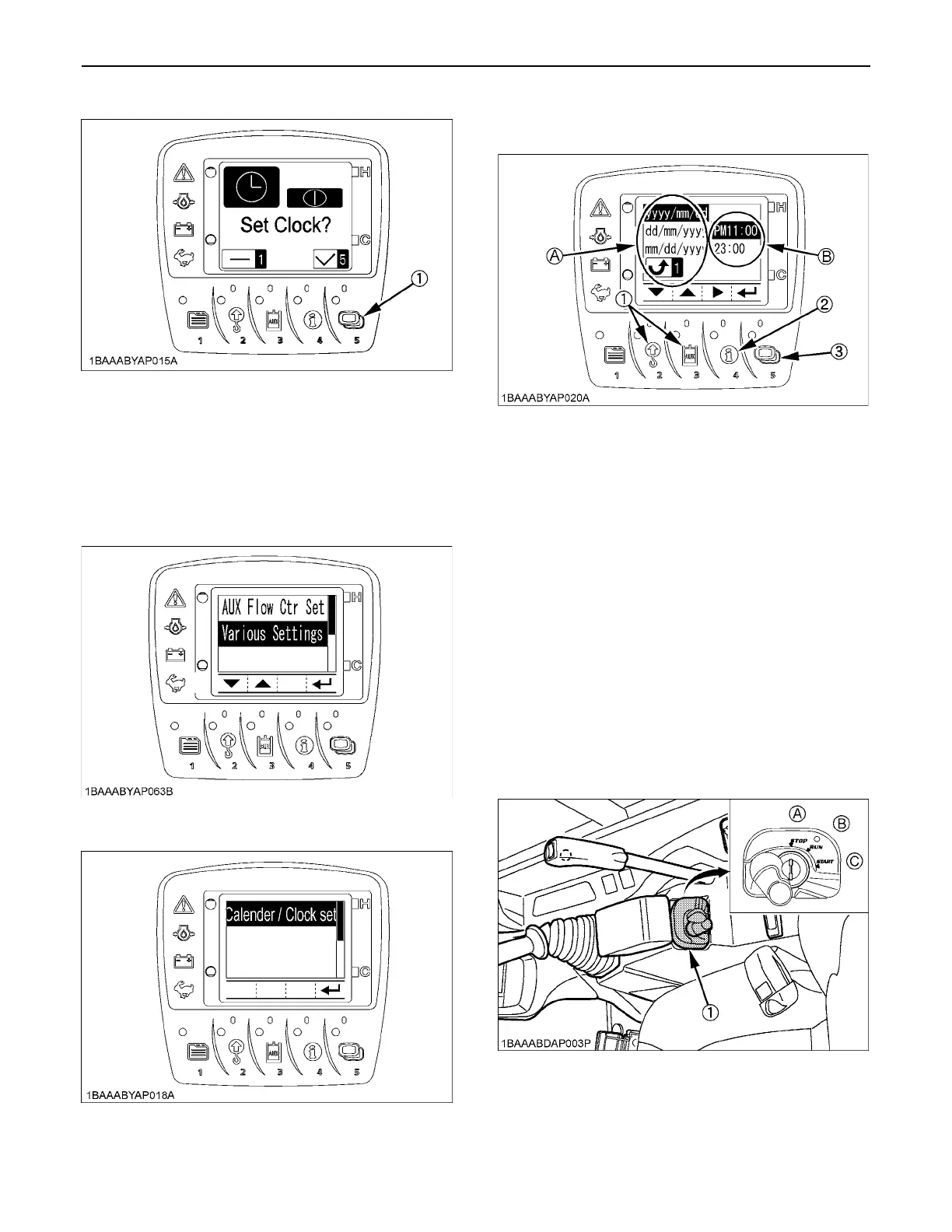
1. On the user setting screen, select "Various
Settings".
2. Select "Calendar/Clock Set" menu screen.
3. Press the switch 5 and the following detailed screen
shows up.
(1) Using the switch 2 and 3, move up and down the
items. The year/month/day on Side (A) will be
reordered.
(2) Using the switch 4, move the cursor to Side (B).
Select the "AM/PM" system or the "24-hour"
system.
(3) Press the switch 5, and the new settings will be
made.
If the switch 1 is pressed, the previous settings will
remain.
BLog Record
The log record helps you check the last 3-month operating
record of the machine. Take the following steps.
1. Set the starter key to the "RUN" position.
2. Press the switch 1 to make the menu appear
onscreen.
(1) Switch 5
(1) Switch 2 and 3
(2) Switch 4
(3) Switch 5
(A) Year/month/day display
(B) Clock display
(1) Starter switch (A) "STOP"
(B) "RUN"
(C) "START"



 To Next Page