EXCAVATOR OPERATION42
C One way hold
[AUX 1 and 2 modes]
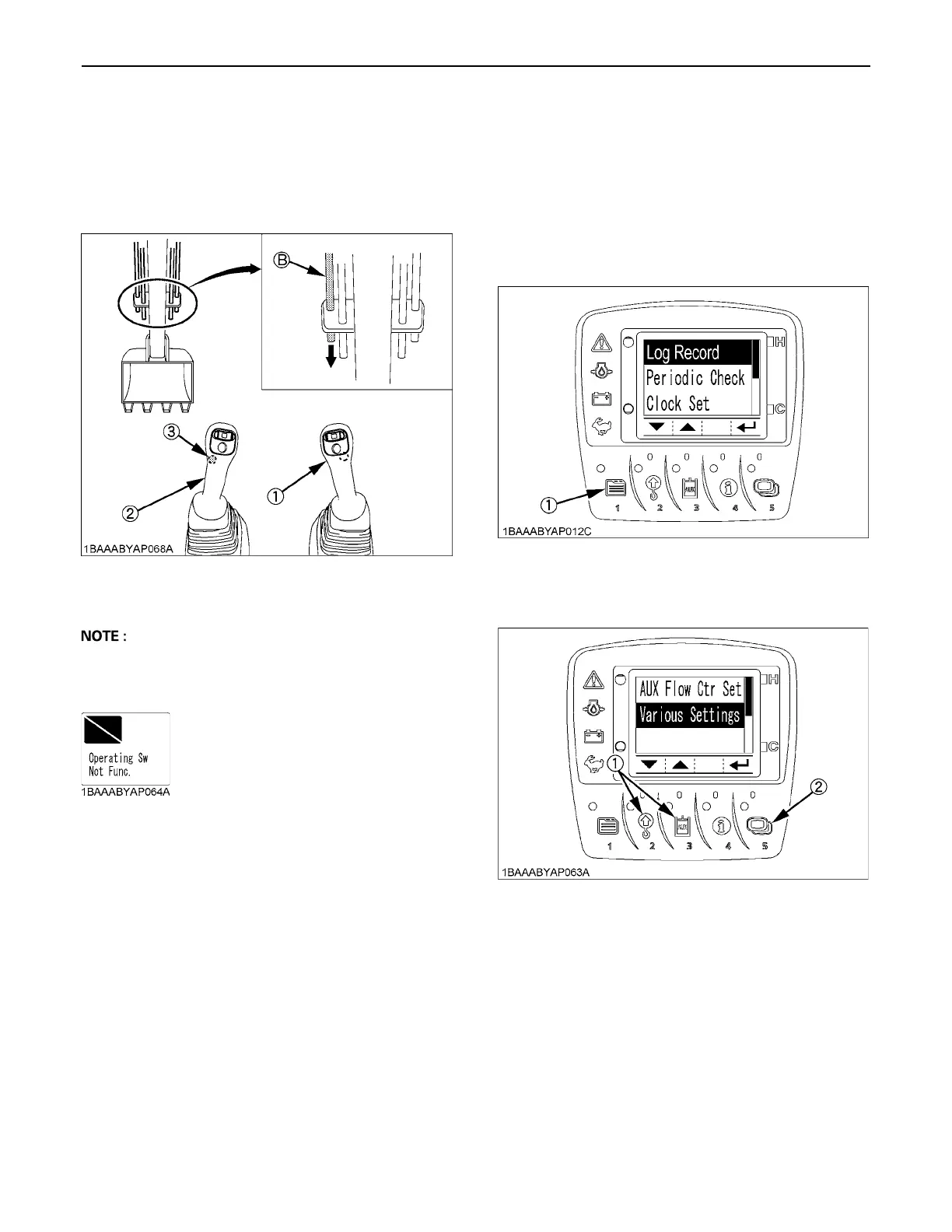
Press the one way hold switch of the left attachment
control lever, and the oil continues to flow through the
AUX port 2. Press this switch again or move the AUX port
knob, and the oil flow is interrupted.
A Even if the one way hold switch of the right attachment
control lever is pressed, no function is assigned. In this
case, the following message appears onscreen.
BSetting the Maximum Flow Volume
The AUX port has been factory-set to three action modes
1, 2 and 3. The action modes 4 and 5 can also be preset.
C How to make the settings
1. With the starter key at the "RUN" position, press the
user setting switch (switch 1), and the following display
appears onscreen.
2. Press the switch 2 or 3 to select "AUX Flow Ctrl Set",
and then press the switch 5.
(1) Attachment control lever (right)
(2) Attachment control lever (left)
(3) One way hold switch (left)
(B) "AUX port 2"
(1) User setting switch (switch 1)
(1) Switch 2 and 3
(2) Switch 5



 To Next Page