43EXCAVATOR OPERATION
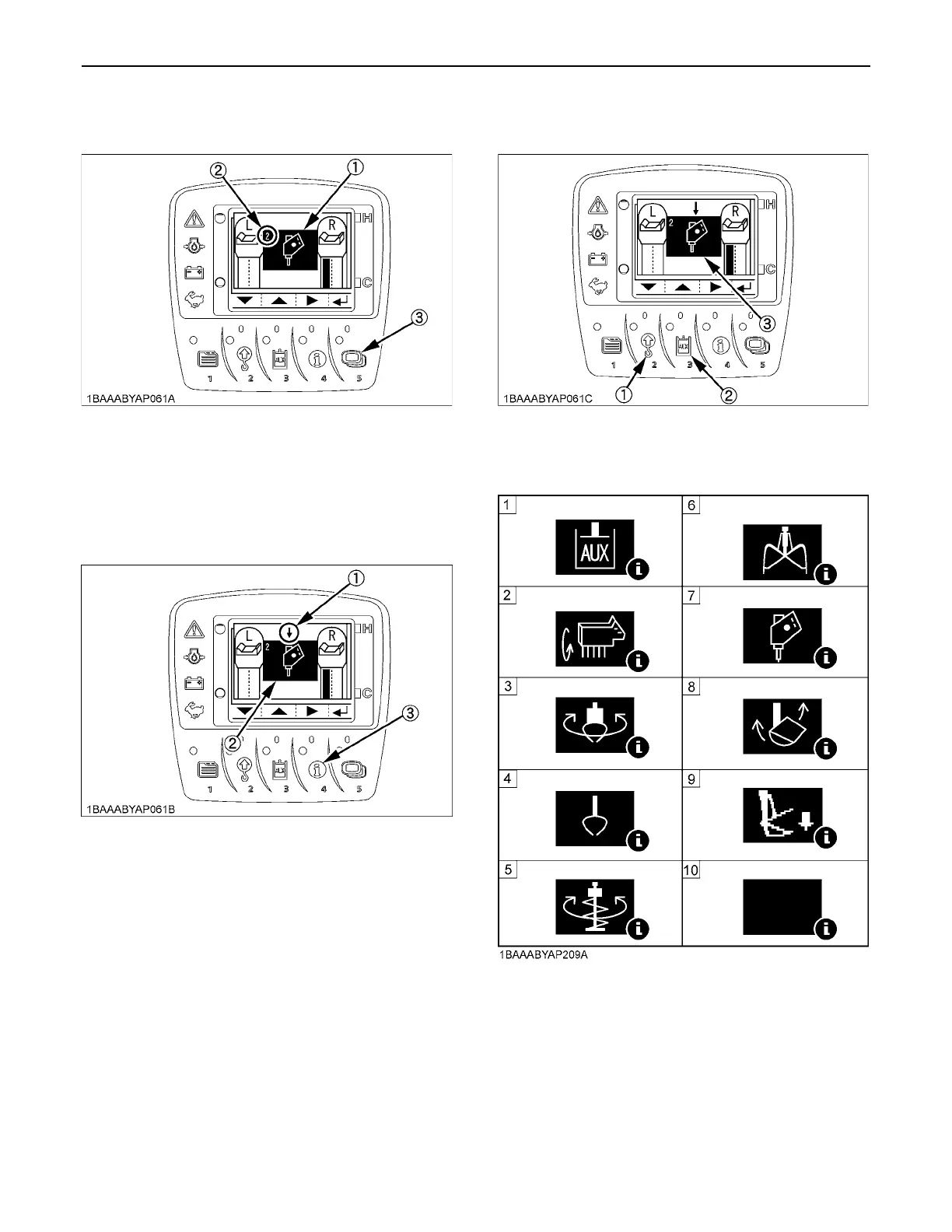
3. Each time the switch 5 is pressed, the mode number
changes. Select your desired setting mode number.
4. Take the following steps to set the icons.
Each time the switch 4 is pressed, the setting cursor
(arrow mark) shifts position. Move the cursor above
the icon.
5. Each time the switch 2 or 3 is pressed, the icon
changes. Select your desired icons.
C Types of AUX icons
(1) Icon
(2) Mode No.
(3) Switch 5
(1) Setting cursor (arrow mark)
(2) Icon
(3) Switch 4
(1) Switch 2
(2) Switch 3
(3) Icon
(1) AUX (Standard)
(2) Brush cutter
(3) Rotary grapple
(4) Grapple
(5) Auger
(6) Clamshell
(7) Breaker
(8) Tilt bucket
(9) Thumb
(10) Blank (disable)



 To Next Page