EXCAVATOR OPERATION44
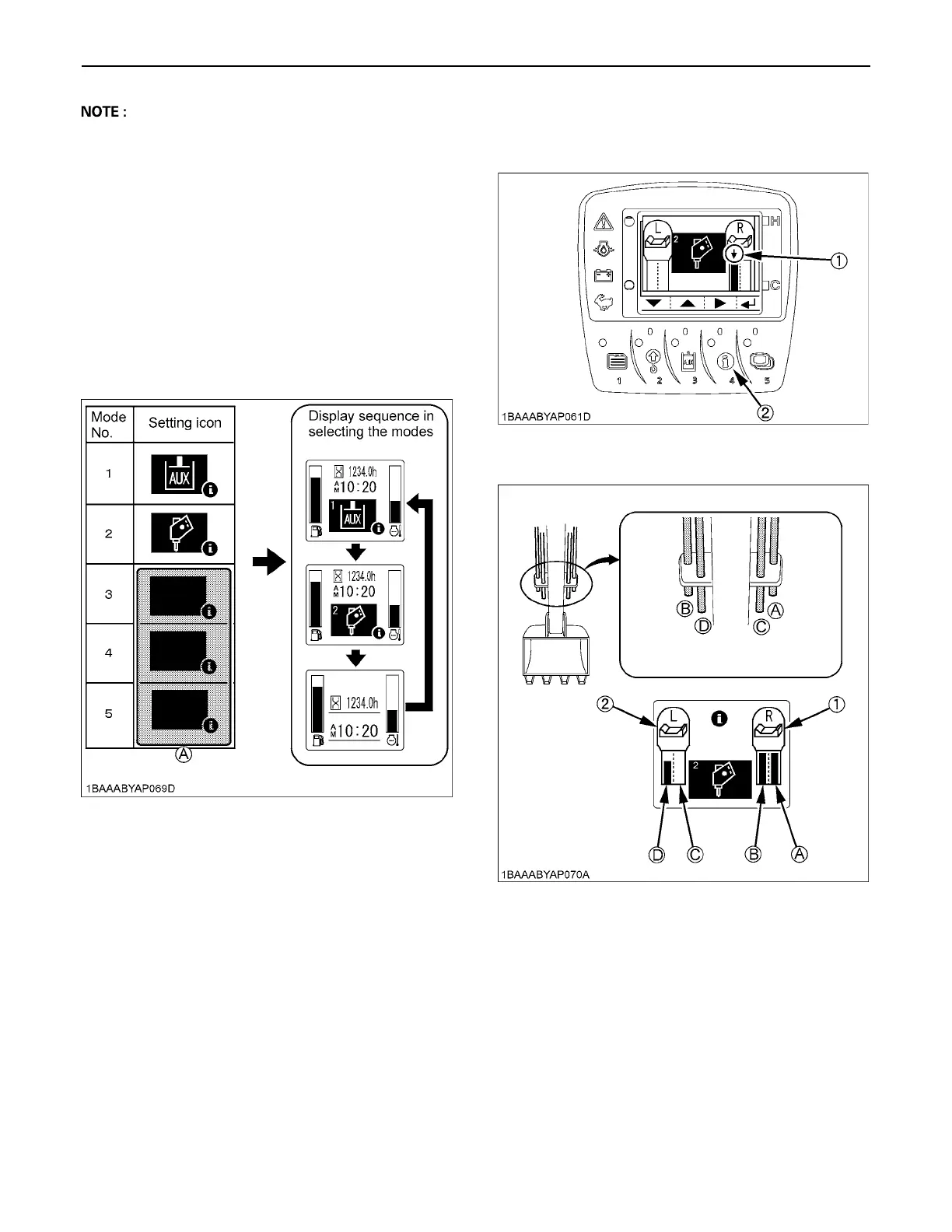
A There is no relationship between the icons and the
flow control settings. Select icons to suit the images of
attachments to be connected.
A In an action mode with the disable icon preset, such
action mode is skipped even if selected.
Take an example of the following settings:
AUX (standard) icon for action mode 1,
Breaker icon for action mode 2,
Disable icon for actions modes 3, 4 and 5.
Each time the AUX port enable switch (switch 3) is
pressed, the display changes from action mode 1,
action mode 2 to normal mode in this order.
[Setting example]
6. Set the maximum flow volume for each AUX port.
Press the switch 4 to move the setting cursor (arrow
mark) to the port 2 position of Thumb port at the right.
(A) Blank (disable) icon
(1) Setting cursor (arrow)
(2) Switch 4
(1) AUX 1
(2) AUX 2
(A) "AUX port 1"
(B) "AUX port 2"
(C) "AUX port 3"
(D) "AUX port 4"



 To Next Page