57INTELLIPANEL(TM) CONTROL
C Recording the program through actual tractor
operation
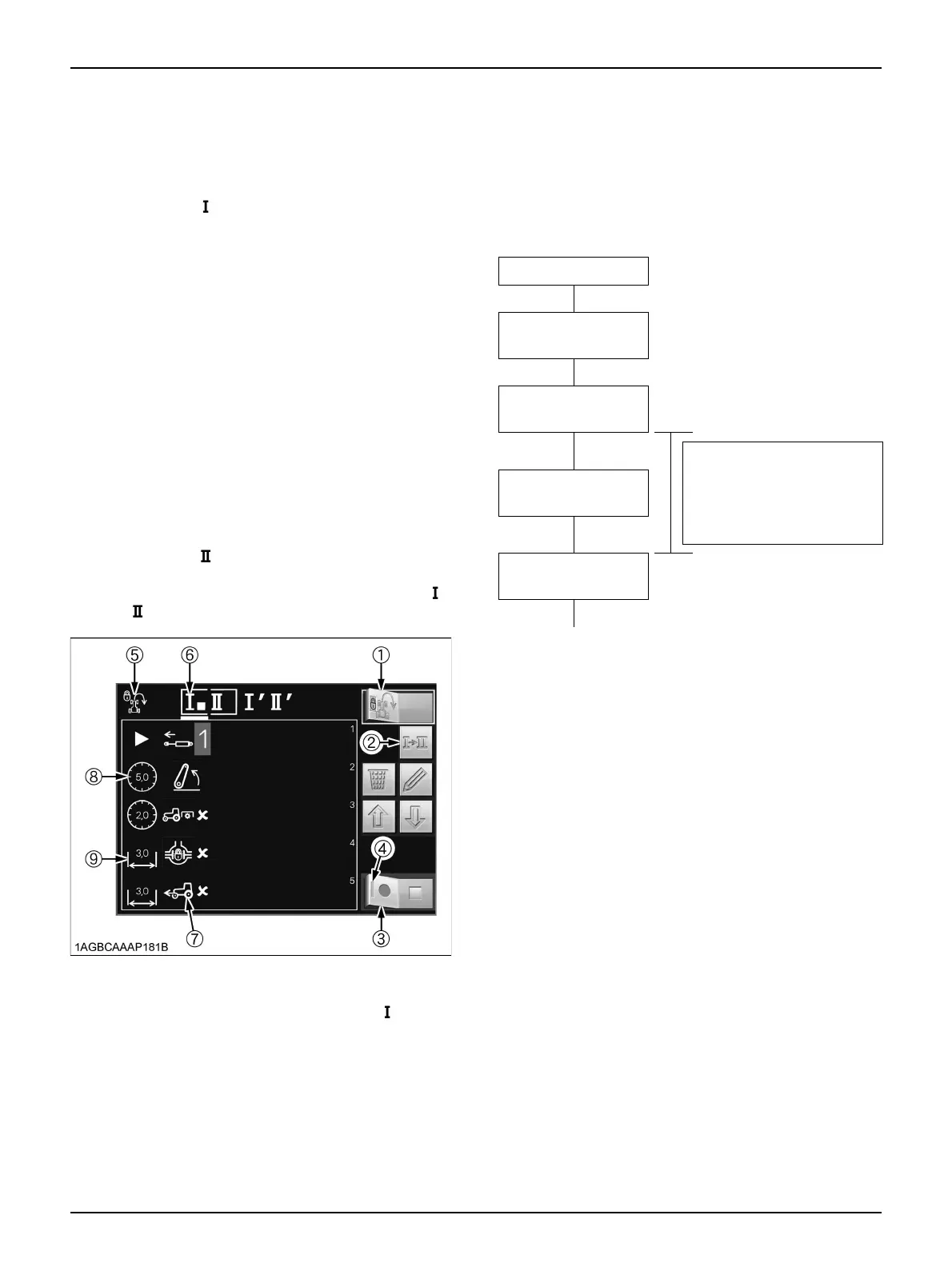
1. Make sure the Headland Management System lock
indicator (5) is off.
2. Using the program select switch (2), be sure that the
program code " " (Field out) is selected.
3. Touch the left half of the automatic record switch (3),
and the indicator (4) of this switch lights up to show
that the program is ready to be recorded.
Carry out actual work in accordance with the field-out
operation procedure to record in the program.
4. In the monitor’s LCD screen, the subcategory icons (7)
get displayed one by one according to the program
recording order.
If the tractor stops and the procedure is still used, the
interrupt duration is recorded as lead time (8). If the
tractor travels and the procedure is continued, the
distance (9) is recorded.
5. With the field-out operating procedure completed,
touch the right half of the record switch (3) to end the
recording procedure.
Now the field-out operating procedure has been
recorded.
6. Next, using the program select switch (2), choose the
program code " " (Field in).
7. Record the field-in operating procedure.
Now the recording for both the program codes " "
and " " is completed.
C What are pre-program lead time and pre-program
travel distance?
They mean the standby time and travel distance from the
moment a program is executed to the moment the next
program gets started.
[Field-out program example]
C Deleting the program
1. Make sure the Headland Management System lock
indicator (8) is off.
2. Using the program select switch (2), choose the
program code to delete.
3. To delete the entire program, touch the delete switch
(3). (The deleting can also be done by turning on the
record switch (7) first and then immediately turning it
off.)
4. To delete part of the program, use the scroll switch (5
or 6) to select the subcategory icon (10) to delete.
Then touch the delete switch (3).
(1) Headland Management
System lock/unlock switch
(2) Program select switch
(3) Record switch
(4) Indicator
(5) Headland Management
System lock indicator
(6) Program codes " " indicator
(7) Subcategory icon
(8) Pre-program lead time
(9) Pre-program travel distance
Field out button ON
Main category
Differential lock
Subcategory
Differential lock OFF
Time or distance from the
moment the differential lock
OFF program has ended to
the moment the rear PTO
program gets started.
Main category
PTO
Subcategory
Rear PTO OFF



 To Next Page