Camera and Video 93
●
Switch View Button: Touch to switch between the back camera lens and the front-
facing camera lens (for self-portraits, video chatting, etc.).
●
Thumbnail: Thumbnail of the latest image you took. Touch to view and manage.
●
Recorder button: Touch to take a video. Touch again to stop.
●
Zoom slider: Drag this slider to change the zoom settings. You can also change the
zoom settings by pressing the volume button up or down.
●
Switch button: Touch to select camera or camcorder.
●
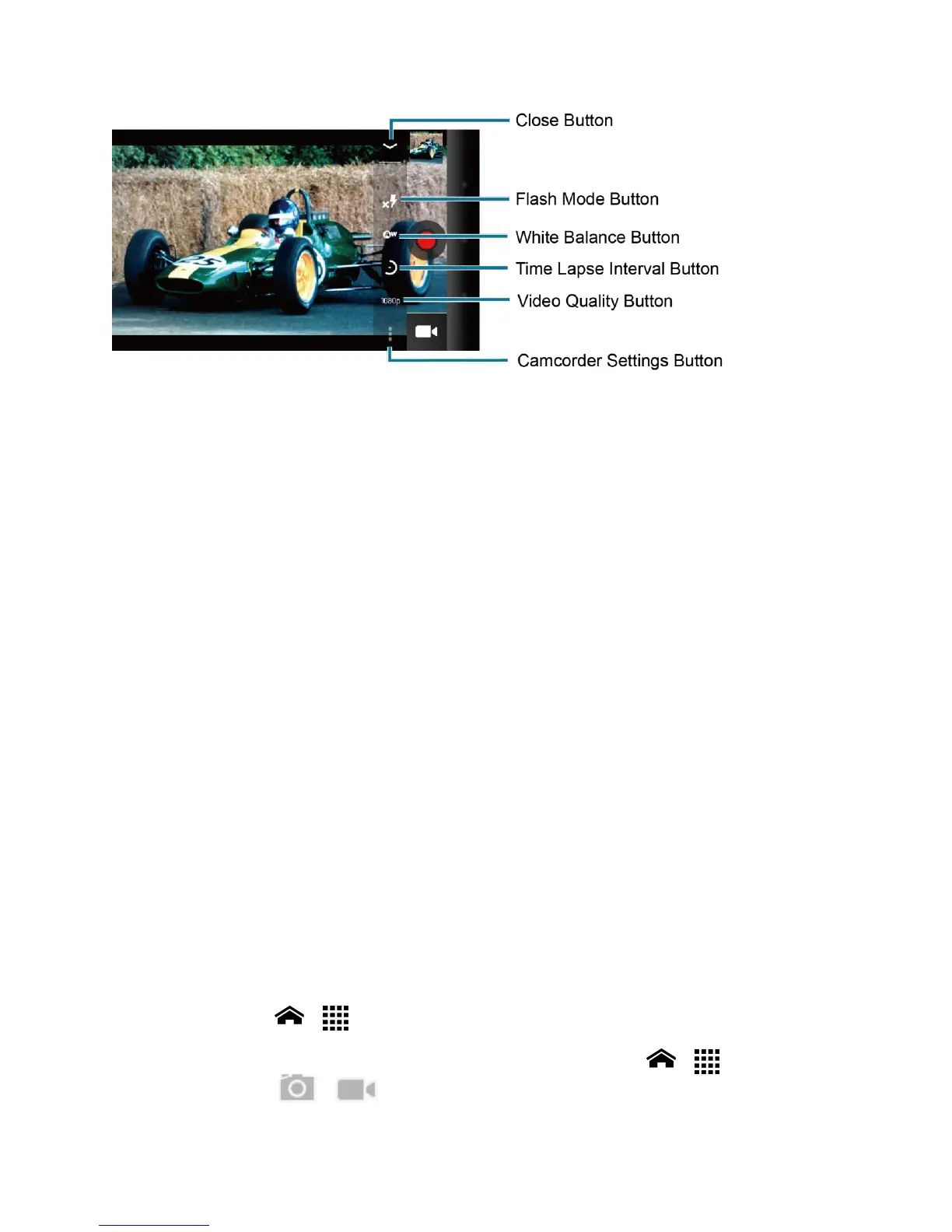
Settings button: Touch to reveal additional camcorder mode buttons.
●
Close button: Touch to close the camcorder mode buttons and return to the zoom
slider.
●
Flash mode button: Touch to select the flash mode.
●
White balance button: Touch to change the white balance to enable the video to
record colors more accurately by adjusting to your current lighting.
●
Time lapse interval button: Touch to set the interval for capturing time-lapse images.
●
Video quality button: Touch to select a video quality.
●
Camcorder settings button: Touch to change the camcorder settings. For more
information, see Camcorder Settings.
Record a Video
1.
Touch Home > > Camcorder to activate the camcorder mode.
Tip: You can also activate the camcorder mode by touching Home > > Camera and
then touching > .












 To Next Page