09/2021 ECO Gold 49 / 134
7.3.4 Graphics window
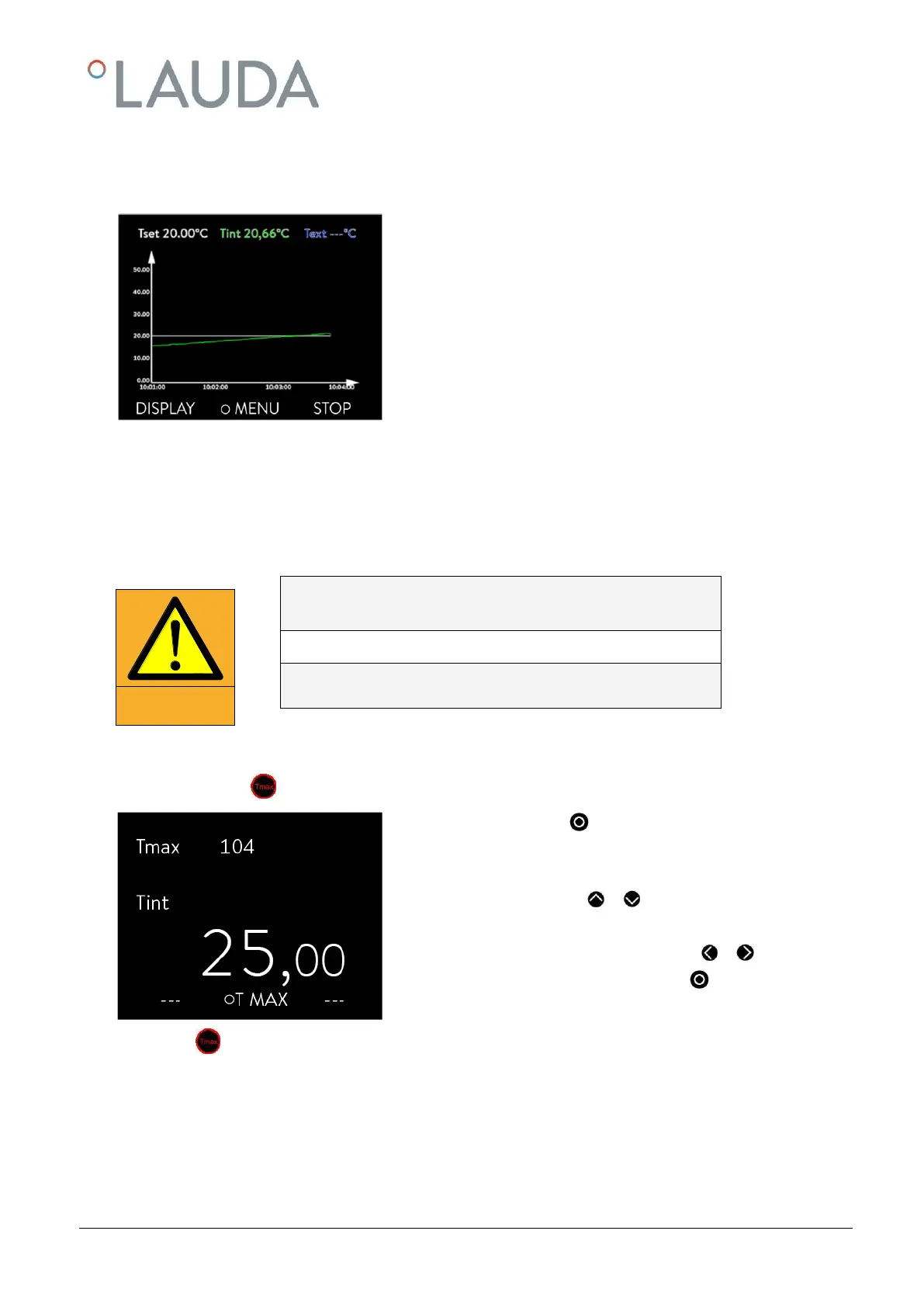
The ECO GOLD thermostats offer you the possibility of displaying temperature traces graphically.
In the graphics window the following information is displayed depending on
the setting:
T
set
set-point temperature (grey)
T
int
internal bath temperature (green)
T
ext
Temperature on the external consumer, external
temperature sensor (blue).
7.4 Basic setup
In this section the settings required for using the device as prescribed are summarized. For more extensive settings refer
to the appendix.
7.4.1 Setting the overtemperature switch-off point T
max
Overheating due to entering an incorrect T
max
and set-point tempera-
ture
Set T
max
in each case according to the heat transfer liquid
used T
max
must be below the flash point.
- Hold the key pressed during the complete setting procedure:
- Press the enter key .
The entry window appears. The cursor flashes under the T
max
value. The
maximum and minimum adjustable temperature values are displayed.
- Change the value with or .
Note: With a longer depression the figures increment faster.
- Single figures can be selected by pressing or .
- Confirm your choice with the enter key .
On releasing you are returned to the menu level without any change.
For T
max
the following applies: 5 Kelvin above the required maximum bath temperature, but below the flash point of the
heat transfer liquid.



 To Next Page