09/2021 ECO Gold 95 / 134
15 Graphical display of temperature measurements
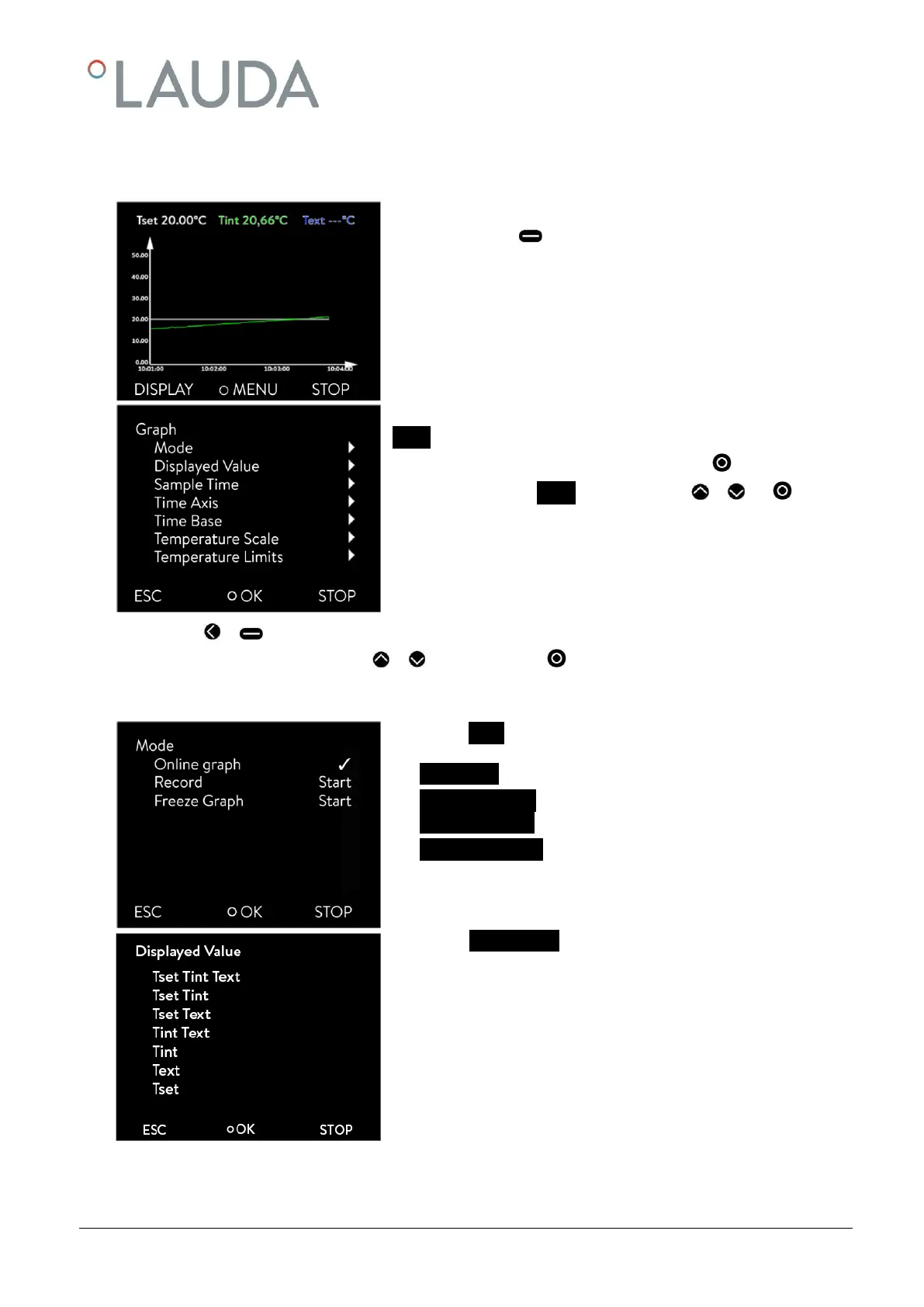
- From the main menu window you access the graphics window
by pressing (DISPLAY).
The temperature traces are shown in different colors.
- T
set
set-point temperature (grey)
- T
int
internal bath temperature (green).
- T
ext
external bath temperature (blue).
You can change the settings for the graphics window in the submenu
Graph.
- Access to the menu level is obtained by pressing .
- Select and confirm Graph in main menu with or and .
The adjacent menu window appears.
- With or you quit the respective window without changes.
- All menu points are selected with or and confirmed with .
In the following the individual menu points of the menu window "Graph" are described.
In the menu Mode there are the following settings:
- Online graph Recording runs continuously.
- Recording Start Start or stop recording
Recording Stop
- Freeze Graph Start Save current recording.
With display Measurements you can define which temperature values
are to be graphically displayed.
Numerous combinations are offered in the menu (see illustration).



 To Next Page