09/2021 ECO Gold 55 / 134
8.2 Device status
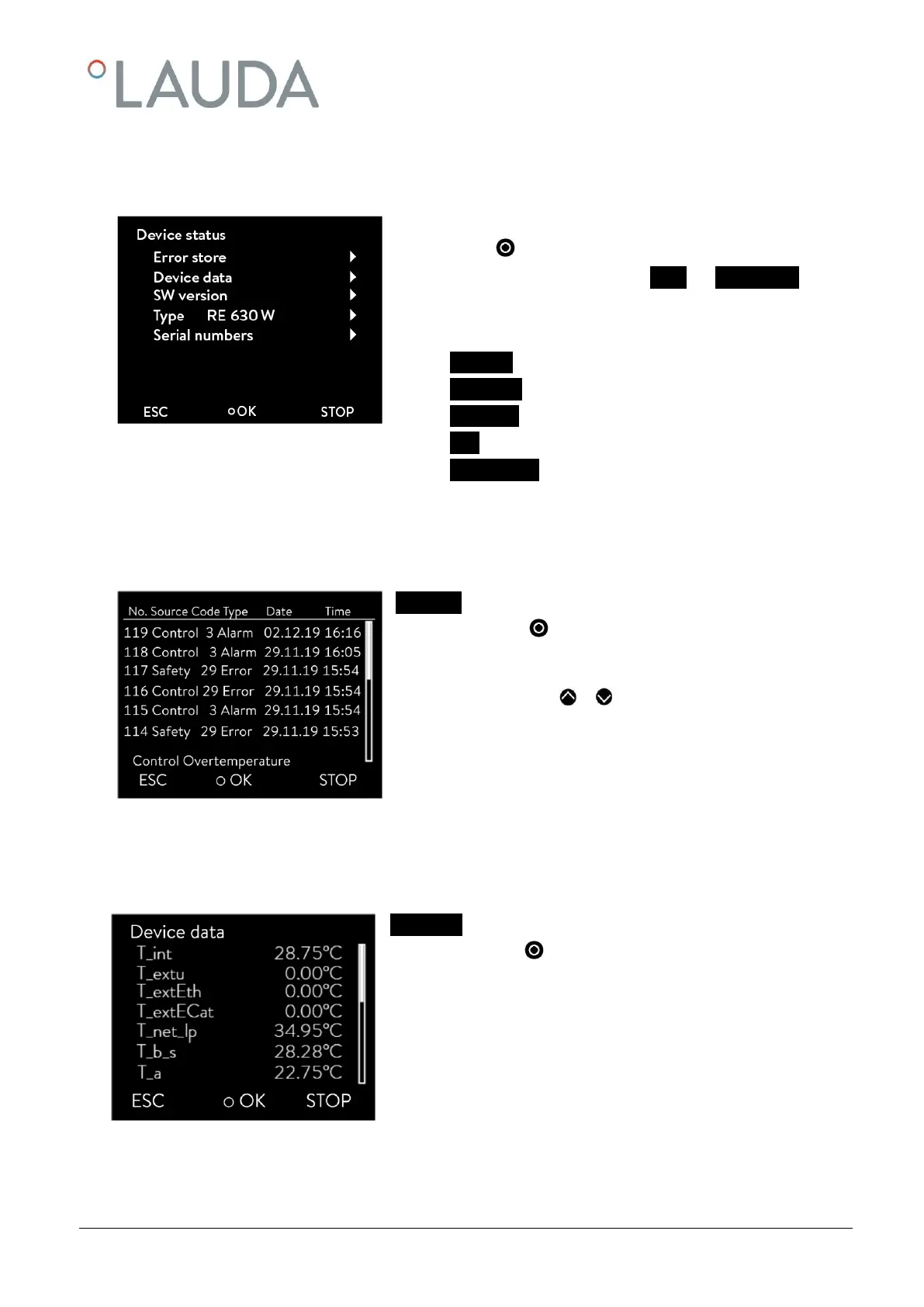
Here, accumulated error messages as well as device and software data can be recalled.
- Access to the main menu level is obtained by pressing the en-
ter key .
- Selection and confirmation of Setup Device Status.
The adjacent menu window appears.
Here, you can now
- Errorstore Read out the error store
- Device data Request device data
- SW version Request the software version
- Type Request the device type
- Serial numbers Request serial number.
8.2.1 Store for errors, alarms and warnings
For error analysis the ECO thermostats have an error store in which up to 140 warning, alarm and error messages can
be saved.
Error store
- confirm with .
The latest message is located in the first position.
- You navigate with or through the results which are sort-
ed by date. The message text appears in the footer.
The relevant module which is causing the message is displayed under
"Source".
"Code" is the coded alarm, warning or error description.
"Type" specifies alarm, warning or error. The list of alarms and warnings
can be found in the appendix ( 14).
8.2.2 Device data
Device data
- confirm with .
The device parameters are displayed under the menu point Device data.



 To Next Page