52 / 134 ECO Gold 09/2021
7.4.6 Setting the date and time
- Access to the main menu level is obtained by pressing the en-
ter key .
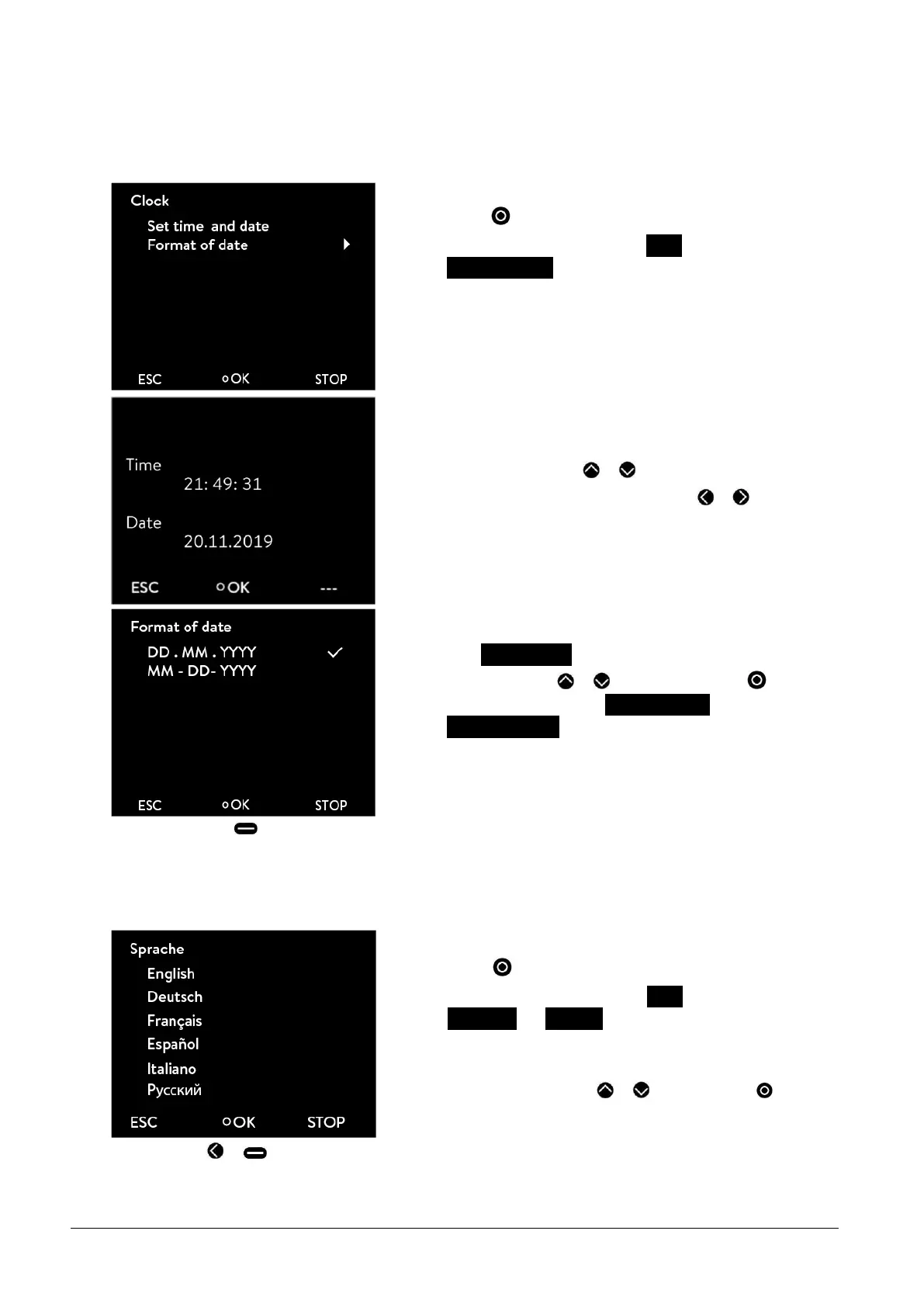
- Selection and confirmation of Clock
Set time and date.
The adjacent menu window appears.
- The cursor flashes under the hours display.
- Change the value with or .
- Single figures can be selected by pressing or .
- The adjacent menu window appears on selecting the menu
point Format of date.
- The selection with or and confirmation with selects
between the date formats DD . MM . YYYY and
MM - DD - YYYY.
-
By pressing (ESC) you are returned to the menu level without any change.
7.4.7 Selecting the menu language
The ECO GOLD thermostats offer you the possibility of selecting the menu languages of English, German, French,
Spanish, Italian and Russian.
- Access to the main menu level is obtained by pressing the en-
ter key .
- Selection and confirmation of Setup
Basic setup Language.
The adjacent menu window appears.
- Select the language with or and confirm with .
-
By pressing or (ESC) you are returned to the menu level without any change.



 To Next Page